
11 Common BPMN Modeling Mistakes and How to Avoid Them
In short: The eleven most common BPMN modeling mistakes are: missing start and end events, activities placed between lanes, vague names, missing exclusive gateways, sequential activities that could run in parallel, overused terminate end events, gateways without a clear question, overlapping conditions, mismatched gateway pairs, unnecessary gateways, and plural activities. Avoiding them gives you models that everyone reads the same way. In Flower, models also run: each activity creates a Jira work item, so precision in the model leads directly to clear work in Jira.
Last updated: October 2026
BPMN is simple and powerful, one notation for all your business processes. But sometimes, after you have sketched everything, the result looks different from what you expected, and the picture seems to be written in a language nobody speaks. Small mistakes can have a big impact. This article shows the eleven most common ones and how to avoid them.
All examples follow one story: the Mayers, a family of four, plan their summer vacation. They have different views about the destination and how to get there, which leads to many discussions and different considerations.
Why Modeling Mistakes Matter for Automation
A process engine cannot guess what a modeler had in mind. In Flower, the name of an activity becomes the summary of its Jira work item, a swimlane decides who gets the work, and gateways decide which path the process follows. An unclear model therefore creates unclear work. Flower checks your model against basic rules and marks nodes with green, yellow, or red markers, but it cannot replace careful modeling.
Tip 1: Always Model Start and End Events
Just like a story, every process has a starting point and, hopefully, a satisfying end.
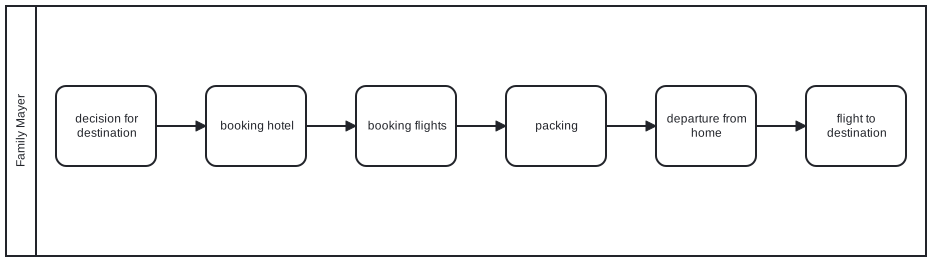
BPMN allows a process model without start and end events. For most processes, however, it is important to define when the process begins and what result it should achieve. Start and end events remove the room for misunderstandings.
Tip 2: Never Place an Activity Between Lanes
Sometimes it is unclear where to place an activity, especially when two participants communicate.
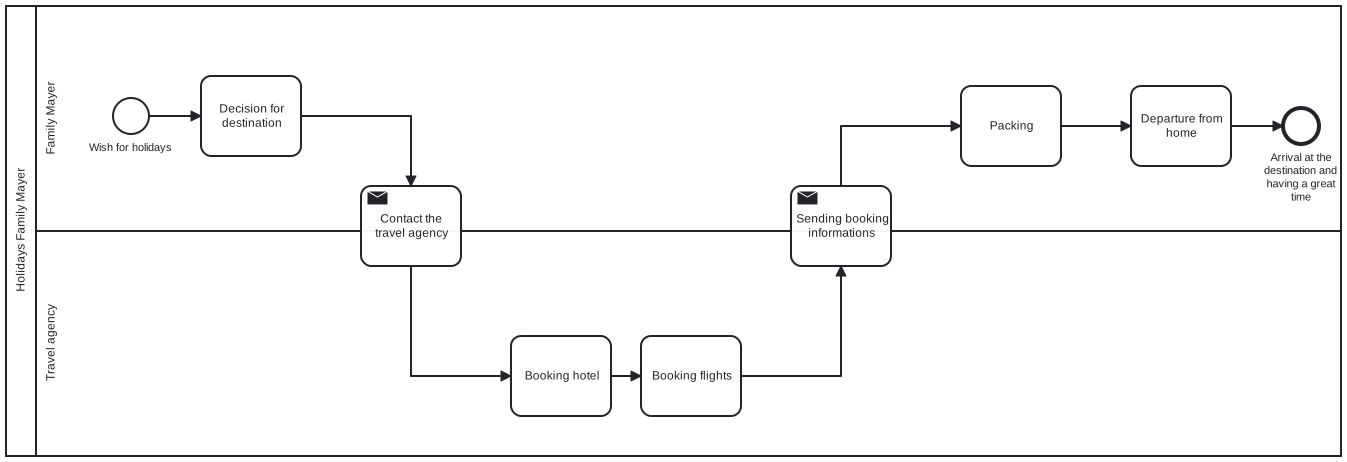
Every interaction between two participants has a sender and at least one receiver. Express an information exchange with a message-sending activity and a message-receiving activity. An activity must never sit between lanes or pools. It always belongs to exactly one lane. In Flower, the lane also decides the assignee of the work item.
Tip 3: Avoid Inadequate Event Naming
Use meaningful names for events and activities.
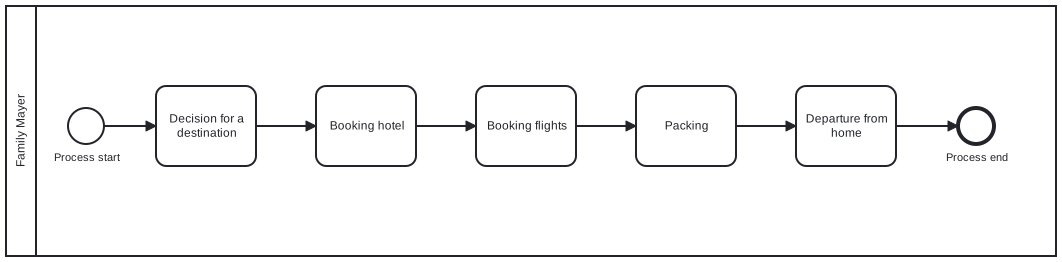
The names “process start” and “process end” are redundant. Name the event that triggers the process and the result that the process achieves, for example “vacation planning requested” and “vacation booked”. A process model is only as accurate as its names.
Tip 4: Use Exclusive Gateways to Show Alternative Paths
Not every process is a straight line. Gateways express alternative and parallel paths. The Mayer family, for example, has different opinions about the holiday destination.
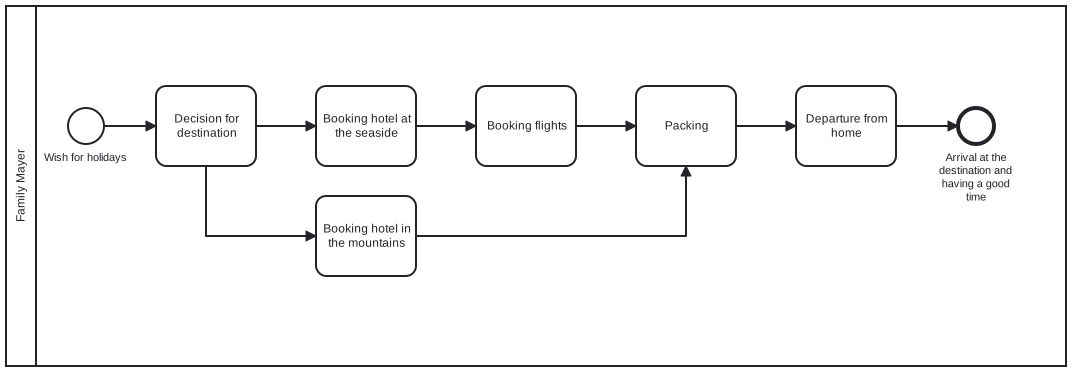
The exclusive gateway says that exactly one path is taken: either one destination or the other. Without it, you could read the model as if the family travels to both. A split gateway should be closed by a matching join gateway, which brings the paths together again.
Tip 5: Show Concurrent Activities with Parallel Gateways
In a complex process, different activities often run at the same time and independently of each other.

Use a parallel gateway. Otherwise a process instance waits for an activity although it does not need to, and time is wasted. In the Mayer example, asking the dog sitter, informing the neighbor, and buying sun cream are independent of each other. In Flower, a parallel gateway creates the work items of all branches at the same time.
Tip 6: Avoid Overusing Terminate End Events
A terminate end event can be misread as a stronger kind of end. Be careful: when one path reaches it, all other active paths and waiting activities stop immediately.
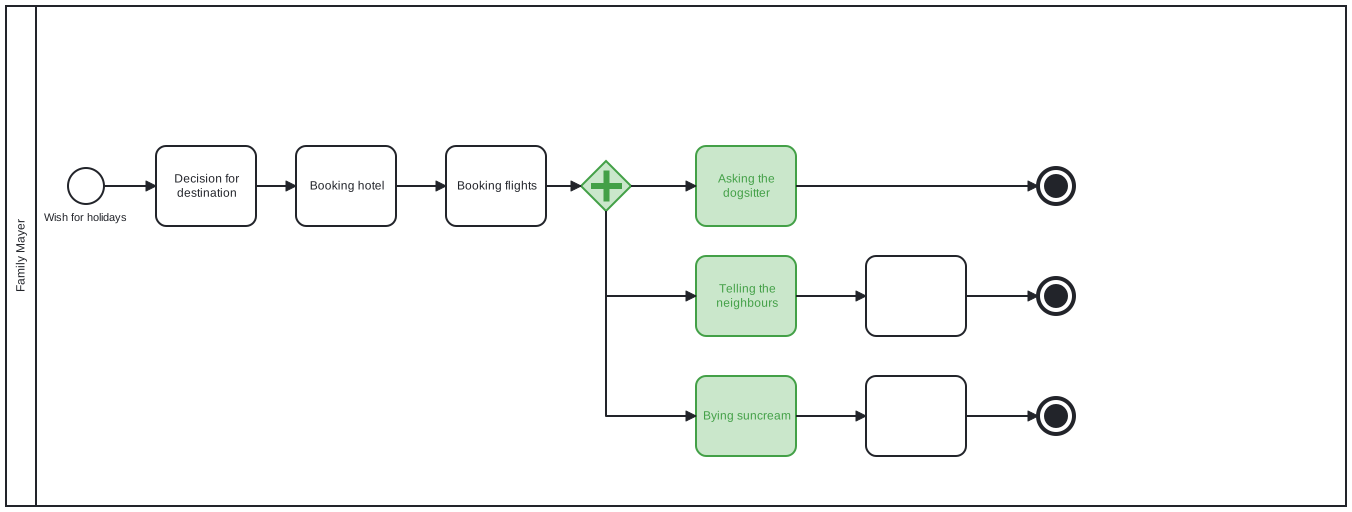
A process ends successfully when all started activities are finished. It is terminated when an unplanned event occurs. Terminate end events are useful when related tasks run in parallel and one result makes the others unnecessary. In our example, the dog sitter takes care of the food herself, so the Mayers no longer need to buy any. In Flower, a terminate end event closes all open work items of the process. See BPMN End Events.
Tip 7: Name Exclusive Gateways with the Relevant Question
It is often unclear what a decision is about. Let us follow the Mayer family in their travel budget planning.
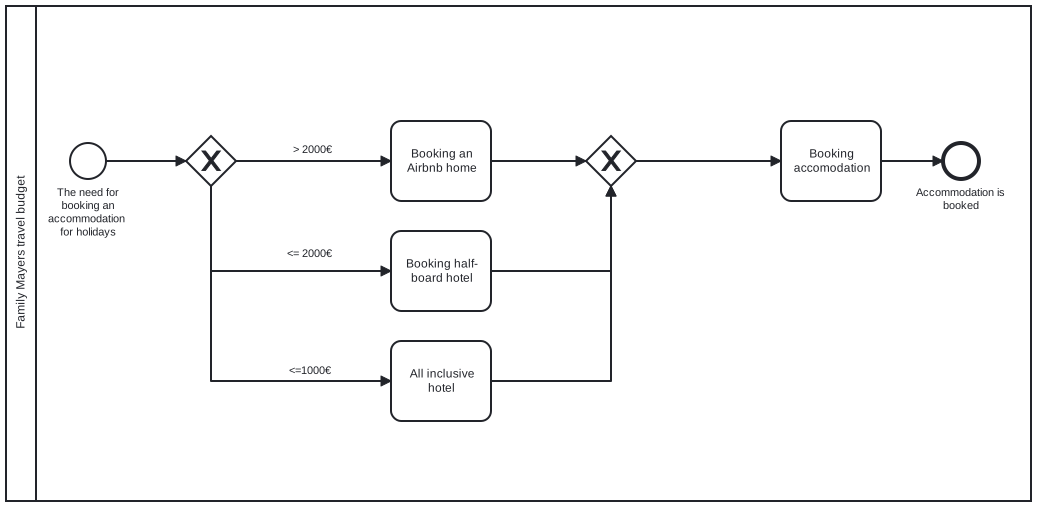
The model should state the decision question and the criteria: if the flights cost more than 2,000 €, the family can only afford an Airbnb home. In this example, the decision can be made manually. In business processes, a decision table is often stored behind a gateway. Today, DMN diagrams are used instead of decision tables. In Flower, each outgoing path of a gateway carries a condition that the engine evaluates. See BPMN Gateways & Decision Handling.
Tip 8: The Paths of an Exclusive Gateway Must Be Unique
The paths of an exclusive gateway must exclude each other. Our previous example is not precise enough.
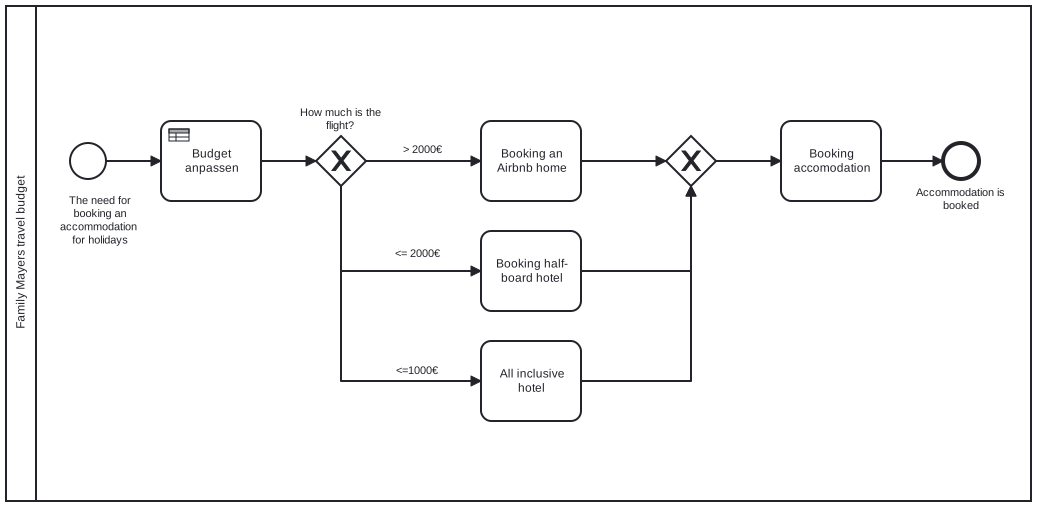
The second and third paths overlap: a price of at most 2,000 € includes a price of at most 1,000 €. To keep a third option, define the conditions so that exactly one is true:
| Cost of flights | Path |
|---|---|
| More than 2,000 € | Book an Airbnb home for the lowest price |
| More than 1,000 € and up to 2,000 € | Book a hotel with half board |
| Up to 1,000 € | Book an all-inclusive hotel |
Tip 9: Be Careful with Mixed Gateway Types
If the join gateway does not match the gateway that opened the paths, the process gets stuck.
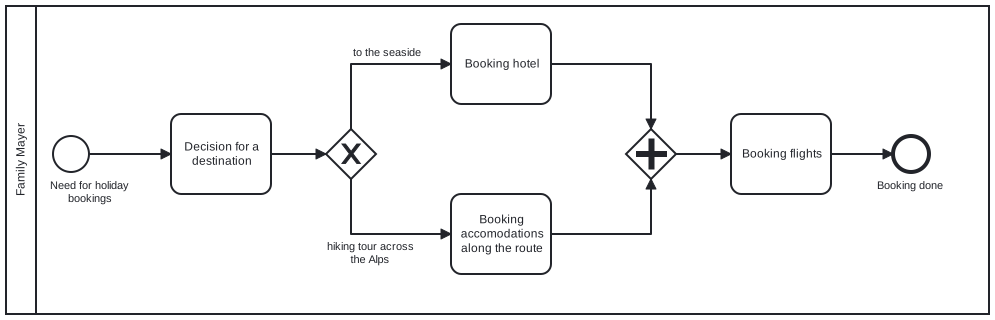
Using different gateway types for split and join only makes sense in rare exceptions, and the process then waits forever at the join (try it in the simulation). In those rare cases, a terminate end event is the better solution. Always close an opening gateway with the matching join gateway.
Tip 10: Avoid Unnecessary Gateways
While modeling as precisely as possible, we sometimes build gateways where none are needed.
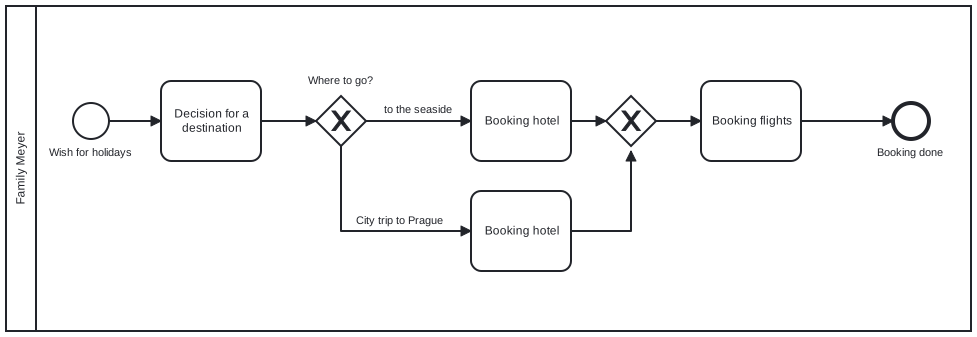
Whether the Mayers go to the sea or on a city trip to Prague, the booking situation is the same: they need a hotel and flights. No exclusive gateway is needed.
Tip 11: Use Loops Instead of Plural
Name an activity with an object and a verb, for example “book hotel”. You could shorten the booking of several hotels on a round trip to “book all hotels”, but then the process engine cannot know how many hotels exist and which ones are already booked.
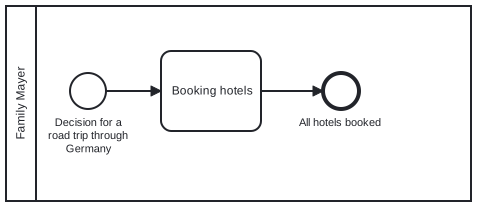
Define every activity with one object. If there are several objects, stay in the singular and loop the process until all objects are processed. In Flower, a transition that loops back to a completed activity reopens its Jira work item.
Conclusion: Precision Is Key
A process is only as good as its designer. A process engine cannot interpret what someone might have meant, so build processes without room for interpretation. These tips cover only the most common mistakes, and following them trains your awareness for other problems. We wish the Mayer family a pleasant vacation.
Frequently Asked Questions
What are the most common BPMN mistakes?
Missing start and end events, activities between lanes, vague names, missing or overlapping gateway conditions, mismatched gateway types, unnecessary gateways, and plural activities.
Does Flower check BPMN models?
Yes. Flower validates a model against basic rules and marks nodes with green, yellow, or red markers. You can still publish a model with warnings.
How do I test a BPMN model before I use it?
Use the token simulation in the Flower modeler. A moving token shows how splits, joins, and waits behave. See Get Started with Modelling.
About Flower
Flower – Business Process & Workflow Automation (BPMN) for Jira is an app on the Atlassian Marketplace for Jira Cloud and Jira Data Center. It lets you model business processes in BPMN 2.0 and run them in Jira: for every activity of a process, Flower creates a Jira work item, assigns it through swimlanes, shows its status in the process diagram, and continues the process when the work item is resolved. Flower stores all process data in Jira, so your permissions, boards, and reports keep working. Flower is Cloud Fortified and has been on the Atlassian Marketplace for more than ten years.
Start a free 30-day trial on the Atlassian Marketplace or follow the Get Started guide.