
BPMN Gateways
BPMN Gateways
Gateways are elements that route tokens in more complex patterns than a plain sequence flow.
An exclusive gateway chooses one sequence flow out of many based on data. A parallel gateway starts several sequence flows at the same time.
Supported Gateways
| Gateway | What it does | Support in Flower |
|---|---|---|
| Exclusive (XOR) | Chooses exactly one path, based on conditions | Supported |
| Parallel (AND) | Starts all paths, and as a join waits for all of them | Supported |
| Inclusive (OR) | Starts every path whose condition is true | Supported as a split only |
| Event-based | Waits for the first of several events | Not supported |
| Complex | Routes with custom rules | Not supported |
Elements that are not supported can be modeled but are ignored during execution. See BPMN Coverage in Jira.
Exclusive Gateways
An exclusive gateway (or XOR gateway) lets you make a decision based on data, namely the data of your Jira work items.
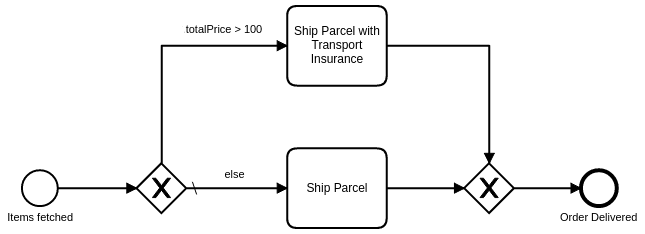
If an exclusive gateway has several outgoing sequence flows, all of them except one need a condition that defines when the flow is taken. One flow can have no condition. You mark it as the default flow.
When the process enters an exclusive gateway, Flower evaluates the conditions. The process takes the first sequence flow whose condition is fulfilled.
If no condition is fulfilled, the process takes the default flow. If the gateway has no default flow, the process cannot continue at this gateway. Therefore, always define a default flow.
An exclusive gateway can also join several incoming flows to make the model easier to read. A joining exclusive gateway only passes tokens through. It does not wait for the other flows, unlike a parallel gateway.
Conditions
A condition is a JavaScript expression inside ${ }. Flower evaluates it with the data of your Jira work items:
piis the work item of the process instance.curis the work item of the last activity before the gateway.
The condition is fulfilled when the expression returns true. Combine several comparisons with && (and) and || (or).
For example:
| # | Expression | What it checks |
|---|---|---|
| 1 | ${pi.fields.summary == 'New Request'} | The summary of the process instance |
| 2 | ${cur.fields.status.name == 'Rejected'} | The status of the last work item |
| 3 | ${cur.fields.priority.name == 'Low' && cur.fields.status.name == 'Rejected'} | Two conditions combined with && |
| 4 | ${cur.fields.assignee.accountId == '557058:fc60faa5-f40d-4344-ae2b-4becd42a7914'} | The assignee of the last work item |
| 5 | ${cur.fields.customfield_10113 >= 5000} | A number field of the last work item |
| 6 | ${pi.properties.flowerVariables.external.data.value >= 1000} | External data stored on the process instance |
| 7 | ${pi.fields.comment.comments[0].author.accountId == '557058:fc60faa5-f40d-4344-ae2b-4becd42a7914'} | The author of the first comment |
Learn how to write expressions, how to read complex fields, and how to troubleshoot them in BPMN Gateways & Decision Handling.
Parallel Gateways
A parallel gateway (or AND gateway) splits the flow into concurrent paths.
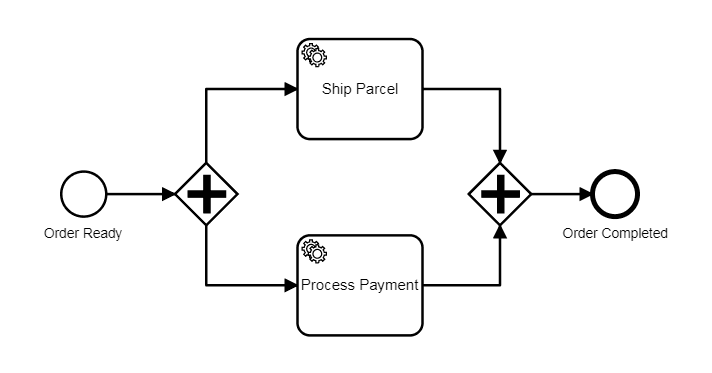
When the process enters a parallel gateway with several outgoing sequence flows, all flows are taken. In Flower, the work items of all branches are created at the same time, and the people responsible work on them independently.
You can join the concurrent paths with a parallel gateway that has several incoming sequence flows. The process waits at this gateway until every incoming flow has arrived.
Inclusive Gateways
Flower supports the diverging (splitting) inclusive gateway only. The converging (merging) inclusive gateway is not supported yet.
As an alternative, you can merge the flows with a combination of parallel and exclusive gateways.
The inclusive gateway (or OR gateway) lets you make several decisions based on data. The process takes every flow whose condition is fulfilled, so more than one flow can run.
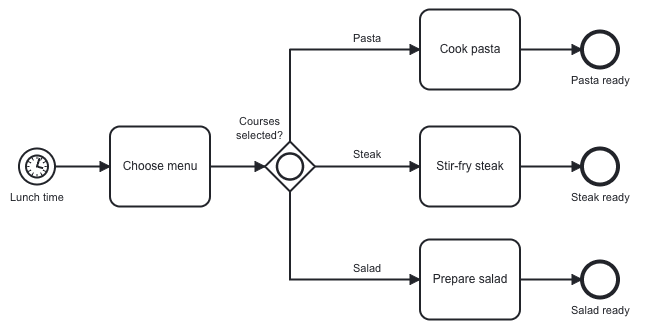
If an inclusive gateway has several outgoing sequence flows, all of them need a condition. If it has only one outgoing sequence flow, it needs no condition.
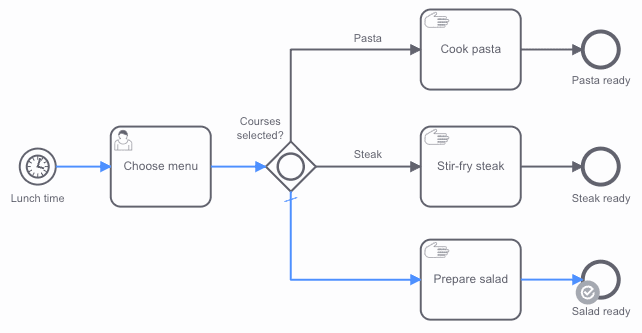
You can mark one flow as the default flow. It should not have a condition, because it is only taken when no other condition is fulfilled.
When the process enters an inclusive gateway, Flower evaluates the conditions. The process takes all flows whose condition is fulfilled.
For example, the selected courses are pasta and salad:
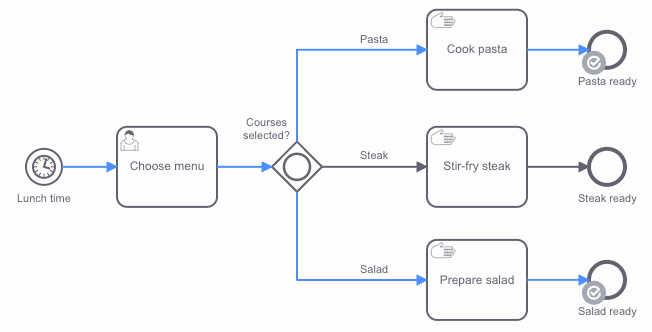
For example, the selected courses are steak, pasta, and salad:
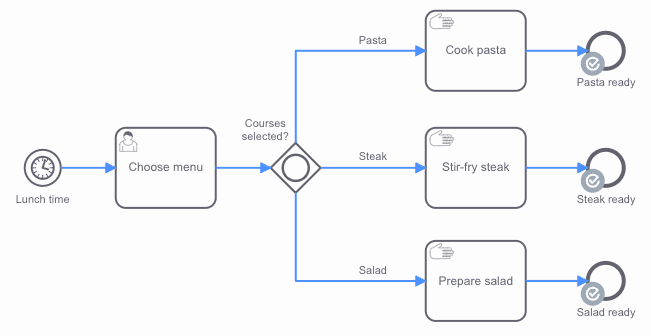
If no condition is fulfilled, the process takes the default flow. Flower does not evaluate the default flow. If no condition is fulfilled and the gateway has no default flow, the process cannot continue at this gateway.
For example, no courses are selected, so the default flow is taken:
Conditions
The conditions of an inclusive gateway work as described for the exclusive gateway: JavaScript expressions inside ${ } that use the data of your Jira work items. The flow is taken when the expression returns true.
Event-Based Gateways
Event-based gateways are not supported. You can model them, but Flower ignores them during execution, because Flower does not support intermediate catch events.
Complex Gateways
Complex gateways are not supported. You can model them, but Flower ignores them during execution.
Learn More
- BPMN Gateways & Decision Handling: Write conditions, read complex fields, and use default transitions.
- BPMN Coverage in Jira: All supported BPMN elements at a glance.