
BPMN End Events
Regular and Terminate End Events in Flower
BPMN End Events
An end event defines how a process instance ends. BPMN knows two main types:
- Regular end event: Ends the flow at this point. Parallel branches are not affected.
- Terminate end event: Ends the entire process instance, including all active branches.
How the End Events Work in Flower
Flower follows the standard BPMN behavior and connects it to Jira:
| Regular end event | Terminate end event | |
|---|---|---|
| Effect on the process | Ends only the current flow. Parallel branches continue. | Stops all parallel branches immediately. |
| Process instance work item | Resolved | Resolved |
| Open task work items | Stay open | Closed |
| Typical use | One path of the process is complete. | The whole process must stop. |
Regular End Event
- Ends only the current flow. Parallel branches continue to run.
- The Jira work item of the process instance is already resolved once a branch reaches a regular end event.
Terminate End Event
- Stops all parallel branches immediately.
- Flower closes all open work items of the process. Work items that are already resolved stay as they are.
- If the workflow of a work item has a status such as Canceled or Rejected, Flower uses it instead of the regular resolved status.
- Closing these work items does not continue the process. The process is terminated for good.
When to Use a Terminate End Event
Use it when a business decision stops the process entirely, for example when:
- A project is canceled and all related work must stop.
- A request is rejected and no further steps must run.
- A compliance rule invalidates the process and requires an immediate halt.
With a terminate end event, the work items in Jira show the true status of the process, and no unnecessary work happens.
Example: Job Application Process
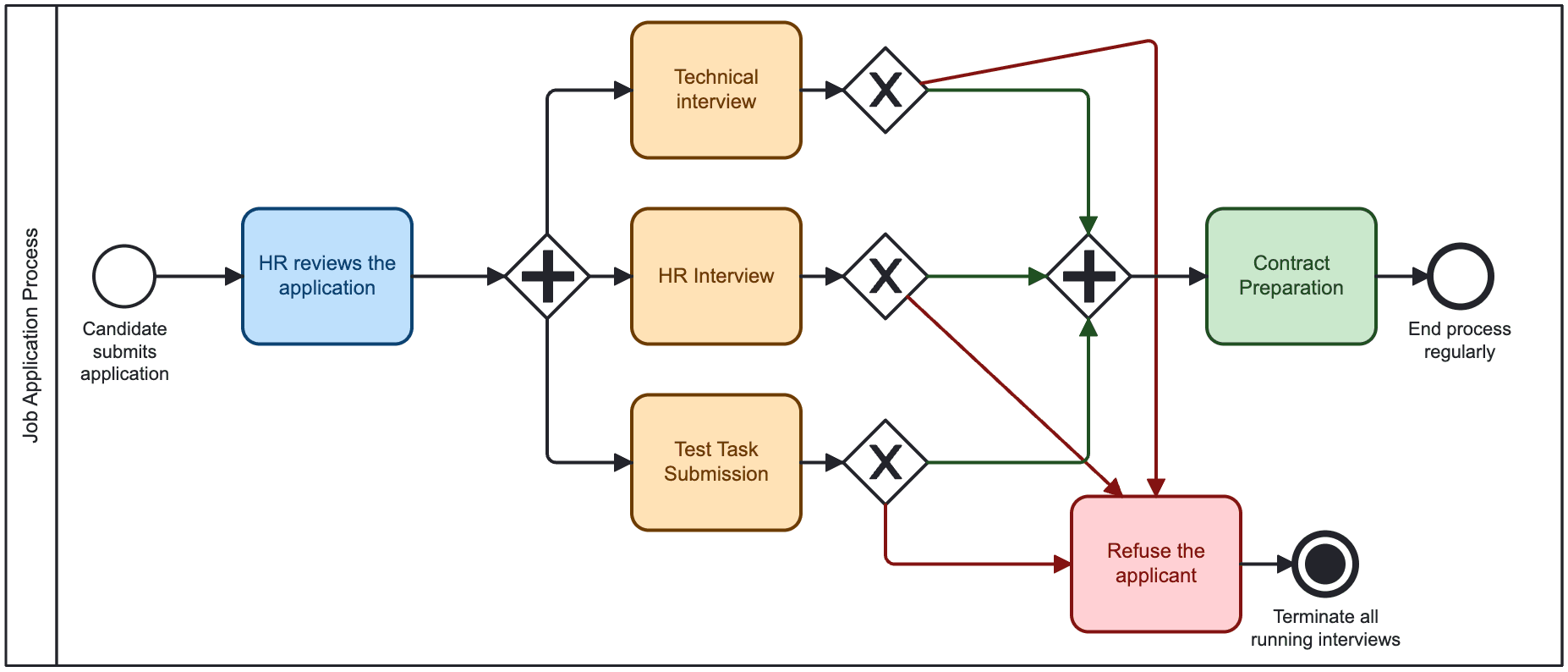
In this process, several interviews run in parallel.
- When all interviews are completed successfully, a regular end event is used. Flower resolves the work item of the process instance.
- When one interview fails, the terminate end event stops all other interviews. Flower closes their open work items with a status such as Rejected or Canceled, so the outcome is clear.
If a candidate is rejected in one evaluation, no further assessments are needed. This saves effort, and the process reflects reality.
What’s Next?
- BPMN Events: All event types that Flower supports.
- Set Jira Due Dates with Timer Events: Escalate with timers and end the process on a timeout.
Last updated on