Jira as a BPM System, Part 2: Jira Workflow vs. Business Process
In short: A Jira workflow describes the statuses of one work item. A business process connects many work items across teams and spaces, in sequence and in parallel, with decisions and deadlines. Jira already has most parts of a business process management (BPM) system: the task list, the forms, the roles and permissions, the rules, and the reports. What it does not have is the process itself. This part shows where the Jira workflow ends and what a BPMN process model adds, with one purchase request built three ways.
Last updated: November 2026
- 1Why Jira Is a BPMN Platform, Even Without a Gartner Quadrant
- 2Jira Workflow vs. Business Process (this article)
- 3Modeling Processes in BPMN
- 4Running BPMN Processes in Jira
- 5Operating and Governing Processes in Jira
Disclosure: the author works for the vendor of Flower, the BPMN app for Jira that the later parts use as the engine. Everything in this part works with Jira alone.
Key takeaways
- A Jira workflow is the status lifecycle of one work item. A business process is the order of the work across many work items, teams, and spaces. A project happens once.
- Jira covers most building blocks of a BPM system natively: work items, workflows, request types and forms, permissions, Jira Automation, JQL, and dashboards.
- You can build a process from Jira Automation rules alone. It works, but the process then exists only as a set of rules that nobody can read as a whole.
- BPMN adds six things: the model as the single source, hand-offs, decisions, deadlines, exceptions, and visibility.
- The gap is small and precise: a place for the process model, and an engine that reads it.
A note on the words: in Jira Cloud, Atlassian now calls issues work items, issue types work types, and projects spaces. This series uses the new words. Jira Data Center still shows the older ones.
What Is a BPM System, and How Much of It Is Already in Jira?
A BPM system is software that runs repeatable business processes: it knows the process model, gives each task to the right person at the right time, and shows where every case stands. Business process management is the practice behind it: modeling, running, analyzing, and improving end-to-end processes.
Take any BPM product apart, and you find the same building blocks. Most of them have been part of Jira for years:
| Building block | What it does | In Jira |
|---|---|---|
| Task list | Shows people their work | Work items, boards, queues, and filters |
| Task lifecycle | Says in which state a task is and who may move it on | Workflows with statuses and transitions |
| Forms | Collect the data of a case | Request types and forms in Jira Service Management, forms and the Create screen in other spaces, custom fields |
| Roles and permissions | Decide who sees and does what | Permission schemes, space roles, and groups |
| Rules | React to events without a person | Jira Automation: a trigger, conditions, and actions |
| Monitoring | Shows what is open, late, and done | JQL, filters, dashboards, and reports |
| Audit trail | Records who did what and when | The history and the comments of every work item |
| Process model and engine | Knows the order of the work across tasks and starts the next step | Not part of Jira itself |
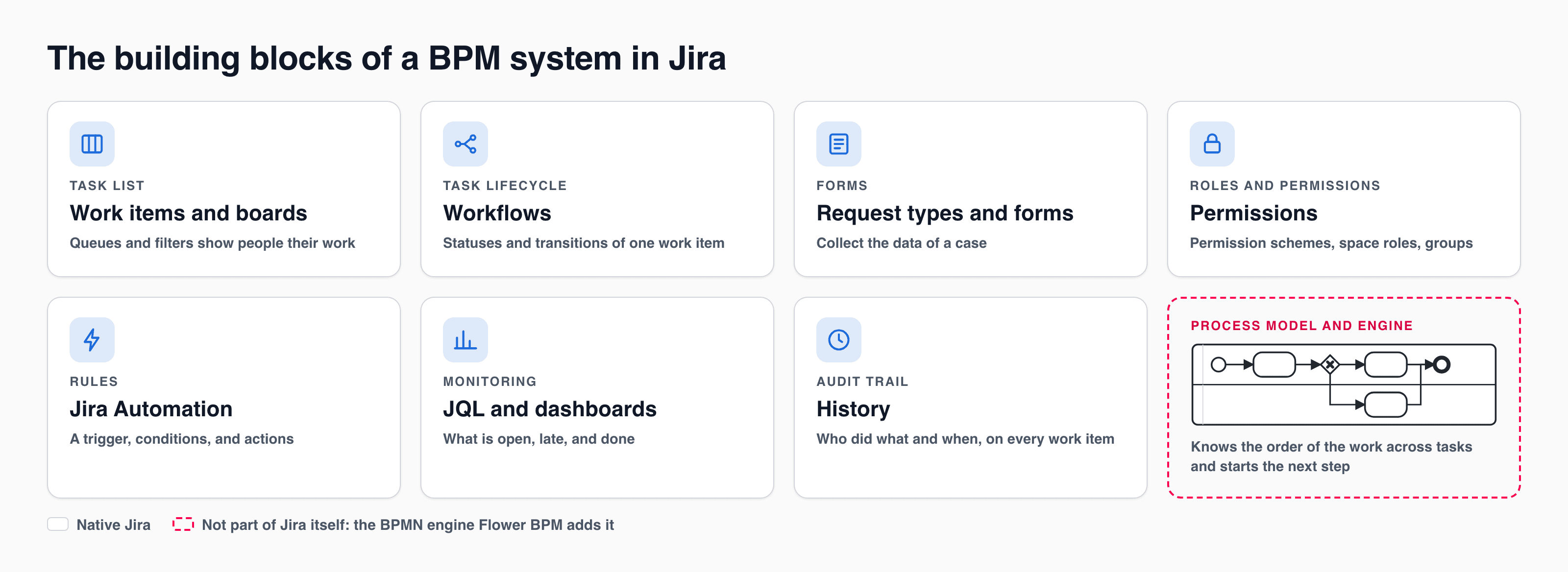
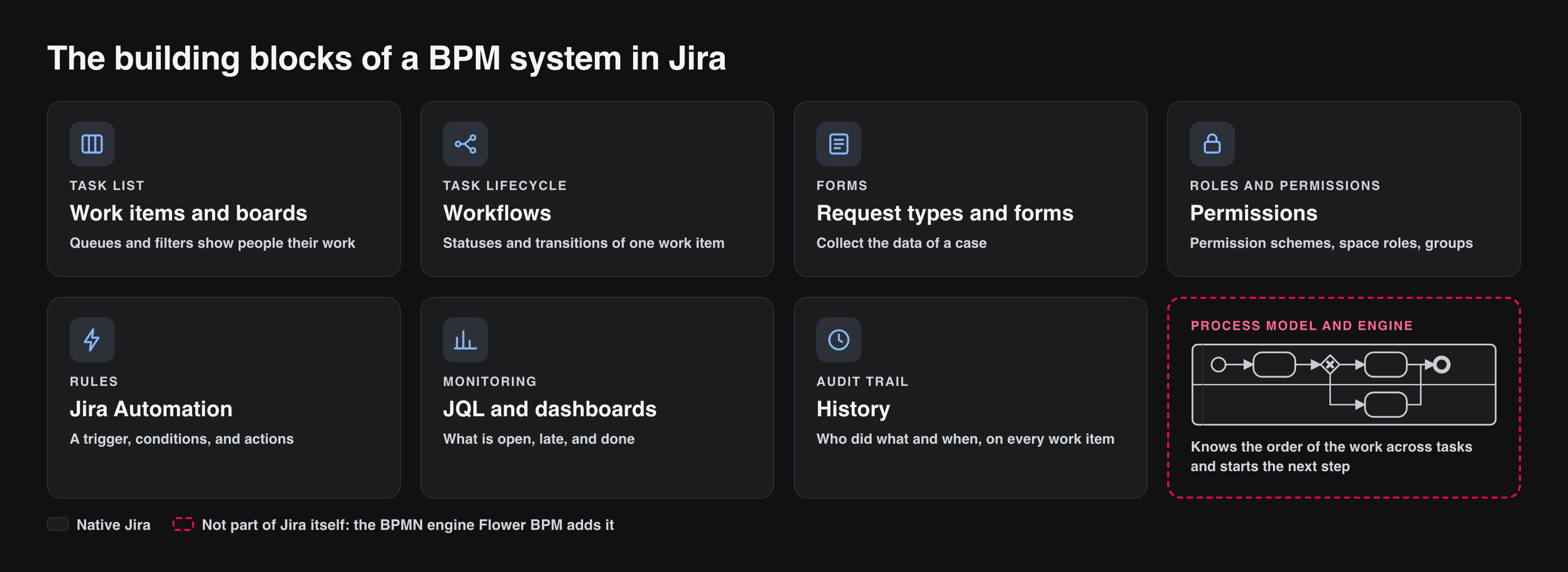
Seven building blocks are native Jira. The process model and its engine are not.
Seven of the eight rows are native Jira. The last row is what this series is about. Part 1 looked at it from the outside, as a question of platforms. This part looks at it from the inside: to see why it is missing, look at what a Jira workflow is.
What Is a Jira Workflow?
A Jira workflow is the set of statuses and transitions that one work item passes through from its creation to its completion. A workflow scheme binds it to the work types of a space. It has four building blocks:
- Statuses. A work item has exactly one status at a time, such as To Do, In Review, or Done. Status categories make states comparable across teams. Check whether a status stands for an activity or a stage: Under Review is usually a stage.
- Transitions. A transition connects two statuses. It can carry rules: who may use it, what has to be filled in, and what happens afterwards. In company-managed spaces these are conditions, validators, and post functions. In Jira Service Management, a status can carry an approval step: the request waits until the approvers have decided.
- The assignee. The person responsible for the work item right now. One work item has one assignee at a time, and it often changes between statuses.
- The resolution. The reason why a work item is closed, such as Done, Fixed, or Won’t Do. Jira treats a work item as resolved only when this field is set. Let the Done transitions of your workflows set a resolution and the transitions that reopen a work item clear it; the BPMN engine of the later parts continues a process exactly when the resolution is set. See How a Work Item Continues the Process.
Workflows do their job well, and the feature is mature. They have one hard border, and it is there by design: a workflow belongs to one work item. It does not know that other work items exist, it cannot wait for two of them, and its work item has one assignee at a time. A workflow answers the question in which state is this piece of work? It does not answer what happens next, and who does it?
What Is a Business Process?
A business process is a repeatable sequence of activities that several people or teams carry out to turn a trigger into a defined result.
The running example of this series is a purchase request:
Lena, a team lead, needs a new test device for 2,400. Procurement checks the request and the supplier. Because the amount is above 1,000, the budget owner has to approve the purchase. Then procurement places the order. While the device is on its way, finance processes the invoice. When the device has arrived and the invoice is paid, the purchase is complete.
Four roles, five activities, one decision, and two things that happen at the same time. None of the tasks is difficult. What makes this a process and not a task is that the work crosses team borders again and again, and that somebody has to know at every moment what comes next.
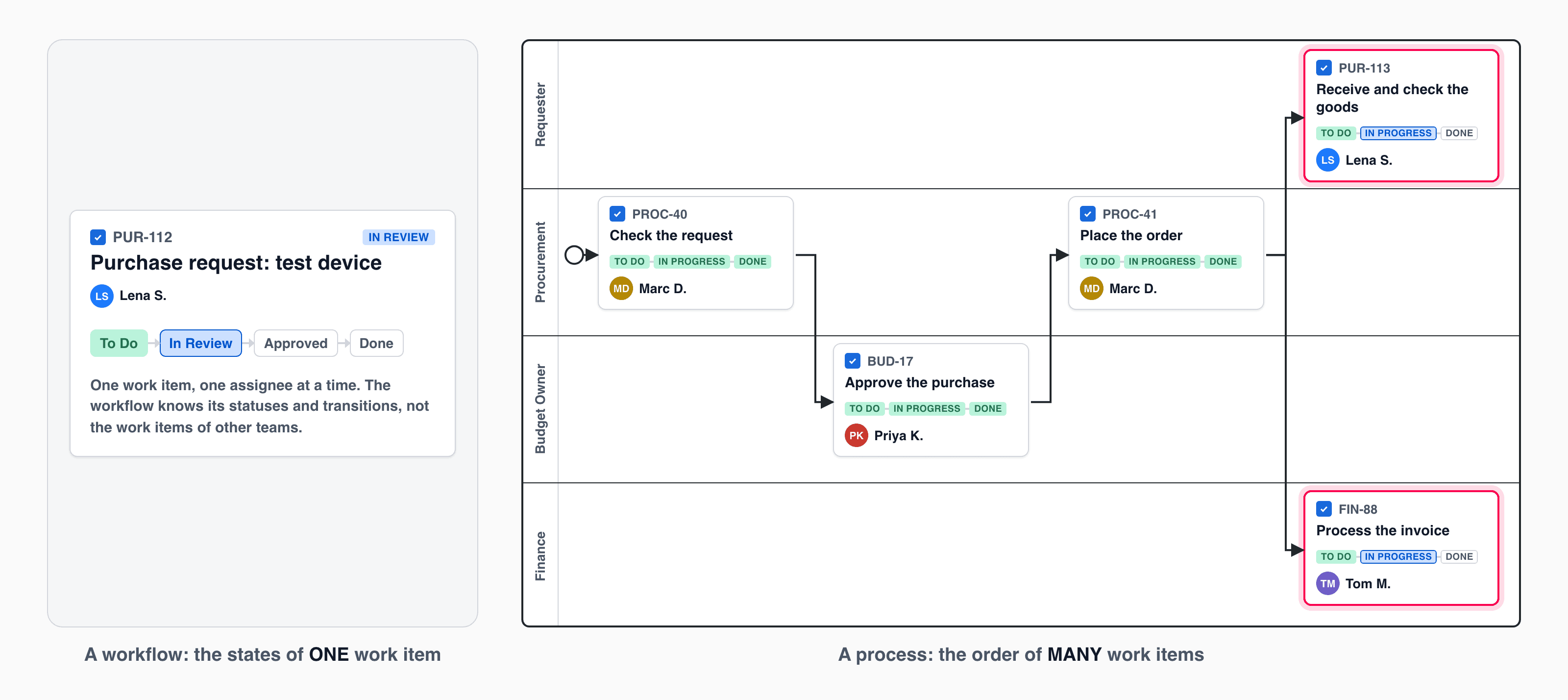
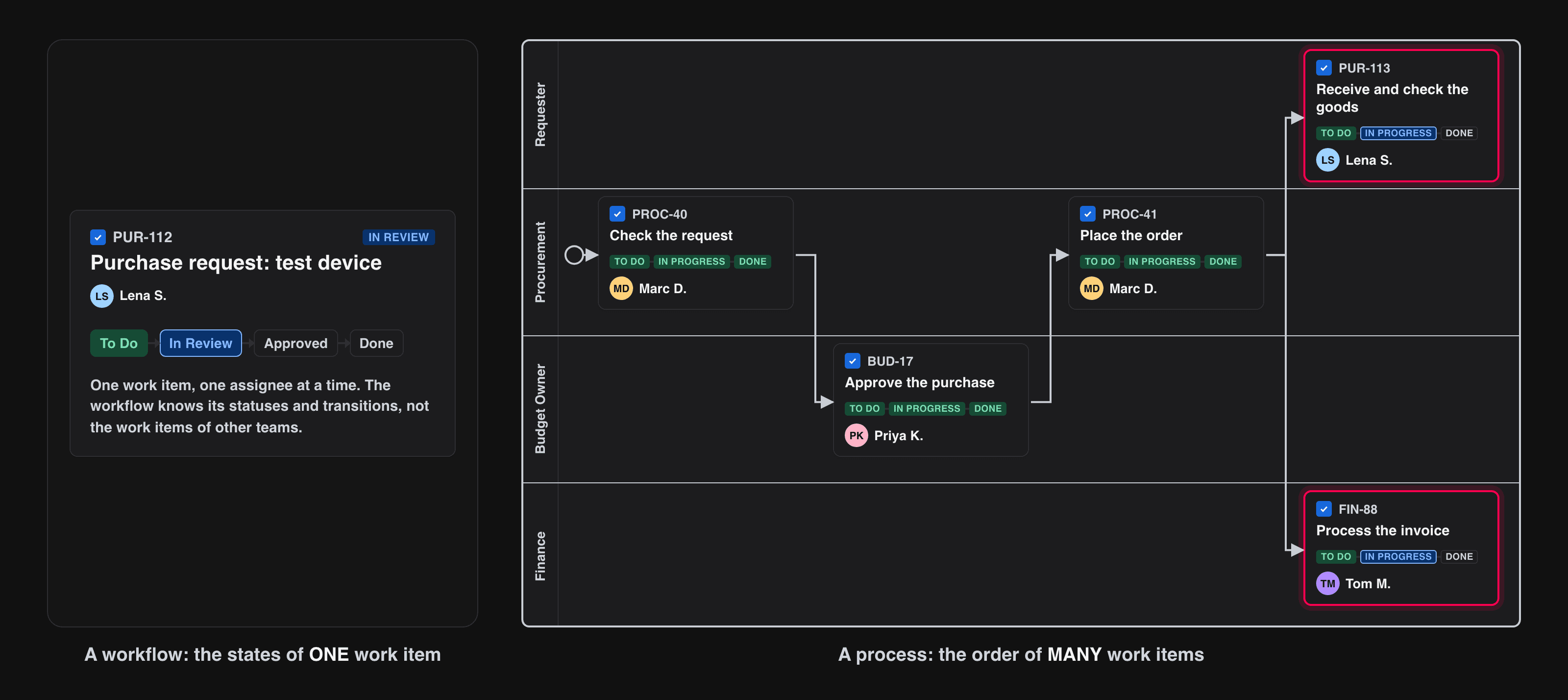
A workflow: the states of ONE work item. A process: the order of MANY work items.
Workflow, Process, or Project?
The three words are often mixed up. The difference between a process and a project is how often it happens; the difference between a workflow and a process is how much of the work it covers:
| Jira workflow | Business process | Project | |
|---|---|---|---|
| Scope | The statuses of one work item | Activities across teams and departments | A one-off set of tasks |
| Repetition | Every work item of its type | Repeated regularly | Happens once |
| Level | Tactical: how one piece of work moves | Strategic: how the work of many fits together | Depends on the project |
| Tool in Jira | Workflow editor | A BPMN model with an engine | Spaces, boards, and timelines |
Think of a football team: the coach chooses the formation and the game plan, which is the business process. Passes, tempo, and moves on the pitch are the workflows. If you reuse a project template again and again, you are running a process. See Jira Project Management vs. Business Process Management.
One Purchase Request, Built Three Ways
1. As One Work Item with a Workflow
The simplest version is a single work item Purchase test device with the statuses Open, In Review, Waiting for Approval, Ordered, Delivered, and Done. It travels from Lena to procurement, to the budget owner, back to procurement, and to finance.
This is quick to build, and for a small team it is enough. Its limits show in daily use:
- One assignee. Somebody has to reassign the work item at every hand-off, and a team finds its work only through the status.
- No parallel work. “The device is on its way” and “the invoice is being processed” do not fit into one status.
- One space for everybody. Finance works inside procurement’s work item, with the same fields, screens, and permissions.
- No numbers per team. How long finance needs is hidden in the time between two statuses.
2. As Several Work Items, Connected by Jira Automation
In the second version, every team gets its own work item in its own space, and Jira Automation rules connect them:
- When a purchase request is created, create Check the request in the procurement space and link it.
- When Check the request is done and the amount is above 1,000, create Approve the purchase for the budget owner. Otherwise, create Place the order.
- When Approve the purchase is done, create Place the order.
- When Place the order is done, create Receive and check the goods and Process the invoice.
- When one of these two is done, check whether the other one is done as well. If so, close the request.
This is real process automation with native Jira, and Jira Automation deserves the credit: triggers for work item events, schedules, and incoming webhooks, conditions on fields and JQL, branches for related work items, and smart values to copy data along. For a process with three or four steps, it is a good solution.
It gets harder as the process grows:
- The process exists only as rules. To understand it, you open five rules and put the order together in your head. The people who do the work never see it.
- A change touches several rules. A second approval level means editing rules that look unrelated.
- Waiting is awkward. “Go on when both are done” needs a rule that fires for each work item and checks the other one.
- Every exception is another rule. A declined approval, a cancelled request, and a reminder after three days each need their own.
- There is no view of one case. The state of Lena’s request is spread over five linked work items.
- Rule runs are counted. Jira Automation has usage limits that depend on your plan, see Atlassian’s page on automation limits and usage .
3. As a BPMN Diagram
Here is the same process, drawn once:
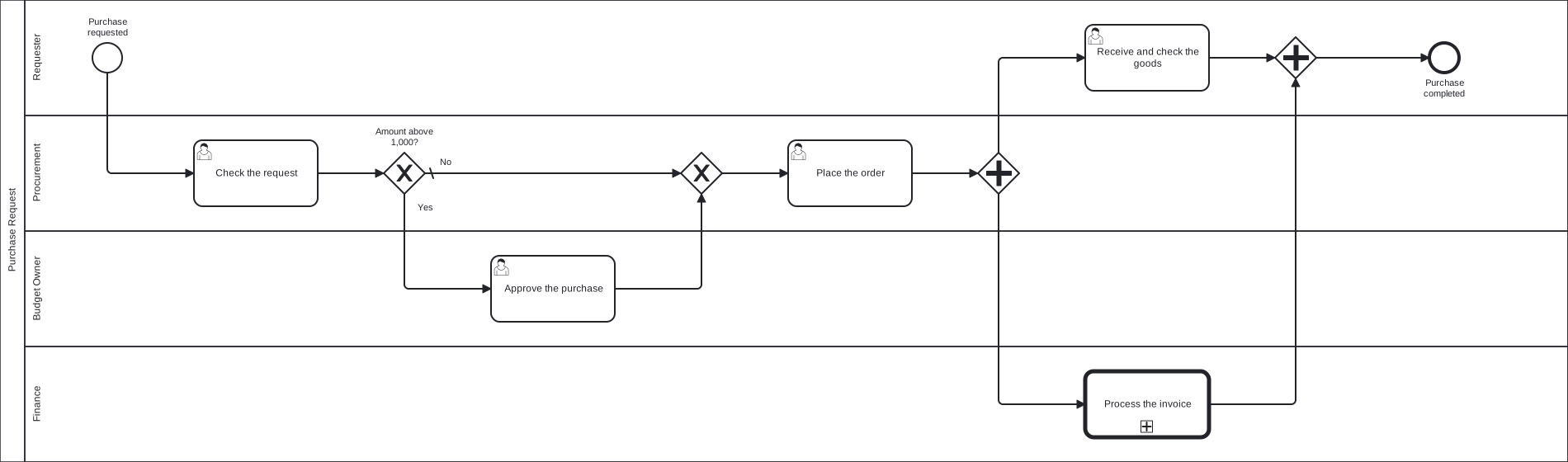
The purchase request as a BPMN diagram. Click the picture to enlarge it, or download the BPMN file.
How to read it:
- The four lanes are the four roles. A task sits in the lane of the role that does it.
- The rounded rectangles are tasks, and the circles are the start and the end.
- The diamonds with the X are exclusive gateways. The first one is a decision: above 1,000, the request takes the path through the approval. The second one brings the two paths together again.
- The diamonds with the plus are parallel gateways: the first one starts two tasks at the same time, the second one waits for both.
- The box with the thick border, Process the invoice, is a step that is a process of its own, owned by finance.
Somebody who has never seen the notation reads this in a minute, and every rule of the second version is visible in it. That is the idea of BPMN (Business Process Model and Notation): an open standard, maintained by the Object Management Group, for drawing a process so that business people can read it and software can execute it. Part 3 explains the notation you need.
What Does BPMN Add to Jira?
Six things that neither a workflow nor a set of rules gives you:
- The model as the single source. One diagram says what happens, in which order, and who does it. You discuss it, train new colleagues with it, show it in an audit, and change the process in one place.
- Hand-offs. Every arrow that crosses a lane is a hand-off between teams. Most delays of a process happen there, not inside the tasks, and the model makes each one explicit.
- Decisions. A gateway names the question (Amount above 1,000?) and its answers. The rule is on the diagram, not in the condition of a rule or in somebody’s head.
- Deadlines. A timer on a task says how long it may take and what happens then: remind, escalate, or drop the task.
- Exceptions. Declined, cancelled, delivered late: BPMN has events for the paths next to the normal one, so they are designed before they happen.
- Visibility. A running process can be shown on its own diagram: this step is done, these two are open. Where is my request? has one answer.
None of this replaces the Jira workflow or Jira Automation. Every task of the diagram is still a work item with its own workflow. A review inside procurement, for example, is best built as two statuses of procurement’s work item. Rules stay the right tool for reactions around a work item: notify somebody, set a field, call another system. The process model sits above both and connects them.
Process Mapping and Modeling in Jira
Most processes already run somewhere in the company, with hand-offs by e-mail and chat. Process mapping makes them visible by answering three questions for every step: what is the task, who is responsible, and when is it due. Mapping works on any medium, from a whiteboard to sticky notes.
Process modeling is mapping with a defined notation such as BPMN, so that the result is precise enough for software. In Jira, you map a process by drawing it as a BPMN model: every task becomes an activity, every team a lane, and every decision a gateway. When the model is stored and run in Jira, the map is also what happens: it does not drift away from reality on a wiki page.
When Is a Jira Workflow Enough?
Do not model a process where a workflow does the job. A workflow is enough when:
- the work is one work item from start to finish,
- one team does it, and
- the steps follow one after another.
Think about a process model when:
- several teams work on a case, in their own spaces,
- some of the work runs in parallel and the next step waits for all of it,
- a decision, a deadline, or an exception changes the path, or
- somebody has to see where the whole case stands.
A process that happens once is a project, and a board is the better tool for it.
So Where Exactly Is the Gap?
It is narrow. Jira has the tasks, the forms, the roles, the rules, and the reports. Two things are missing:
- A home for the process model, with versions, where everybody finds the one that is valid today.
- An engine that reads the model and starts the next work item when the previous one is done.
Without these two, a BPMN diagram is documentation. It sits on a wiki page, and reality drifts away from it with every rule that somebody edits. With them, Jira’s own building blocks do the rest: the work item is the task, the workflow is its lifecycle, the request type is the form, the permission scheme guards the access, and JQL is the monitor.
Frequently Asked Questions
What is the difference between a Jira workflow and a business process?
A Jira workflow describes the statuses of one work item. A business process describes how many activities of several teams depend on each other, in sequence and in parallel, with decisions and deadlines. Each task of a business process can follow its own Jira workflow.
What is the difference between workflow management and business process management?
Workflow management moves single pieces of work through their states. Business process management designs, runs, and improves the whole chain of work across teams, including the hand-offs, decisions, and deadlines between the steps.
What is the difference between process mapping and process modeling?
Mapping makes a process visible on any medium. Modeling uses a defined notation such as BPMN, precise enough that software can run the model. Modeling is a form of mapping.
Is Jira a BPM tool?
Jira contains most parts of one, and a BPMN app adds the process model and the engine. Part 1 answers the question in full, including why Gartner lists Jira for IT service management and not for business process automation.
Can Jira Automation replace a BPM system?
For short processes, yes: rules can create and connect work items. For longer ones, the logic is spread over many rules, there is no picture of the process, and parallel work and exceptions need extra rules. Part 4 shows how rules and a BPMN engine work together.
Do I need BPMN for every process?
No. Use it where work crosses teams, runs in parallel, or follows rules that have to hold. A single work item with a good workflow needs no process model.
What Comes Next
Everything in this part works with a whiteboard and native Jira. The diagram of the purchase request is drawn, but roughly: which symbols does it need for the approval, the parallel work, and a late delivery? And how do you draw it so that it can run?
Part 3 explains the BPMN notation you need for processes in Jira, how each element becomes work in Jira, and how to build your first model.
Related Articles
- Jira Project Management vs. Business Process Management
- Agile Business Process Management with Jira
- The Approval Process, Steps and Examples
- What Is BPMN?