BPMN Events
BPMN Events
Events in BPMN represent things that happen. A process can react to events (catching events) as well as emit events (throwing events). For example, a catching message event makes the token continue as soon as a message is received.
Events can make a token wait at a certain point, and they can interrupt the progress of a token.
Flower executes a subset of the BPMN events: throw events, timer boundary events, and the none start, none end, and terminate end events. Catch events are not supported yet. Events that Flower does not support can be modeled but are ignored during execution. See BPMN Coverage in Jira for the complete overview.
Events in General
Events in BPMN are either thrown (sent) or caught (received). They are called throw events and catch events, for example message throw event or timer catch event.
BPMN distinguishes three positions:
| Position | Type | Purpose |
|---|---|---|
| Start event | Catch event, because it can only react to something | Marks the beginning of a process or sub-process |
| Intermediate event | Throw event (something happens) or catch event (wait and react) | Sits in the normal flow or is attached to an activity |
| End event | Throw event, because it indicates that something has happened | Marks the end of a sequence flow |
An intermediate catch event can be inserted into the process in two contexts: in the normal flow, or attached to an activity. In the second case it is called a boundary event.
Supported Events at a Glance
| Event type | Supported in Flower | What happens |
|---|---|---|
| None | Start, intermediate throw, end | The process starts, passes the event, or ends the flow |
| Message | Intermediate throw | Flower sends a request to a webhook URL |
| Signal | Intermediate throw | Flower sends a request to a webhook URL |
| Escalation | Intermediate throw | Flower sends a request to a webhook URL |
| Link | Intermediate throw | Flower sends a request to a webhook URL |
| Timer | Boundary, interrupting and non-interrupting | Flower sets the due date of the work item and starts a timeout path |
| Terminate | End | Flower ends the whole process and closes all open work items |
| Error, conditional, compensation, cancel, multiple, multiple parallel | Not supported | Can be modeled but is ignored |
Intermediate Events
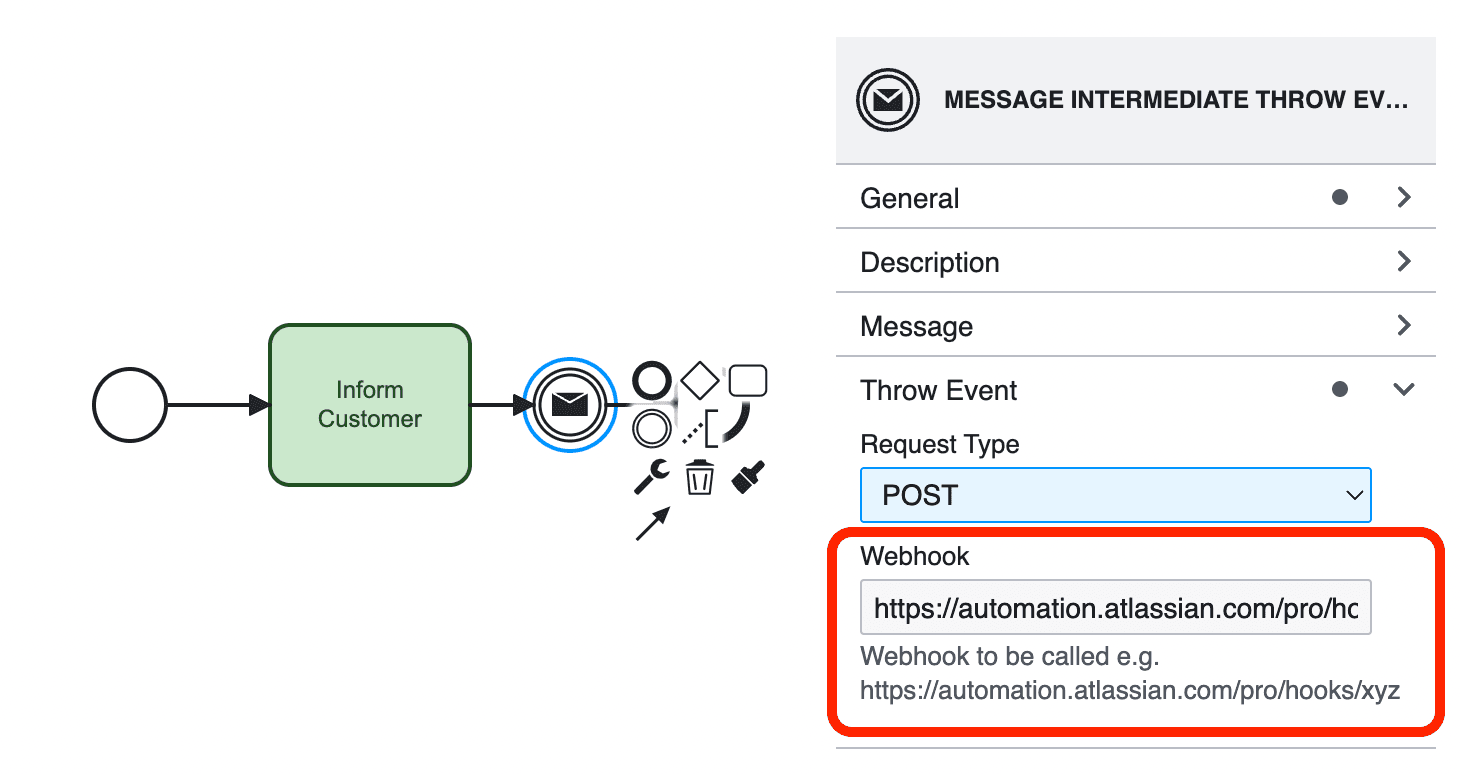
In a typical flow, an intermediate throw event executes its action as soon as the token reaches it, for example it sends a message. When it is complete, the token continues to all outgoing sequence flows (1). Read more about throw events and webhooks.
An intermediate catch event stops the token and waits until the awaited event occurs. Then the execution resumes and the token moves on (2). Intermediate catch events are currently not supported in Flower.
Boundary Events
A boundary event models what should happen if an event occurs while an activity is active. For example, a user task takes too long. A timer boundary event on the task has an outgoing sequence flow to a notification task, which reminds the user. Read more about timers.
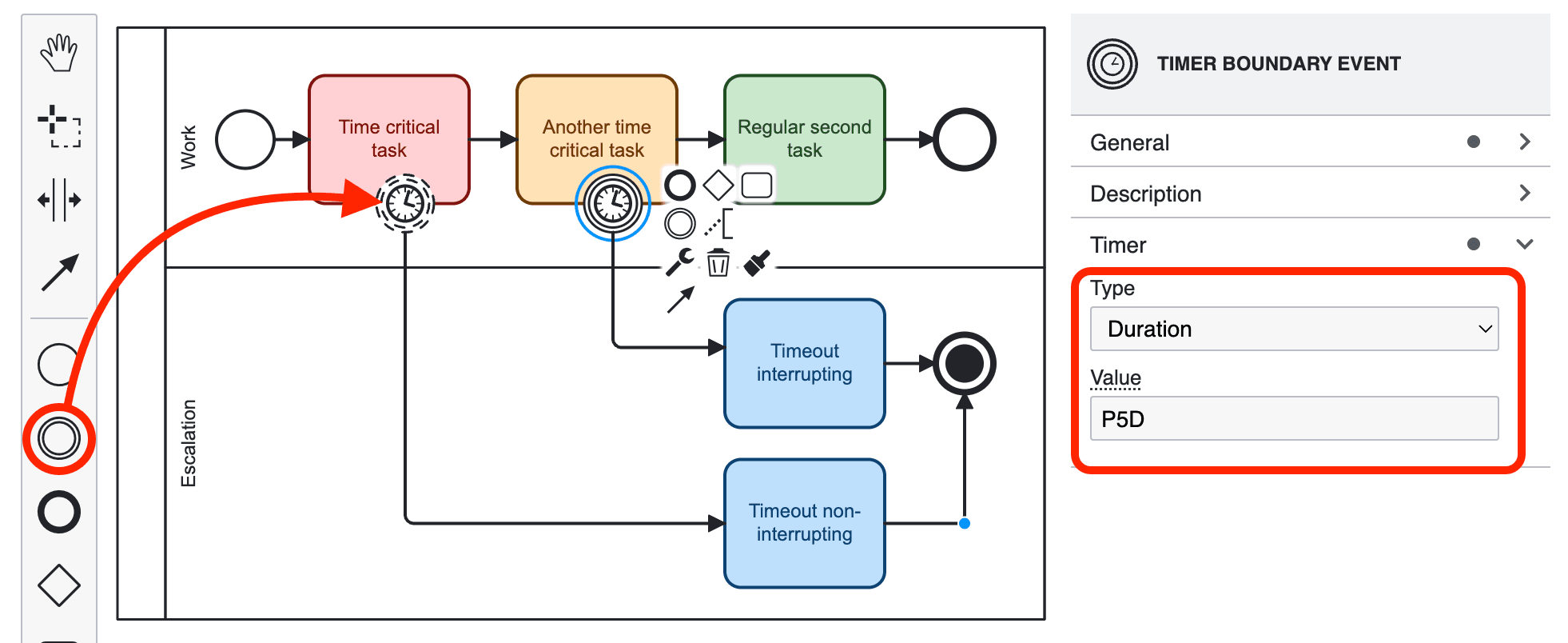
A boundary event must be an intermediate catch event. It is either interrupting (1) or non-interrupting (2):
- Interrupting: When the event is triggered, the activity it is attached to ends before the process takes the outgoing sequence flow. Use it to model timeouts that cut off a path, for example when the process takes too long.
- Non-interrupting: The activity continues, and the process follows both flows.
The example also contains a terminate end event. It ends all parallel flows at once and closes all open work items of the process. See BPMN End Events.
Event Types in Detail
The headings in this section are the link targets of the coverage overview.
None Events
A none event has no trigger.
- The none start event starts the process.
- The none end event ends its flow. Parallel flows continue.
- The none intermediate throw event passes the token on. If you enter a webhook URL, Flower calls it first.
Message Events
Flower supports the message intermediate throw event. When the token reaches it, Flower sends an HTTP POST request to the webhook URL from the properties panel and then continues. This is how a process calls a Jira Automation rule or an external service. See Sync Magic.
Message start events, catch events, boundary events, end events, and event sub-processes are not supported.
Timer Events
Flower supports the timer boundary event, interrupting and non-interrupting. It sets the due date of the work item and starts a timeout path when the date passes. You define the timer with an ISO 8601 date, duration, or repeating interval. See Set Jira Due Dates with Timer Events.
Timer start events, catch events, and event sub-processes are not supported.
Error Events
Error events are not supported. You can model them, but Flower ignores them during execution.
Signal Events
Flower supports the signal intermediate throw event. It works like the message throw event and calls the webhook URL. Signal start, catch, boundary, end, and event sub-process variants are not supported.
Escalation Events
Flower supports the escalation intermediate throw event. It works like the message throw event and calls the webhook URL. To escalate work that is overdue, use a timer boundary event. Escalation boundary events, end events, and event sub-processes are not supported.
Terminate Events
Flower supports the terminate end event. It ends the whole process instance and closes all open work items. Closing them does not continue the process. See BPMN End Events.
Link Events
Flower supports the link intermediate throw event. It works like the other throw events. Link catch events are not supported.
Other Event Types
Conditional, compensation, cancel, multiple, and multiple parallel events are not supported. You can model them, but Flower ignores them during execution.
Read More
- BPMN Coverage in Jira: All supported BPMN elements at a glance.
- BPMN End Events: Regular and terminate end events.
- Set Jira Due Dates with Timer Events: Timer boundary events, due dates, and escalations.
- Sync Magic: Trigger Jira Automation and external services with throw events.