
DMN (Deprecated)
DMN evaluation is deprecated and will be removed soon.
DMN evaluation is deprecated and will be removed soon. Use conditions at exclusive gateways instead, see Migrate from DMN to Gateway Conditions.
What Changes for You
In Flower, DMN decision tables made decisions for BPMN gateways and updated Jira fields on the fly. Replace both uses:
| Task | Instead of DMN |
|---|---|
| Decide the path at a gateway | Add a condition to each outgoing transition of an exclusive gateway. A condition is a JavaScript expression inside ${ } that uses the data of your Jira work items. See BPMN Gateways & Decision Handling. |
| Update Jira fields during a process | Call a Jira Automation rule with a throw event. The rule changes the fields of the work item. See Sync Magic. |
The rest of this page is a reference for existing models until DMN is removed.
Migrate from DMN to Gateway Conditions
Take a decision table that routes a process by the priority of a work item. Its hit policy is FIRST:
| Priority (input) | Path (output) |
|---|---|
"High" | Escalate |
"Medium" | Review |
- (any value) | Standard |
Replace it with an exclusive gateway that has three outgoing transitions:
| Transition | Condition |
|---|---|
| Escalate | ${cur.fields.priority.name == 'High'} |
| Review | ${cur.fields.priority.name == 'Medium'} |
| Standard | none, marked as the default flow |
Follow these steps:
- Open the BPMN model and find every gateway that gets its decision from a DMN rule.
- Write one condition for each rule that leads to a path, in the order of the table.
- Mark the path of the rule without an input (
-) as the default flow. - Test the model with real work items, see Troubleshooting Expressions.
Fields look different. In DMN, fields are directly below the work item, for example pi.priority.name. In gateway conditions, they are below fields, for example pi.fields.priority.name. Use cur for the work item of the last activity before the gateway.
From FEEL to Expressions
| FEEL (DMN) | Expression at a gateway |
|---|---|
a = b | a == b |
a and b, a or b | a && b, a || b |
not(a) | !a |
x in ("A", "B") | ['A', 'B'].includes(x) |
x between 5 and 10 | x >= 5 && x <= 10 |
starts with(text, "CAM") | text.startsWith('CAM') |
contains(text, "screen") | text.includes('screen') |
count(list) > 1 | list.length > 1 |
What Is DMN?
DMN (Decision Model and Notation™) is a standard of the Object Management Group (OMG) that businesses use in many industries to design decision models and automate decisions. It is a common language that aligns business and IT on repeatable business rules and decision management, and it makes decision models interchangeable across the organization. See the DMN specification .
The core elements of DMN are:
- Decision tables: A simple and intuitive representation of decisions with inputs, conditions, and outputs.
- Friendly Enough Expression Language (FEEL): The language that expresses the conditions in decision tables so that they can be executed.
- Decision Requirements Diagrams (DRD): Used when a decision cannot be described in one table, for example when intermediate decisions are inputs of the final decision.
Get Started
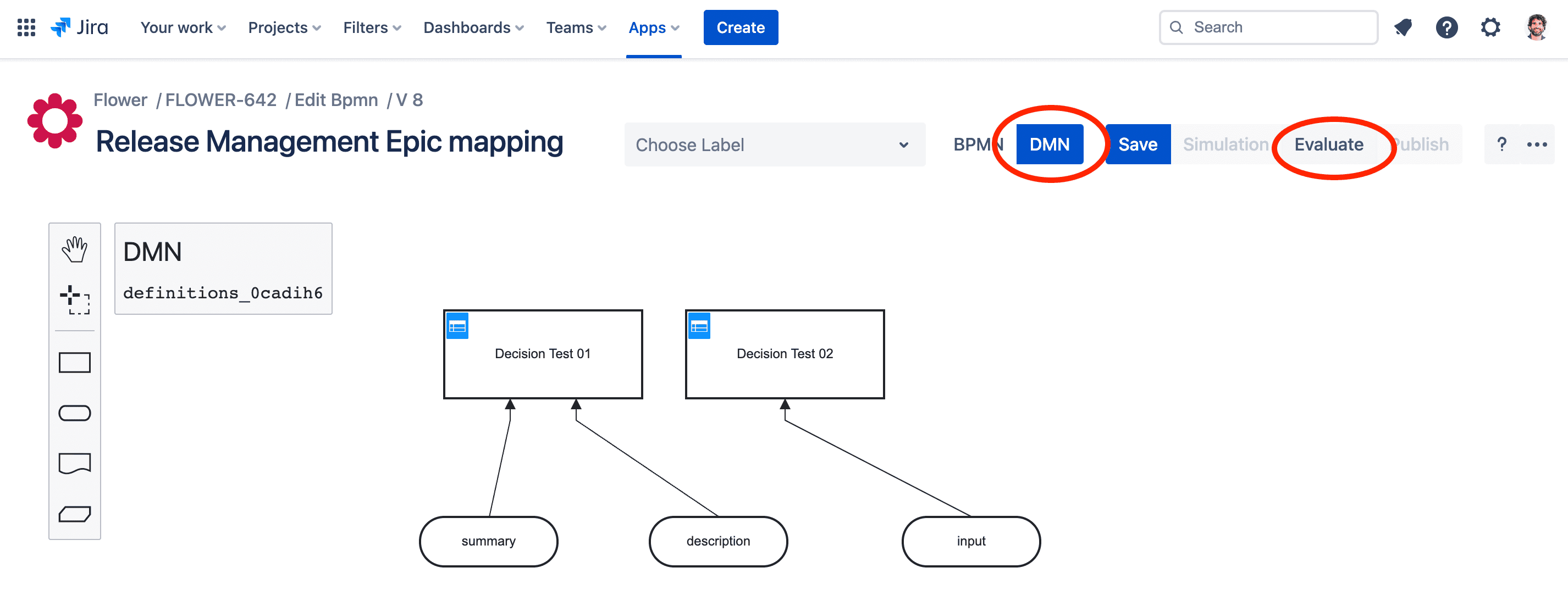
The DMN editor is part of the Flower BPMN modeler, so you can switch between BPMN and DMN at any time. When you have created a DMN model, you can evaluate it together with the current BPMN model and example Jira work items. See Evaluate DMN in Flower.
Note: In contrast to the BPMN model, the DMN model is not versioned. The draft is also the published version.
How Flower Interprets the DMN Result
Flower uses the DMN result to make decisions in your BPMN model and to update the Jira work items that belong to your process instance.
To test decision tables, the Flower DMN modeler can evaluate them together with the BPMN model and Jira. For this, you map BPMN activities and the process instance to existing Jira work item keys.
If you select Apply DMN result, Flower applies the result directly: it saves the decision on the process instance and writes the field updates to the Jira work item that you mapped for the test.
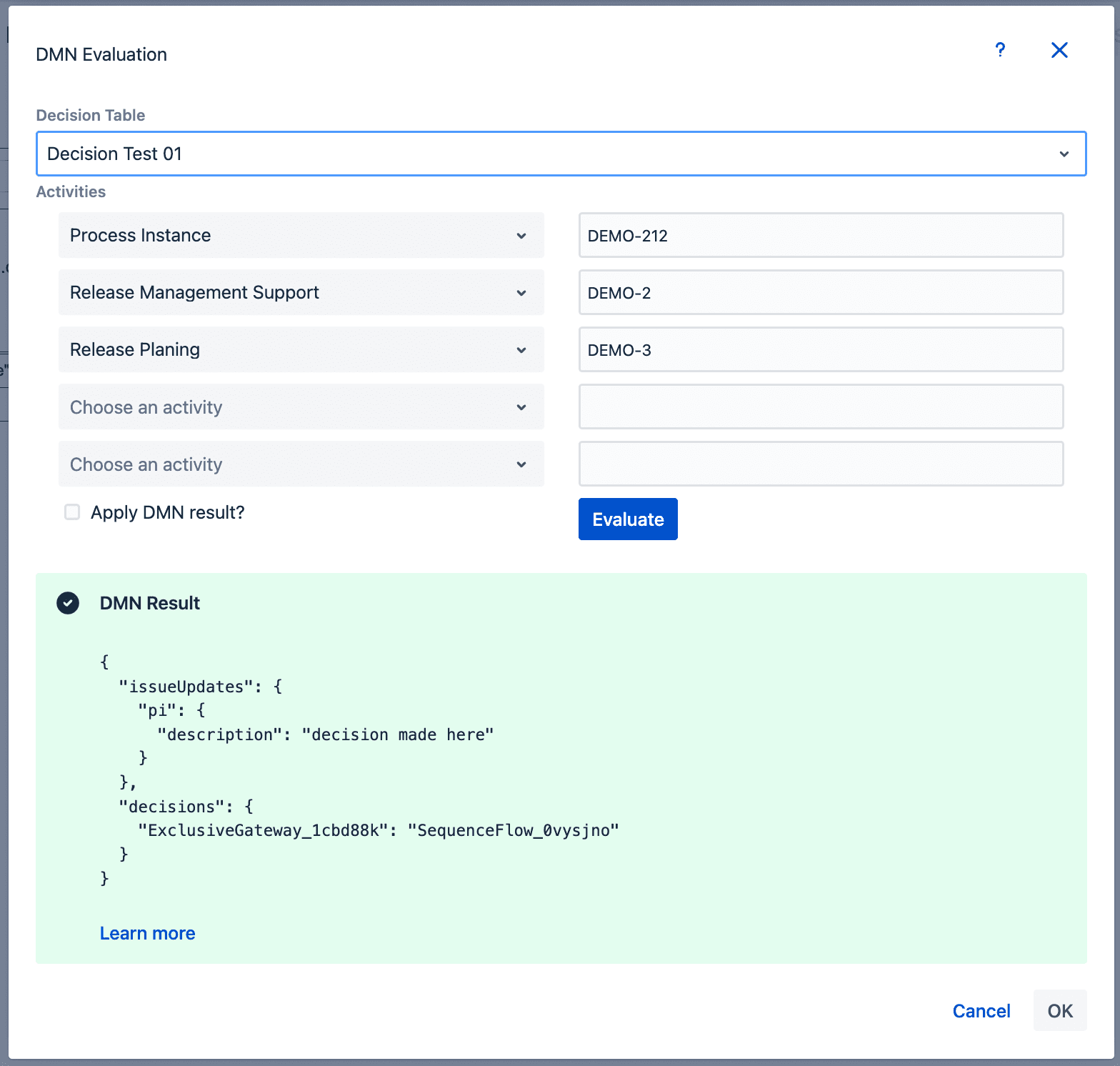
Flower interprets a DMN evaluation result in this general JSON form (shortened notation):
{
    decisions:{
        gatewayId:[transitionId],
        gatewayId:transitionId
    },
    issueUpdates:{
        nodeId:{fieldId:value},
        nodeId:{description:'Lorem ipsum'}
    }
}
The following example decides based on the summary of the process instance:
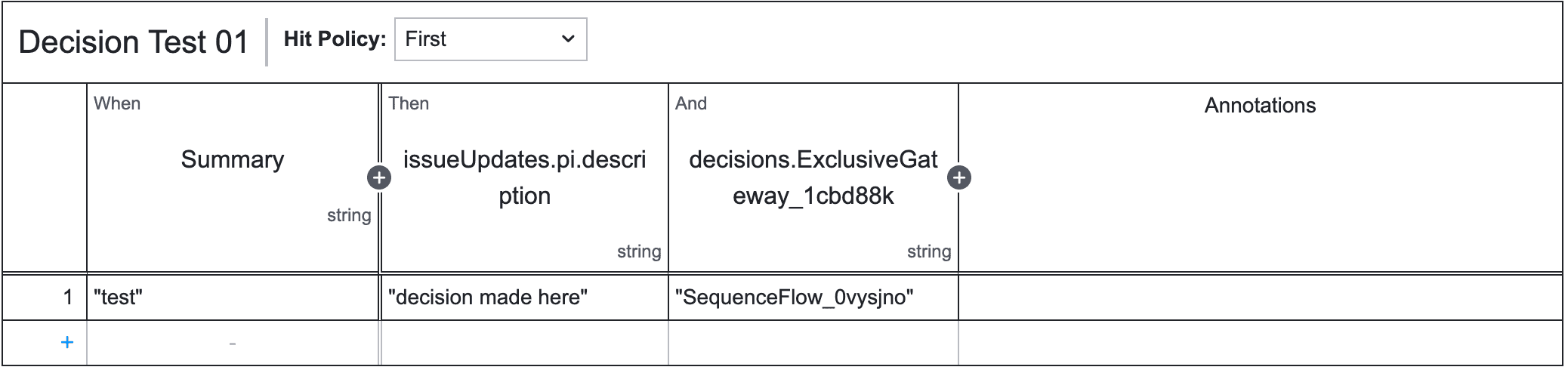
It produces this JSON. Take the node IDs and gateway IDs from your BPMN diagram.
{
  "issueUpdates": {
    "pi": {
      "description": "decision made here"
    }
  },
  "decisions": {
    "ExclusiveGateway_1cbd88k": "SequenceFlow_0vysjno"
  }
}
Address Jira Fields
| Expression | Returns |
|---|---|
pi.summary | The summary of the process instance |
pi.key | The key of the process instance |
pi.project.key | The key of the space of the process instance |
pi.customfield_10016 | The story points of the process instance (number field) |
pi.customfield_10123.value | The value of a custom select field (dropdown) |
pi.reporter.displayName | The reporter, for example “Tom Smith” |
pi.status.statusCategory.name | The status category, for example “In Progress” |
date and time(pi.created) < date and time(pi.lastViewed) | True if the process instance was viewed after its creation |
pi.priority.name | The priority, for example “Medium” |
contains(pi.description,'screen') | True if the description contains “screen” |
count(pi.comment.comments) > 1 | True if the process instance has more than one comment (array field) |
Debugging
It can be hard to formulate a DMN expression and to address a Jira field correctly. Flower therefore logs further details to the developer console of your browser.
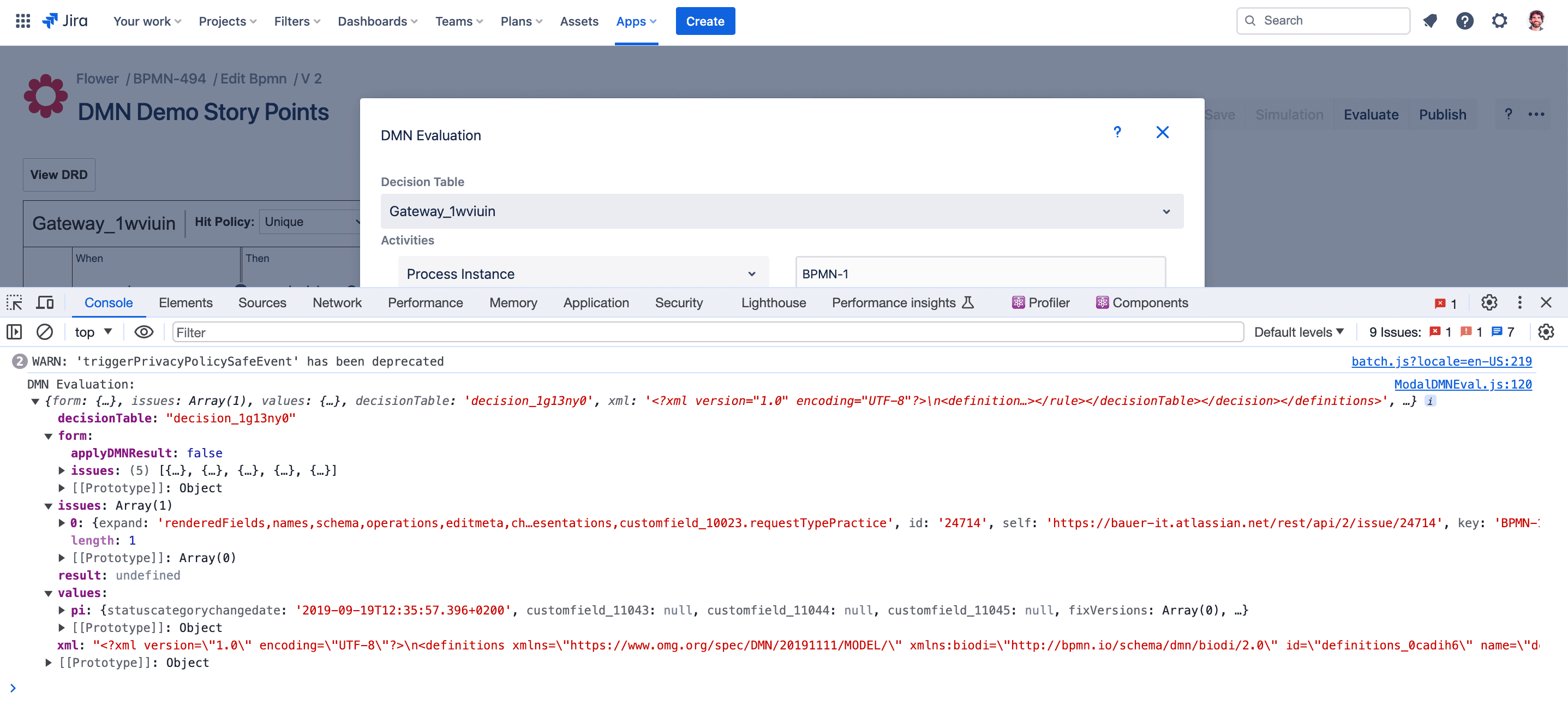
Introducing FEEL
FEEL gives many kinds of expressions in a decision model a standard, executable meaning. It is part of the DMN standard of the OMG. FEEL defines a syntax for conditions that input data is evaluated against. For example, you can describe that input data must be:
- a concrete string, like the season “summer”
- true or false, like the fact that our guests are vegetarians
- a number that is below, above, or exactly the same as another number
- a number between a minimum and a maximum
- a date before, after, or the same as another date
- and much more
Sample FEEL Expressions
This is not a complete list. See the DMN specification for the full FEEL grammar.
| Category | Examples |
|---|---|
| Arithmetic | a + b - c((a + b)/c - (d + e*2))**f1-(1+rate/12)**-term(a + b)**-ctime("T13:10:06") - time("T13:10:05")date and time("2012-12-24T23:59:00") + duration("P1Y") |
| Comparison | "thisStringValue"not("thisStringValue")5 in (<= 5)5 in ((5..10])5 in ([5..10])5 in (4,5,6)5 in (<5,>5)(a + 5) >= (7 + g)(a+b) between (c + d) and (e - f)date("2012-12-25") > date("2012-12-24")date and time("2012-12-24T23:59:00") < date and time("2012-12-25T00:00:00") |
| Conjunction | a or ba and b((a or b) and (b or c)) or (a and d)((a > b) and (a > c)) and (b > c)((a + b) > (c - d)) and (a > b)a or b or a > b(x(i, j) = y) and (a > b)(a + b) > (c - d) and (a > b) |
| For | for a in [1,2,3] return a * afor age in [18..40], name in ["george", "mike", "bob"] return status |
| Function definition | function(age) age < 21function(rate, term, amount) (amount*rate/12)/(1-(1+rate/12)**-term) |
| If | if applicant.maritalStatus in ("M", "S") then "valid" else "not valid"if Pre-Bureau Risk Category = "DECLINE" or Installment Affordable = false or Age < 18 or Monthly Income < 100 then "INELIGIBLE" else "ELIGIBLE"if "Pre-Bureau Risk Category" = "DECLINE" or "Installment Affordable" = false or Age < 18 or "Monthly Income" < 100 then "INELIGIBLE" else "ELIGIBLE" |
| Quantified | some ch in credit history satisfies ch.event = "bankruptcy" |
| Date and time parts | time("13:10:05@Etc/UTC").hourtime("13:10:05@Etc/UTC").minutetime("13:01:05+05:30").seconddate and time("2012-12-24T23:59:00").yeardate("2017-06-10").monthdate("2017-06-10").dayduration("P13M").yearsduration("P1Y11M").monthsduration("P5DT12H10M").daysduration("P5DT12H10M").hoursduration("P5DT12H10M").minutesduration("P5DT12H10M25S").seconds |
| Date and time conversion and equality | date("2012-12-25") - date("2012-12-24") = duration("P1D")date and time("2012-12-24T23:59:00") + duration("PT1M") = date and time("2012-12-25T00:00:00")time("23:59:00z") + duration("PT2M") = time("00:01:00@Etc/UTC")date and time("2012-12-24T23:59:00") - date and time("2012-12-22T03:45:00") = duration("P2DT20H14M")duration("P2Y2M") = duration("P26M") |
Evaluate DMN in Flower
The result of evaluating a decision table depends on the hit policy:
| Hit policy | Result |
|---|---|
| No rule matched | undefined |
| COLLECT or RULE ORDER | An array of objects, one item for each matching rule |
| FIRST or UNIQUE, and a rule matched | An object |
The object of a matching rule contains the evaluated output values. The output names define its structure, and qualified names with a dot (.) lead to nested objects. See the following example:

An object for a matching rule of the table above looks like this:
{
  plainOutputProperty: '...',
  output: {
    property: '...',
    nested: {
       property: '...',
    },
  }
}
Supported Content in Decision Tables
Input expressions are commonly (qualified) names, for example customerAge or customer.age. You can also use any expression according to S-FEEL, and even function invocations, for example employee.salary * 12 or convertToUSD(employee.salary).
Built-in functions. Flower supports these built-in functions from DMN:
- String functions:
starts with,ends with,contains,upper case,lower case - Boolean functions:
not - List functions:
list contains,count,min,max,sum,mean,and,or,append,concatenate,insert before,remove,reverse,index of,union,distinct values,flatten
Input entries. Flower supports simple unary tests according to the DMN specification, with these additions:
- An endpoint can also be an arithmetic expression.
- A simple value can also be a function invocation.
- A simple literal can also be a null literal.
- A date and time literal can also be written as “date and time”.
- Brackets in arithmetic expressions are supported.
- Additional name symbols are not supported.
Examples (not a complete list):
| Input entry | Matches if the input expression evaluates to |
|---|---|
42 | The numeric value 42 |
< 42 | A value less than 42 |
[41 .. 50] | A value between 41 and 50 (inclusive) |
10, 20 | Either 10 or 20 |
<10, >20 | A value either less than 10 or greater than 20 |
"A" | The string “A” |
"A", "B" | The string “A” or “B” |
true | The boolean value true |
- | Any value, even undefined |
| (empty) | Any value, even undefined (same as -) |
null | The value null or undefined |
not(null) | Any value other than null or undefined |
property | The same value as the property (must be given in the context) |
object.property | The same value as the property of the object |
f(a) | The same value as the function evaluated with the property (function and property must be given in the context) |
limit - 10 | The same value as the limit minus 10 |
limit * 2 | The same value as the limit times 2 |
[limit.upper, limit.lower] | A value between the values of two properties of the object limit |
date("2017-05-01") | The date May 1st, 2017 (date is a built-in function) |
date(property) | The date defined by the value of the property, with the time cropped to 00:00:00 |
date and time(property) | The date and time defined by the value of the property |
duration(d) | The duration specified by d, an ISO 8601 duration string like P3D for three days |
duration(d) * 2 | Twice the duration |
duration(begin, end) | The duration between the specified begin and end date |
date(begin) + duration(d) | The date that results from adding the duration to the date |
< date(begin) + duration(d) | Any date before the date that results from adding the duration to the date |
Most combinations of these syntax elements are valid as well. For example, this is a valid input entry, although it probably makes no sense:
not(f(a + 1), [ date(b) + duration(c.d) .. g(d) ])Input Variables as Parameters of Functions
Sometimes you want to use the value of an input expression as a parameter of a function in an input entry, for example to test whether a string contains a substring, where each substring forms a different rule. You can use this to derive the space of a work item from the prefix of its key:
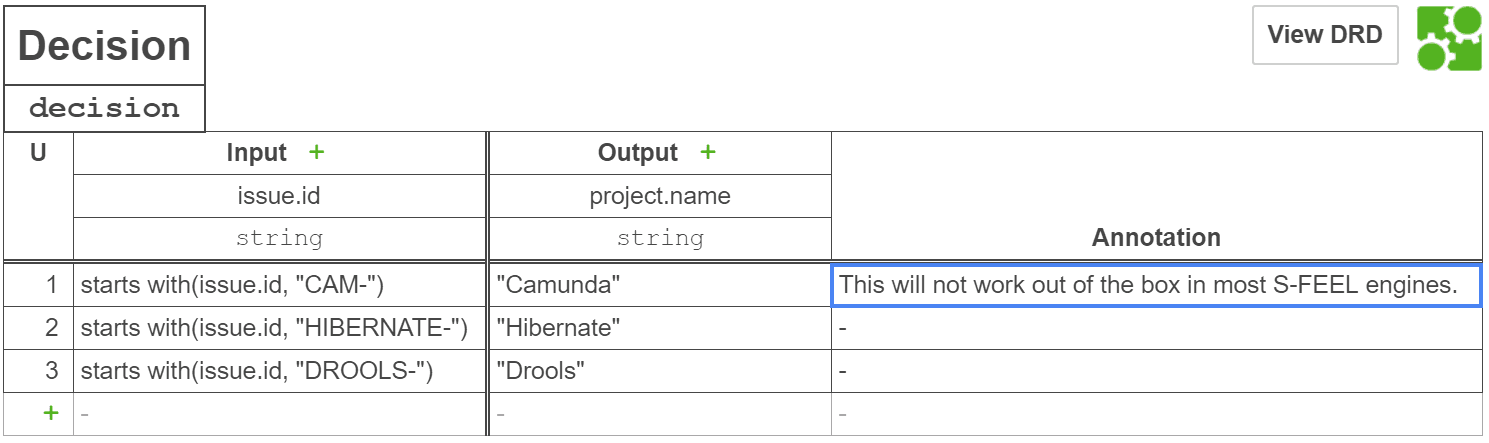
The function starts with(string, substring) tests whether a string starts with a prefix. With S-FEEL, however, you cannot use the value of an input expression as a parameter of the function. If the input expression is issueId and the input entry is starts with(issueId, "CAM"), the input entry evaluates to true for CAM-42. A rule with this input entry still does not match, because true does not equal the value of the input expression, which is CAM-42.
Flower DMN therefore follows a pragmatic convention: if an input expression is a qualified name and an input entry contains a function that takes the same qualified name as one of its parameters, and the function evaluates to true, the rule matches with respect to this input entry. (It may still not match because of other input entries.) The decision table above can therefore derive the space from the key prefix.
Output Entries
Flower supports a simple expression according to the DMN specification as output entry, with the same additions as for input entries. Output entries are expressions, not comparisons, so these values are not allowed:
< 1[1 .. 2]not("A")- Empty values, including the dash
-
Undefined Values
Input expressions, input entries, and output entries may reference functions and properties that are undefined or missing from the input context. Flower handles this as follows.
Evaluation. An input expression, input entry, or output entry evaluates to undefined if it contains a function or property that is not found in the input context or has an undefined value. You cannot compare undefined values or check them for equality: for undefined values a and b, the expression a = b evaluates to undefined, not to true. The built-in function defined is the exception. It returns true if the argument is neither null nor undefined, and false otherwise.
Matching of rules.
- If an input expression evaluates to undefined, every rule whose input entry is not empty (neither the empty string nor the dash
-) does not match, whatever the input entry evaluates to. - If an input entry evaluates to undefined, its rule does not match, whatever the input expression evaluates to.
Decision result. If an output entry of a matching rule evaluates to undefined, the variable of the output name is set to undefined for the hit policies UNIQUE and FIRST. For COLLECT and RULE ORDER, the undefined value is not added to the result list.
Custom functions. If you cannot rule out undefined values, your custom functions should check their arguments and return undefined if one or more arguments are undefined.
Pass Dates as Input
For input expressions, input entries, or output entries of the type date(property) or date and time(property), you can create the value of property in these ways:
// For dates only: a date string in the format YYYY-MM-DD
const context = {
  property: '2018-03-01',
}

// For date and time: an ISO 8601 date and time string
const context = {
  property: '2018-03-01T14:30:00+01:00',
}

// JavaScript date a): from numerical year, month, and so on
// (this is implicitly in the local time zone)
const context = {
  property: new Date(2018, 2, 1, 0, 0, 0),
}

// JavaScript date b): from a string with an explicit time zone
const context = {
  property: new Date('2018-03-01T00:00:00+01:00'),
}

// moment-js value
const context = {
  property: moment.parseZone('2018-03-01T00:00:00+01:00'),
}
Any JavaScript Date or moment-js value is syntactically fine, however you created it.
The built-in date function crops the time portion of a JavaScript Date or moment-js value after converting it to UTC. Therefore date('2018-03-01T00:00:00.000+01:00') resolves to February 28th, 2018 and not to March 1st, 2018, because the time is 2018-02-28T23:00:00.000+00:00 in UTC.