
Automatic Jira Assignment with BPMN Swimlanes
How Flower assigns Jira work items by lane
In short: In Jira, every work item has exactly one assignee, and you cannot assign a work item to a group. In a process with many tasks, this leads to manual hand-offs and unclear responsibilities. BPMN swimlanes solve this: each lane stands for a role or team, and Flower assigns all work items of a lane to the same person automatically.
Last updated: October 2026
The Assignment Problem in Jira
Good task assignment decides how smoothly work flows. The options range from simple priorities and automatic assignment rules to role-based and skill-based assignment. Jira offers a default assignee per space (formerly called project), and otherwise the assignment is manual. Assigning a work item to a group is not possible. Jira Automation rules can cover many cases, but complex scenarios need complex rules that someone has to maintain.
A process makes this harder: the same people work on several related work items, and a hand-off from one team to the next must not leave a work item unassigned.
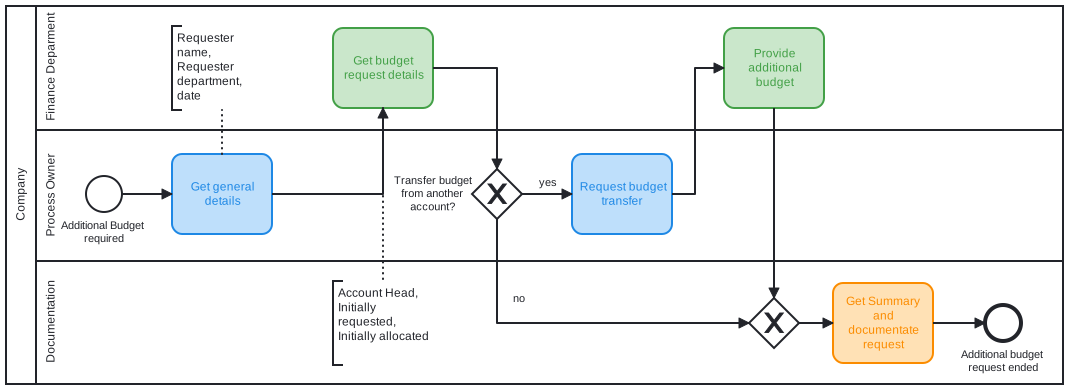
What Are BPMN Swimlanes?
BPMN uses swimlanes to show who is responsible for which activity. There are two kinds:
- A pool represents a participant of the process, for example a company, a department, or an external party.
- A lane is a sub-partition of a pool. It stands for a role or team, for example HR, IT, or Finance.
Every activity of the process sits in exactly one lane. That makes responsibilities visible in the diagram. Swimlanes in BPMN are not the same as swimlanes on a Jira board.
How Flower Uses Swimlanes for Jira Assignment
Flower creates a Jira work item for every activity of a process. The lane of the activity decides the assignee:
- When a work item in a lane is assigned for the first time, Flower remembers this user for the lane. Work items created later in this lane get the same assignee.
- When you reassign a work item, Flower updates the open work items of the entire lane and uses the new assignee for the work items created later.
- Assignments apply within one process instance. The same lane can have different assignees in different process instances.
This removes manual reassignments, and the team knows who owns each step.
See and Track Assignments
In the Flower view of a process instance, the Assignees section lists the lanes with their current assignees. A click on a lane opens a Jira search with its work items. You can also search yourself:
flowerLane = "YOUR-LANE-NAME"Save the query as a filter and create a Jira board from it to give a team a clear overview of the work in its lane. See Search Flower Data with JQL.
Set Space and Work Type per Lane
A lane can also define the Jira space and the work type for all its activities. This helps when each team works in its own space. See Defining Jira Space & Work Type.
Swimlanes Compared with Other Assignment Methods
| Method | Strength | Limit |
|---|---|---|
| Default assignee of a space | Simple, built into Jira | One person for all work items of the space |
| Jira Automation rules | Flexible, event-driven | Complex scenarios need complex rules that you have to maintain |
| BPMN swimlanes with Flower | Assignment follows the process model and stays consistent across all steps of a team | Requires a process model |
Tips for Using Swimlanes
- Model one lane per role or team, not one lane per person.
- Do not nest lanes to mirror your organization chart. Use an organization chart for that.
- Keep lane names stable, because they are used in the JQL query
flowerLane.
Frequently Asked Questions
Can I assign a Jira work item to a team?
Not directly, because Jira allows one assignee per work item. With Flower, a swimlane represents the team, and the work items of the lane are assigned to the same person.
What happens when someone reassigns a work item in a lane?
Flower assigns the new person to the other open work items of the lane and to the work items created later.
How do I find all work items of a swimlane?
Use the JQL query flowerLane = "YOUR-LANE-NAME", or click the lane in the Assignees section of the process instance.
About Flower
Flower – Business Process & Workflow Automation (BPMN) for Jira is an app on the Atlassian Marketplace for Jira Cloud and Jira Data Center. It lets you model business processes in BPMN 2.0 and run them in Jira: for every activity of a process, Flower creates a Jira work item, assigns it through swimlanes, shows its status in the process diagram, and continues the process when the work item is resolved. Flower stores all process data in Jira, so your permissions, boards, and reports keep working. Flower is Cloud Fortified and has been on the Atlassian Marketplace for more than ten years.
Start a free 30-day trial on the Atlassian Marketplace or follow the Get Started guide.