
Search Flower Data with JQL
Find Models, Process Instances, and Activities in Jira
Search Flower Data with JQL
Flower stores all its data as Jira work items: models, process instances, and activities (the tasks of a process) are all work items.
So you can search, filter, and track them with JQL (Jira Query Language) like any other work item. For example, you can:
- Find all BPMN models in Jira.
- Monitor running process instances and their progress.
- Track activities and their assignments.
To try a query, open the advanced search in Jira, switch to JQL, and enter the query:
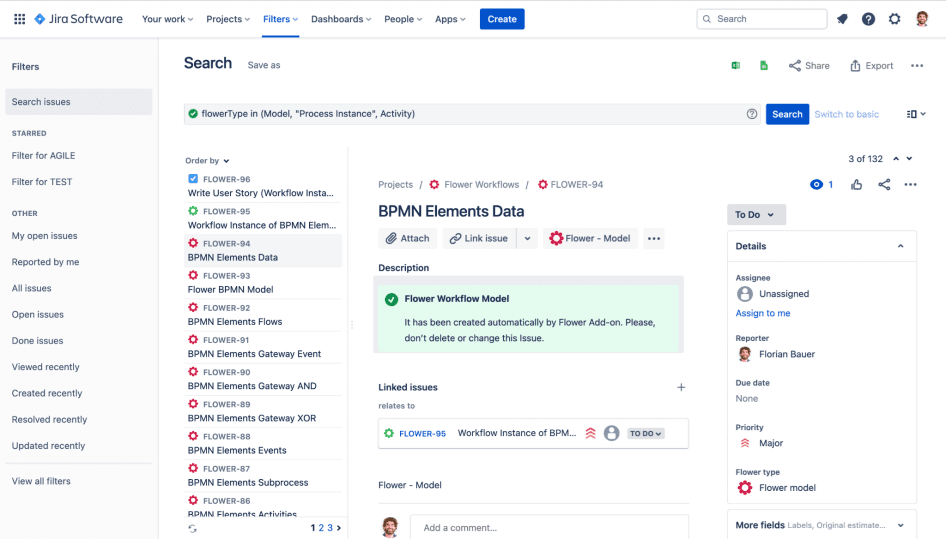
Flower Search Fields
Flower adds the following fields to JQL:
| Field | Contains | Example |
|---|---|---|
flowerType | The kind of Flower entity: Model, "Process Instance", or Activity | flowerType = Activity |
flowerModel | The key of the model | flowerModel = YOUR-MODEL-KEY |
flowerInstance | The key of the process instance an activity belongs to | flowerInstance = YOUR-INSTANCE-KEY |
flowerLane | The name of the swimlane of an activity | flowerLane = "YOUR-LANE-NAME" |
flowerNode | The ID of the BPMN activity in the model. You find it in the Flower BPMN modeler. | flowerNode = YOUR-ACTIVITY-ID |
You can combine them with Jira’s standard fields, for example resolution is EMPTY to find only open work.
Common Queries
Find Flower Entities
| Goal | JQL |
|---|---|
| All Flower entities | flowerType in (Model, "Process Instance", Activity) |
| All process models | flowerType = Model |
| All process instances | flowerType = "Process Instance" |
| All activities | flowerType = Activity |
Narrow Down by Model, Instance, Swimlane, or Activity
| Goal | JQL |
|---|---|
| All process instances of a model | flowerModel = YOUR-MODEL-KEY AND flowerType = "Process Instance" |
| All activities of a model | flowerModel = YOUR-MODEL-KEY AND flowerType = Activity |
| All activities of a process instance | flowerInstance = YOUR-INSTANCE-KEY |
| All activities of a swimlane | flowerLane = "YOUR-LANE-NAME" |
| All work items of one BPMN activity, across all process instances | flowerNode = YOUR-ACTIVITY-ID |
Find Open Work Only
| Goal | JQL |
|---|---|
| Running process instances | flowerType = "Process Instance" AND resolution is EMPTY |
| Open activities of a swimlane | flowerLane = "YOUR-LANE-NAME" AND resolution is EMPTY |
| Open activities of a model | flowerModel = YOUR-MODEL-KEY AND flowerType = Activity AND resolution is EMPTY |
Find Activities with a Due Timer
This query finds all open activities with a timer that is due today or overdue.
It is also available as Timer Filter in the Flower Settings. Learn more about timers and due dates.
flowerType = Activity AND Resolution IS EMPTY AND flowerTimer IS NOT EMPTY AND (duedate <= endOfDay() OR duedate IS EMPTY AND flowerTimer <= endOfDay())Use Your Queries
- Save a query as a filter and mark it as a favorite to find it again quickly.
- Use a filter for a Jira board to manage your processes visually. See how to configure the filter of a board .
- Build dashboards and reports on your filters to monitor and improve your processes.
With JQL, your process models, process instances, and activities are always searchable, trackable, and actionable in Jira.
What’s Next?
- Get Started with Automation: Run your model as a process and track it in Jira.
- Timers and Due Dates: Learn how Flower sets due dates and triggers timers.