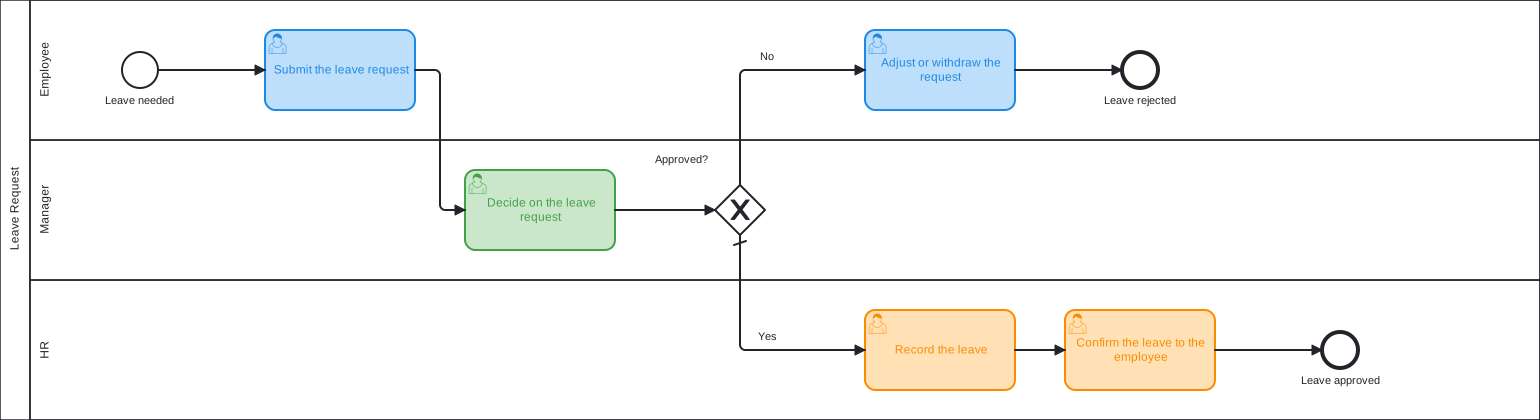
Leave Request
Leave Request
An employee requests leave, the manager decides, and HR records it. A rejected request goes back to the employee.
Download Business Process Template for Free
Use the process template as it is or adjust and extend it to your needs.
The employee submits the leave request, and the manager decides on it. An exclusive gateway reads the decision. If the request is approved, HR records the leave and confirms it to the employee. If it is rejected, the employee adjusts or withdraws the request.
The decision is the status of the approval work item: when it is resolved with the status Rejected, the process takes the rejection path. The workflow of the work type needs this status. Without it, the default path is taken.
Adapt it: start the process from a Jira Service Management portal so that employees can submit the request with a form, and add a task for the substitute during the leave.
Learn More