BPMN Workflow Patterns
In short: Workflow patterns are solutions to problems that return in almost every process: do this, then that. Do both at once. Decide. Repeat. Stop when time runs out. Each pattern has a BPMN construct. If you know a dozen of them, you can model most processes.
The patterns go back to the research of the Workflow Patterns initiative, which collected and named them independent of any tool.
The Patterns at a Glance
| Pattern | What it does | BPMN construct | In Flower |
|---|---|---|---|
| Sequence | Steps follow one another | Sequence flow | Supported |
| Parallel split | One path becomes several that run at the same time | Parallel gateway, diverging | Supported |
| Synchronization | Parallel paths wait for each other | Parallel gateway, converging | Supported |
| Exclusive choice | Exactly one of several paths is taken | Exclusive gateway, diverging | Supported |
| Simple merge | Alternative paths come together without waiting | Exclusive gateway, converging | Supported |
| Multi-choice | One or more paths are taken | Inclusive gateway, diverging | Supported |
| Synchronizing merge | Waits for the paths that were started | Inclusive gateway, converging | Not supported yet |
| Loop | A step or a part of the process repeats | Sequence flow back to an earlier step | Supported |
| Multiple instances | A step runs once for each item of a list | Multi-instance marker | Not supported |
| Deferred choice | The first event that happens decides | Event-based gateway | Not supported |
| Deadline and escalation | Something happens when a step takes too long | Timer boundary event | Supported |
| Cancellation | A step or the whole process is stopped | Interrupting boundary event, terminate end event | Supported |
| Sub-process and reuse | A step is a process of its own | Call activity | Supported |
Sequence
The simplest pattern: one step follows the other. In BPMN a sequence flow connects the two.
In Flower: when the work item of a task is resolved, Flower creates the work item of the next task.
Parallel Split and Synchronization
Several things happen at the same time, and the process goes on when all of them are done. A new employee needs a laptop, an account, and a desk. Nobody has to wait for the others.
A parallel gateway splits the flow, a second parallel gateway joins it. The join waits for every incoming path.
In Flower: the split creates the work items of all paths at once. The join waits until all of them are resolved. One limit: a loop inside a parallel branch can let the join continue too early, see Known Issues.
Exclusive Choice and Simple Merge
A decision with exactly one outcome: approved or rejected. An exclusive gateway splits the flow, and conditions on the outgoing flows say which path is taken. A second exclusive gateway merges the alternatives. It does not wait, because only one path is active.
In Flower: conditions read the fields of your Jira work items, for example the status of the last one. Flower takes the first path whose condition is true, else the default flow. See BPMN Gateways.
Multi-Choice and Synchronizing Merge
A decision with one or more outcomes: a request may need a security review, a legal review, both, or none. An inclusive gateway takes every path whose condition is true. As a join, it waits for exactly the paths that were started.
In Flower: the inclusive split is supported. The inclusive join is not supported yet. Until then, model the optional steps so that each path ends on its own, or use a parallel gateway when all paths always run.
Loop
A part of the process repeats until a condition is met: revise the document until the review approves it. In BPMN, a sequence flow leads from a gateway back to an earlier step. Name the gateway with the question, for example Approved?.
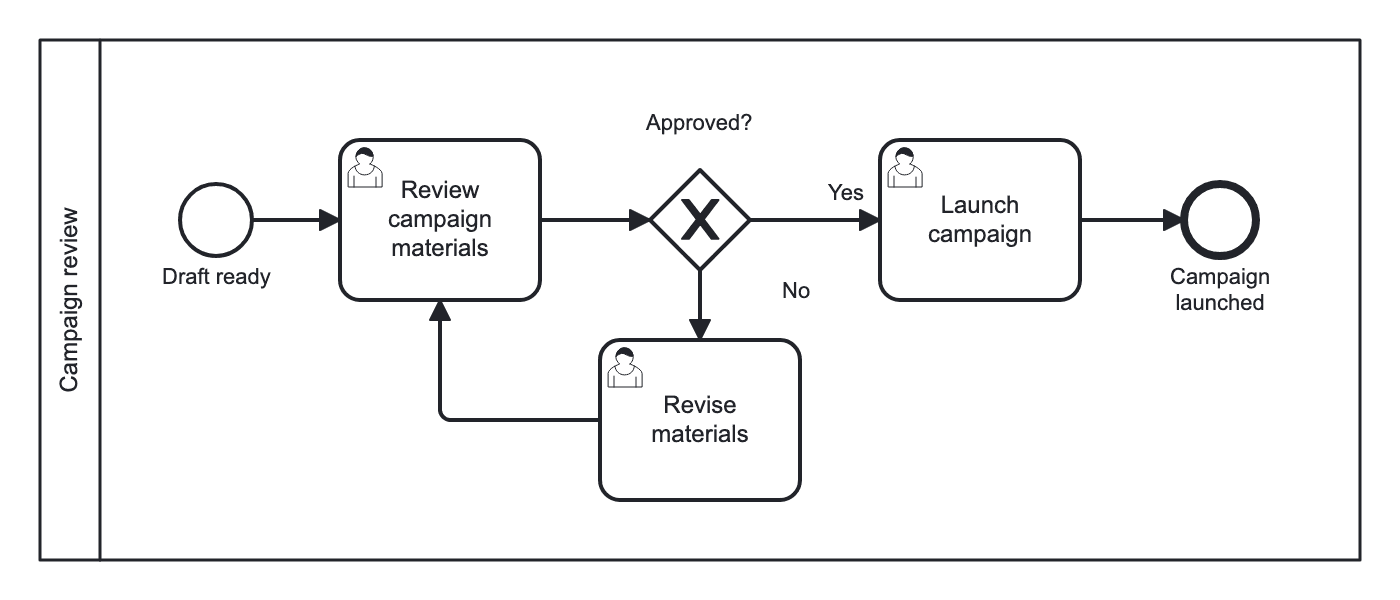
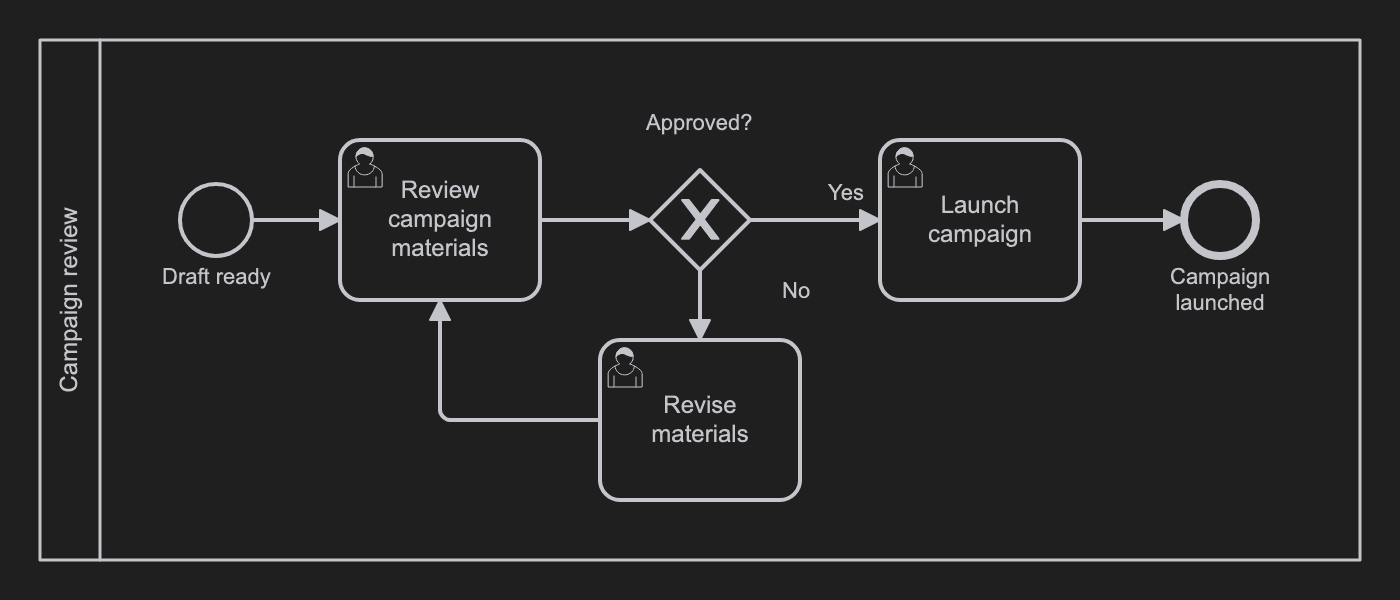
In Flower: supported. When the flow returns to a task that is already done, Flower reopens its work item, so the Jira workflow needs a transition back to an open status. A loop back into a call activity is not supported. Put the loop inside the called model instead.
Multiple Instances
One step runs once for each item of a list: one review per chapter, one approval per department. BPMN marks such a task with three lines, vertical for parallel and horizontal for sequential.
In Flower: the marker is ignored. If the number of items is fixed, draw the steps as parallel paths.
Deferred Choice
The process waits, and whatever happens first decides: the customer answers, or seven days pass. BPMN uses an event-based gateway followed by catch events.
In Flower: not supported, because intermediate catch events are not executed. For a deadline on a task, use a timer boundary event, see the next pattern.
Deadline and Escalation
A step has a time limit. When it passes, something else happens: a reminder, an escalation to the manager, or another path. BPMN attaches a timer boundary event to the task. Interrupting, it cancels the task and continues on the timeout path. Non-interrupting, the task stays open and the timeout path runs next to it.
In Flower: supported. The timer sets the due date of the Jira work item. When the date passes, the timeout path starts. A reminder that repeats needs a non-interrupting timer. See Set Due Dates with Timer Events. When a person or a Jira Automation rule should escalate instead of the clock, use an escalation boundary event (from Flower 3.7.0).
Cancellation
A step or the whole process is stopped: the order is withdrawn, so nobody needs to pack it any more. In BPMN, an interrupting boundary event cancels one activity, and a terminate end event ends the whole process at once.
In Flower: an interrupting timer cancels its task. From Flower 3.7.0, a person can cancel a task as well: resolving the work item in an error status takes the path of an error boundary event. A terminate end event ends the process instance and closes all work items that are still open. See Terminate End.
Sub-Process and Reuse
A step is a whole process, and several processes use it: the same approval in purchasing, travel, and hiring. In BPMN, a call activity calls the other model.
In Flower: supported. The call activity runs the called model as a sub-process and waits for it. See BPMN Sub-Processes.
Read More
- BPMN Gateways
- BPMN Events
- BPMN Coverage in Jira
- 11 Common BPMN Modeling Mistakes
- BPMN templates: real processes that use these patterns
Frequently Asked Questions
What is a workflow pattern?
A named, reusable solution for a situation that occurs in many processes, such as doing things in parallel or repeating a step.
How do I model parallel work in BPMN?
With a parallel gateway that splits the flow and a second parallel gateway that joins it.
How do I model a loop in BPMN?
With a gateway that decides whether to continue or to go back, and a sequence flow from the gateway to an earlier step.
How do I model a deadline in BPMN?
With a timer boundary event on the task. Its outgoing flow is the path for the case that the time runs out.