BPMN Signal Events
In short: A signal event is a circle with a triangle. A white triangle waits for a signal, a black one sends one. A signal is news for everyone who listens: the price list has changed, the release is approved, the office is closed. In Flower every process instance that waits for a signal of that name gets it, at the same time. A person, a Jira Automation rule, another system, or another process sends it.
Quick start: model an intermediate signal catch event, select a signal named Price list changed, and publish. Start two process instances. When both wait there, write the comment @FlowerBPM signal Price list changed on any work item. Both processes go on.
Symbols
| Symbol | Element | Meaning |
|---|---|---|
 | Signal start event | The process starts when the signal comes |
 | Intermediate signal event (catch) | The process waits here until the signal comes |
 | Signal boundary event, interrupting | While the activity runs, the signal comes: the activity ends and the path of the event is taken |
 | Signal boundary event, non-interrupting | The activity stays open and the path of the event starts in addition. Dashed border |
 | Signal event sub-process, interrupting | While the process runs, the signal comes: the process stops and the event sub-process takes over |
 | Signal event sub-process, non-interrupting | The event sub-process runs beside the process. Dashed border |
 | Intermediate signal event (throw) | The process sends a signal and goes on |
 | Signal end event | The path ends and sends a signal |
Signal or Message
A signal and a message both come from outside and both move a waiting process on. The difference is who gets them.
| Signal | Message | |
|---|---|---|
| Who gets it | Every process instance that waits for it | One process instance |
| How it is addressed | Only by its name | By its name and the key of the process instance (or one of its work items) |
| Typical use | News for many: Price list changed, Release approved, Year-end closing started | An answer for one case: Payment received, Supplier confirmed |
| Nobody waits | Nothing happens | The message is dropped with a warning comment |
Rule of thumb: if the sender knows the case, send a message. If the sender only knows that something happened, send a signal.
What Waits for a Signal
These elements wait for a signal in Flower:
| Element | What happens when the signal comes |
|---|---|
| Intermediate signal catch event | The process goes on after it |
| Signal boundary event, interrupting | Flower closes the work item of the activity and takes the path of the event |
| Signal boundary event, non-interrupting | The work item stays open, the path of the event starts in addition |
| Signal start event | The process instance is created and waits at the start. The first task starts when the signal comes |
| Signal event sub-process, interrupting or non-interrupting | It starts, like the other event sub-processes |
| Signal catch event behind an event-based gateway | It takes the path when its signal comes first. A timer, a conditional event, or a message behind the same gateway can win as well; the events that do not win are discarded, see Event-Based Gateways |
Each of them waits for a signal of one name: the name of the BPMN signal that the element references. Select or create the signal in the properties panel of the element and give it a name, for example Price list changed. Upper and lower case do not matter: price list changed reaches it too.
While an element waits, the process instance gets the comment Waiting for the signal Price list changed at …. It is a note, not a warning.
Flower also marks the process instance: the property flower.waitsForSignal holds the names it waits for. In JQL it is flowerSignal, with the name normalized: upper case, without accents and apostrophes, -, _ and several spaces as one space (Won’t Do is WONT DO):
flowerSignal = "PRICE LIST CHANGED"This search lists the process instances that a signal of this name would reach now.
Send a Signal
There are four ways to send a signal. None of them needs the key of a process instance: the name is enough.
| Way | Who uses it | Hosts |
|---|---|---|
A comment with a line @FlowerBPM signal <name> | A person, a Jira Automation rule that acts as a person, any system with the Jira REST API | Cloud and Data Center |
| The Jira Automation action Flower: Send signal | A Jira Automation rule | Cloud |
POST /rest/flower/latest/service/processSignal | Another system, a Send web request of Jira Automation, a script | Data Center |
| A signal throw event or signal end event of a process | Another process | Cloud and Data Center |
With a Comment
Write a comment on any work item. It does not have to belong to a process: a work item in a team space, a release ticket, or a process instance all work. A line that starts with @FlowerBPM signal sends a signal. The rest of that line is the name of the signal:
@FlowerBPM signal Price list changed
list: 2027
valid from: 2027-01-01
The new prices apply to all open offers.
This comment sends the signal Price list changed with the data:
{ "list": "2027", "valid from": "2027-01-01", "text": "The new prices apply to all open offers." }The rules:
- The word after
@FlowerBPMis the command.signalsends a signal.message, or no word at all, sends a message to the process of the work item. So@FlowerBPM Payment receivedstays a message. - The lines directly after it in the form
key: valuebecome the data. - All other text of the comment becomes
textin the data. - The values are text. A condition such as
> 1000still compares them as numbers. @FlowerBPMmust start a line. Upper and lower case do not matter,@Flower BPMworks too, also when the editor turns it into a mention.
Flower answers on the commented work item:
- Signal Price list changed sent. To FLOW-1, FLOW-2. with the process instances it reached, or
- Signal Price list changed sent. No process instance waits for it.
A person writes this comment by hand. Any system writes it with the Jira REST API. A comment that a Jira Automation rule writes (action Add comment) counts when the rule acts as a person who can edit (its actor). On Cloud the default actor Automation for Jira is an app account, and Flower ignores comments of apps: there the rule uses the action Flower: Send signal below, or acts as a person.
With Jira Automation
How rules and processes work together in both directions, on Forge and Data Center: Flower BPM and Jira Automation.
On Cloud, Flower adds the action Flower: Send signal to Jira Automation. Its inputs:
| Input | Value |
|---|---|
| Name of the signal | The name of the signal, for example Price list changed |
| Data | Optional: text or JSON that the processes can read |
The action needs no work item. A scheduled rule can send a signal every Monday, for example:
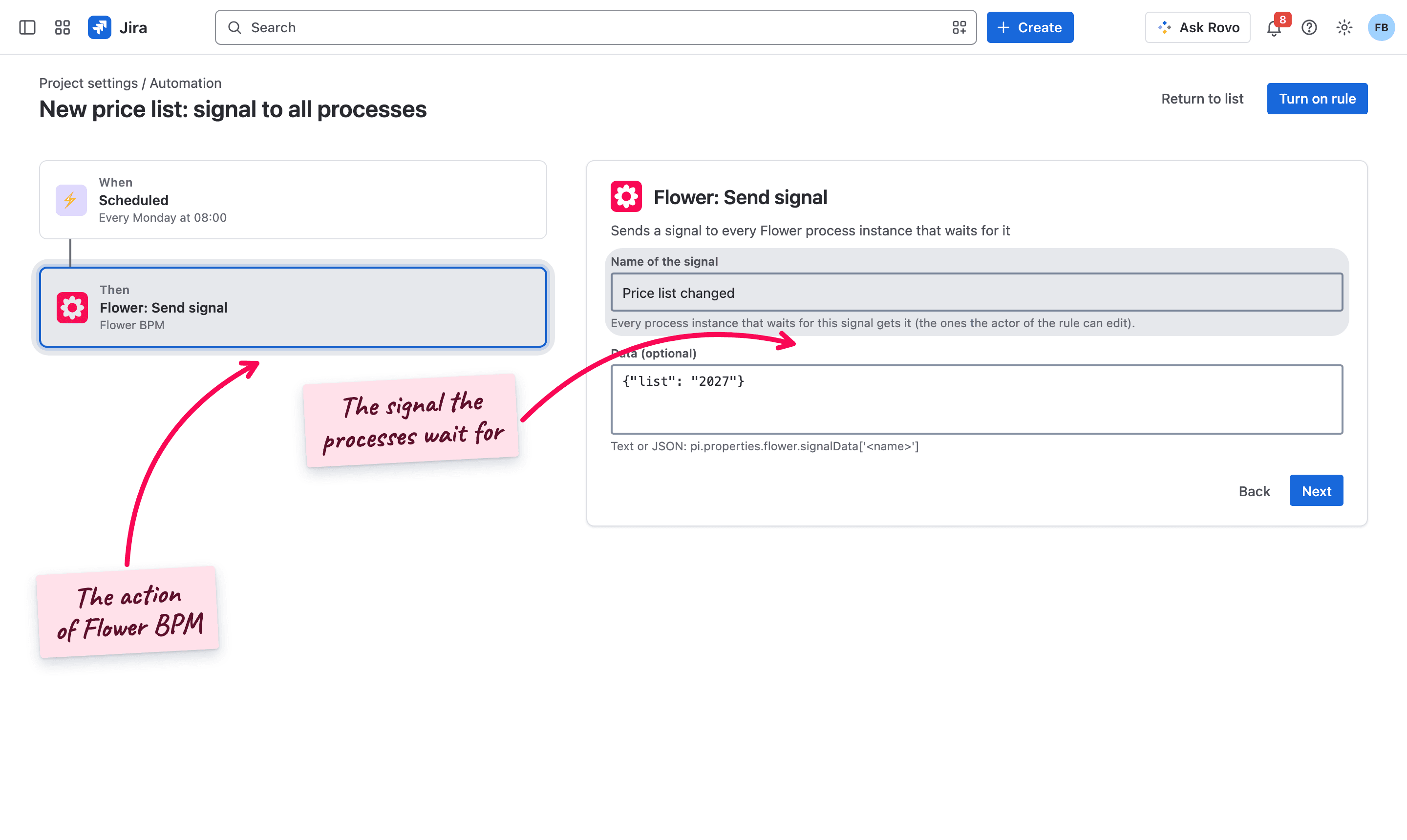
The first time someone adds an action of Flower to a rule, the rule author connects the app once for the site.
With the REST API (Data Center)
On Data Center, another system sends a signal with a POST request:
POST /rest/flower/latest/service/processSignal
Content-Type: application/json

{
  "name": "Price list changed",
  "data": { "list": "2027" }
}nameis the name of the signal.datais optional and can be any JSON.
The answers:
| Status | Meaning |
|---|---|
202 {"queued": true} | The signal is accepted and will be delivered |
400 | name is missing |
403 | The caller is not logged in |
A comment with @FlowerBPM signal works on Data Center too.
From Another Process
A signal intermediate throw event or a signal end event sends the signal of its name to every process instance that waits for it. The throw event also triggers its Jira Automation rule, or calls its webhook URL (Connect, Data Center), as every throw event does; the end event does that only when it has a webhook URL or the request type Jira Automation. See Trigger Jira Automation. Inside its own process instance, BPMN delivers the signal directly, without a detour.
This is how one process tells many others: a release process ends with the signal end event Release approved, and every deployment process that waits for it goes on.
Who Is Reached
| Sender | Reaches |
|---|---|
| A person: a comment, the action of a rule (its actor), the REST API | The waiting process instances that this person can edit |
| A signal throw or end event of a process | All waiting process instances |
- The writer of a comment must also be able to edit the work item they comment on. Otherwise Flower writes a warning comment and sends nothing.
- One signal reaches at most 1000 process instances, the oldest first.
- A process instance that does not wait for the signal any more when its turn comes is skipped silently.
One Inbox for Messages and Signals
For admins and integrators: every way in ends in the same entry point of Flower, the inbox. A comment, the Jira Automation actions, the Data Center REST API, and a signal throw or end event all hand their message or signal to it.
The inbox finds the receiving process instances: those that wait for the signal and that the sender can edit (a signal throw or end event of a process reaches all of them; a sender whose account is not known, for example a rule without an actor, reaches none). Each way in checks its sender before (a comment is handled once). Then the inbox gives every receiving process instance its own delivery. The deliveries of one process instance run one after the other, so two signals never change the same process instance at the same moment. The same entry point is prepared for further commands.
Use the Data in Conditions
Flower keeps the data of the last delivered signal of each name at the process instance, in flower.signalData, up to 2000 characters (longer data is cut, with a warning comment). JSON text from the Jira Automation action becomes an object. A gateway after the catch event decides with it:
| Gateway flow | Condition |
|---|---|
| New price list | ${pi.properties.flower.signalData['Price list changed'].list == '2027'} |
| Release 5 | ${pi.properties.flower.signalData['Release approved'].version == '5.0'} |
The key is the name of the signal as the sender wrote it. The data is there already in the run that delivers the signal, so a gateway directly after the catch event sees it. See Expressions.
What Flower Writes
| When | Comment |
|---|---|
| An element starts to wait | Waiting for the signal … at … on the process instance (a note) |
| The signal is delivered | Signal … received on the process instance, with the elements that got it |
| A comment sent the signal | Signal … sent on the commented work item, with the process instances it reached, or No process instance waits for it |
| The writer of the comment cannot edit the work item | A warning comment on the commented work item |
Every delivered signal is listed in the property flower of the process instance:
| Property | Contains |
|---|---|
flower.messages | The handled messages and signals in the order they arrived (the last 50). A signal has kind: 'signal', plus name, withData (the data itself is in flower.signalData), at, by, via (comment, automation, rest or throw), delivered, and nodes (the elements that got it) |
flower.signalData['<name>'] | The data of the last delivered signal of that name |
flower.waitsForSignal | The names of the signals the process instance waits for now (JQL flowerSignal) |
Read it with the Jira REST API, GET /rest/api/3/issue/{key}/properties/flower, or in expressions as pi.properties.flower.
Edge Cases
- Nobody waits: the signal reaches no process instance. There is no warning, and the signal is not kept for later. A process instance that reaches its catch event afterwards waits for the next signal.
- A signal does not create process instances. The process instance with a signal start event is created as usual, and then it waits at its start for the signal.
- A comment is handled once. Changing it later sends nothing. Write a new comment instead.
- Comments of the app itself are ignored.
- Restricted comments (Cloud): a comment that is visible only to a group or a role is not seen by the app.
- A name that starts with “signal” or “message”: write the command word in front of it.
@FlowerBPM message Signal receivedsends the message Signal received. - A signal without a name: the validator warns: … has a signal without a name: select or create a signal with a name. Signals are matched by their name.
Common Mistakes
@FlowerBPM Price list changedwithoutsignal. That is a message to the process of the commented work item, not a signal.- A signal where a message is meant. A signal reaches every waiting process instance. To answer one case, send a message.
- The signal is sent before the processes wait. It reaches nobody. Let the processes wait first, or use a conditional event on a field that stays set.
- The sender cannot edit the process instances. A signal from a person reaches only what this person can edit. Let a Jira Automation rule with a suitable actor send it, or a signal throw event of a process.
Read More
- BPMN Message Events: a message to one process instance
- BPMN Events: all event types and positions
- BPMN Sub-Processes: event sub-processes
- Trigger Jira Automation: what a throw event does besides
- JQL: search for waiting process instances
Frequently Asked Questions
What is a signal event in BPMN?
An event that sends or receives a signal. A signal has no receiver: everyone who listens gets it. It is drawn as a circle with a triangle: white when it waits, black when it sends.
What is the difference between a signal and a message in BPMN?
A message goes from one sender to one receiver. A signal is broadcast: every process instance that waits for it gets it. In Flower a message needs the key of the process instance, a signal only its name.
How do I continue many Jira processes at once?
Let them wait at a signal catch event with the same signal name. Then write a comment @FlowerBPM signal <name> on any work item, use the Jira Automation action Flower: Send signal, or end another process with a signal end event.
Can I pass data with the signal?
Yes. In a comment, the lines key: value after the @FlowerBPM signal line become the data. A gateway reads it as pi.properties.flower.signalData['<name>'].
Which process instances does a signal reach?
Every open process instance that waits for a signal of that name, at most 1000. A signal from a person reaches only the process instances this person can edit.