BPMN Markers
In short: A marker is a small symbol at the bottom center of a task or sub-process. It changes how often or how the activity runs: again and again (loop), once per item of a list (multi-instance), or to undo something (compensation). The type symbol in the top left corner of a task, such as the person of a user task, is not a marker. It says who or what does the work.
Symbols
| Symbol | Marker | Meaning |
|---|---|---|
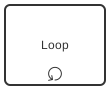 | Loop | The activity repeats as long as a condition is true |
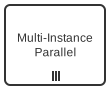 | Multi-instance, parallel (three vertical lines) | The activity runs once per item of a list, all at the same time |
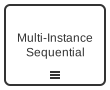 | Multi-instance, sequential (three horizontal lines) | The activity runs once per item of a list, one after another |
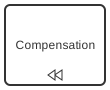 | Compensation | The activity undoes the effect of another activity |
| Tilde (~) | Ad-hoc | The steps inside the sub-process have no fixed order |
| Plus sign in a square | Collapsed sub-process | The box contains a process that is not shown |
An activity can carry several markers, for example a collapsed sub-process that is also multi-instance.
Loop
A loop marker says: do this again until it is right. Revise the document repeats until the reviewer accepts it. The condition is checked after or before each round.
The marker is compact, but it hides the decision. The reader does not see who decides and what happens in between. A gateway with a flow back to an earlier step shows this openly and is often the better choice.
Multi-Instance
A multi-instance activity runs once for each item of a collection: one approval per department, one check per order line. The number of rounds is known when the activity starts.
- Parallel: all instances run at the same time. The activity is complete when all of them are.
- Sequential: the instances run one after another.
This is the difference to a loop: a loop repeats until a condition is met, a multi-instance activity runs a known number of times.
Compensation
Some steps cannot simply be canceled, because they have already changed something: a booked flight, a sent invoice. A compensation activity undoes such an effect, for example Cancel flight. It is linked to a compensation boundary event and runs only when compensation is triggered. Compensation appears mostly in technical processes and in transactions.
In Flower and Jira
Flower does not execute the loop, multi-instance, and compensation markers. You can set them in the modeler and they stay in the diagram. During execution a marked task behaves like a task without the marker: it creates one work item.
How to get the result anyway:
| You want | Model it like this in Flower |
|---|---|
| Repeat a step until it is right | A gateway after the step and a sequence flow back. When the process returns to a task that is done, Flower reopens its work item. See BPMN Flows |
| Several people do the same step at once | A parallel gateway with one task per person or team. The joining parallel gateway waits for all |
| The same steps for a known set of cases | A call activity per case, or one process instance per case |
| Undo a step | A task on the path that handles the failure, for example after a gateway Successful? |
| Steps without a fixed order | The agile mode of Flower, see Agile Business Process Management |
The collapsed sub-process marker is only a display option of an embedded sub-process. See BPMN Sub-Processes.
Common Mistakes
- A loop marker where a decision matters. Show the gateway and the way back.
- Loop instead of multi-instance. For each item is multi-instance, until a condition is a loop.
- A plural task name instead of a marker or a loop (Review documents). The reader cannot tell how often the step runs. See tip 11 in 11 Common BPMN Modeling Mistakes.
Read More
- BPMN Tasks
- BPMN Workflow Patterns: loop and multiple instances as patterns
- BPMN Coverage in Jira
- All BPMN symbols at a glance
Frequently Asked Questions
What is a marker in BPMN?
A small symbol at the bottom of an activity that changes its behavior, for example loop or multi-instance.
What is the difference between loop and multi-instance?
A loop repeats an activity until a condition is met. A multi-instance activity runs once for each item of a list, in parallel or one after another.
What do three vertical lines on a BPMN task mean?
Parallel multi-instance: the task runs once per item of a list, and all instances run at the same time. Three horizontal lines mean sequential multi-instance.
How do I repeat a task in Jira with BPMN?
With Flower, model a gateway and a sequence flow back to the task. When the process returns, Flower reopens the Jira work item of the task.