Export and Import Your BPMN File
A BPMN file stores a process model in the standard XML format of BPMN 2.0, usually with the extension .bpmn. Because the format is a standard, a model can move between tools. With the Export and Import buttons of Flower you move process models from one Jira to another, for example from test to production, and exchange them with other BPMN tools.
What Is a BPMN File?
A BPMN file is a text file in XML. It has two parts:
- The process: the elements of the model, such as events, activities, gateways, and the sequence flows between them. A process engine reads this part to run the process.
- The diagram: the position and size of every element. A modeling tool reads this part to draw the picture.
<bpmn:definitions xmlns:bpmn="http://www.omg.org/spec/BPMN/20100524/MODEL" ...>
  <bpmn:process id="Process_1" isExecutable="true">
    <bpmn:startEvent id="Start" name="Invoice received" />
    <bpmn:userTask id="Check" name="Check the invoice" />
    <bpmn:sequenceFlow id="Flow_1" sourceRef="Start" targetRef="Check" />
  </bpmn:process>
  <bpmndi:BPMNDiagram>
    <!-- where each element is drawn -->
  </bpmndi:BPMNDiagram>
</bpmn:definitions>
Most tools use the extension .bpmn. Some save the same format as .xml or .bpmn20.xml. The content decides, not the name.
To look at a complete file, download the invoice approval process or the employee onboarding process, or one of the process templates.
How to Open a BPMN File
- In Jira with Flower: create a new model in the Flower repository and choose the file under Import model. Flower accepts
.bpmnand.xmlfiles and the.ziparchive of a Flower export. It shows the diagram, and you can edit, validate, and run it. See Import Your BPMN File. - In a BPMN modeling tool: every tool that supports BPMN 2.0 can open the file. See Tools That Can Open BPMN Files.
- In a text editor: a BPMN file is plain XML, so every editor shows its content. You see the elements, not the picture.
A double-click often does not work, because no program is registered for .bpmn. Open the file from inside the tool instead.
If a tool shows an empty canvas or reports that there is no diagram to display, the file contains the process but no diagram part. This happens with files that were written by hand or generated by code.
Export Your BPMN File
BPMN diagrams are typically saved as XML files with the extension .bpmn. Various BPMN modeling tools can open and edit these files. If your favorite process designer supports the BPMN format, it can most likely import Flower models.
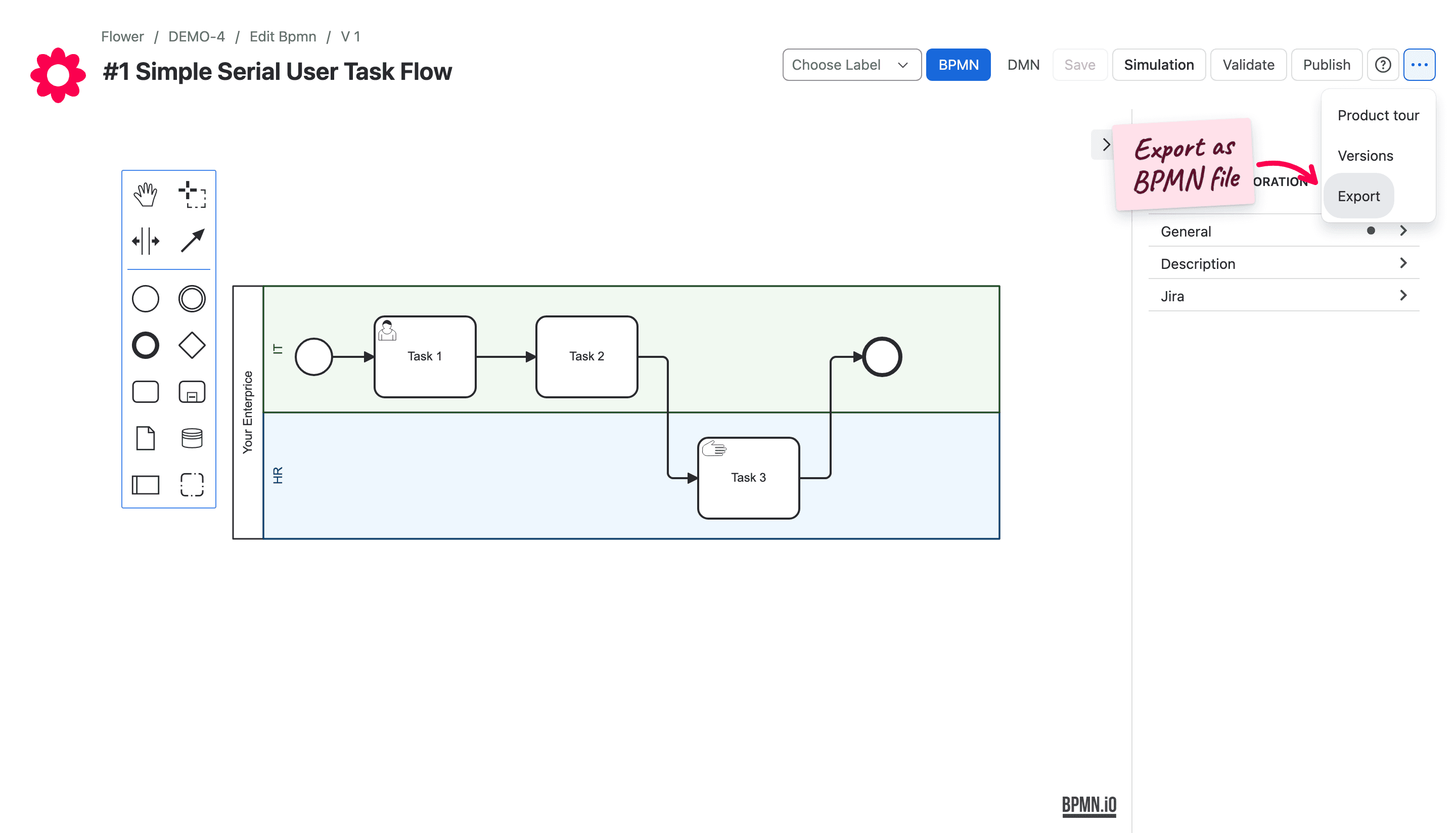
Flower creates a ZIP archive that contains the BPMN, the DMN, a JSON, and an SVG file.
Flower stores its own settings, such as the space and work type of an activity, as extension attributes in the BPMN file. Other tools usually ignore these attributes and keep them when they save the file.
Tools That Can Open BPMN Files
Tools that work with BPMN files include, among others:
- Camunda Modeler: open-source, cross-platform tool to create, edit, and analyze BPMN diagrams.
- bpmn.io: the open-source toolkit behind many BPMN editors and viewers. The Flower modeler is based on it.
- Signavio: a cloud-based BPMN modeling tool with collaboration, simulation, and process automation.
- Lucidchart: a web-based diagramming tool that supports BPMN and other diagram types.
- Microsoft Visio: diagramming software with support for BPMN diagrams.
- BPMN Modeler for Confluence: a Confluence app to model BPMN diagrams without automation support.
Whether a tool reads a file correctly depends on the BPMN elements in it and on the tool.
Import Your BPMN File
Flower imports BPMN files that you exported from Flower and files from other process designers that produce the standard BPMN format.
After the import, check the model:
- Space and work type: If you import a Flower model from a different Jira instance, the values for the space and the work type may not match. Adjust them for the model, its swimlanes, and its activities.
- Supported elements: Flower runs a subset of the BPMN elements. Elements from other tools that Flower does not support are imported but ignored during execution. See BPMN Coverage in Jira.
- Validation: Run the validation check and the token simulation, then publish the model. See Get Started with Modelling.
Convert BPMN to XML and Back
A BPMN file already is XML, so nothing has to be converted:
- BPMN to XML: open the
.bpmnfile in a text editor, or change the extension to.xml. The content stays the same. - XML to BPMN: if the XML file is a BPMN 2.0 file, change the extension to
.bpmnor import it as it is. Flower accepts both extensions. Other XML files, for example exports in the format of a single vendor, are not BPMN and need the export function of the tool that created them.
Frequently Asked Questions
What is a .bpmn file?
An XML file that describes a process model in the BPMN 2.0 standard: the elements of the process and the layout of the diagram.
How do I open a BPMN file?
Import it into a BPMN tool, for example into Flower in Jira, or open it in a text editor to read the XML.
Is a BPMN file the same as an XML file?
Every BPMN file is an XML file, but not every XML file is a BPMN file. A BPMN file follows the schema of the BPMN 2.0 standard.
What is the difference between BPMN and BPM?
BPM, business process management, is the discipline of designing, running, and improving processes. BPMN, Business Process Model and Notation, is the standard notation to draw them. See The Ultimate Guide to BPMN in Jira.
Can I use a BPMN file from another tool in Jira?
Yes. Flower imports standard BPMN 2.0 files. Elements that Flower does not execute are imported but ignored when the process runs.
Learn More
- Get Started with Modelling: Create, validate, and publish a model.
- BPMN Coverage in Jira: Which elements Flower executes.