BPMN Sub-Processes
In short: A sub-process is an activity that contains other steps. It lets you show a process at two levels: one box in the overview, and the details inside. BPMN knows the embedded sub-process (the steps are part of the same model) and the call activity (the steps are another model that can be reused).
Guide: Run Sub-Processes shows how to set up a call activity in Flower, step by step.
Symbols
| Symbol | Element | Meaning |
|---|---|---|
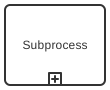 | Embedded sub-process | Steps of the same model, drawn inside one box. Collapsed, the box shows a plus sign |
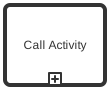 | Call activity | Calls another process model. It has a thick border |
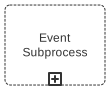 | Event sub-process | Starts when an event happens while its parent runs. It has a dotted border |
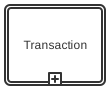 | Transaction | Steps that succeed together or are undone together. It has a double border |
| Box with a tilde (~) | Ad-hoc sub-process | Steps that can be done in any order, several times, or not at all |
Task or Sub-Process?
Use a task for work that you do not want to break down further. Use a sub-process when the work has steps of its own that somebody needs to see.
The choice depends on the reader, not only on the size of the work. As a customer you do not care how your payment is processed. As the shop you do.
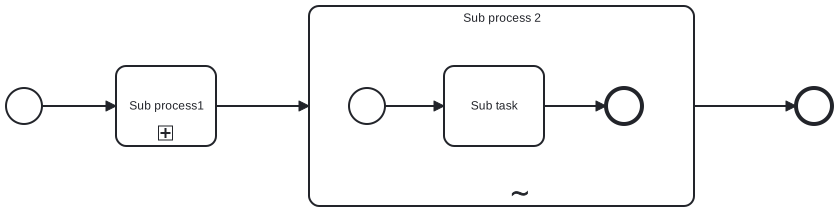
Embedded Sub-Process
An embedded sub-process belongs to its parent model. It has its own start and end event, and the parent waits until it has ended. It cannot be used by another model.
It can be drawn expanded (you see the steps) or collapsed (you see one box with a plus sign). Collapsing keeps a large diagram readable.
Call Activity
A call activity starts another process model and waits until it has finished. The called model is a normal model that can also run on its own. Use it to:
- Reuse a process in several models, for example an approval.
- Split a large model into parts that can be read alone.
- Share ownership: each team maintains its own model.
Event Sub-Process
An event sub-process sits inside a process or sub-process but is not connected to its flow. It starts when its start event happens, for example a message or a timer. Interrupting, it cancels its parent. Non-interrupting, it runs next to it. Typical use: a customer can cancel an order at any time.
Transaction
A transaction groups steps that belong together like a booking: either all succeed, or the ones already done are undone with compensation. It is used mostly in technical processes.
Ad-Hoc Sub-Process
In an ad-hoc sub-process the people who do the work decide what to do and in which order. Activities can be done several times or skipped. BPMN allows tasks, gateways, and intermediate events inside it, but no start and end events.
This looks like the opposite of process modeling. It is the honest picture of work that depends on experience and creativity, and often a first step on the way to a more defined process.
In Flower and Jira
| Element | Status in Flower | What happens |
|---|---|---|
| Call activity | Executed | Flower creates a work item for the call activity and turns it into a process instance of the called model. The main process continues when this sub-process instance is resolved |
| Embedded sub-process | Graphical only | It groups steps in the diagram. Flower starts nothing for the box itself |
| Event sub-process, transaction | Modeled, ignored | Kept in the model, not executed |
| Ad-hoc sub-process | Modeled, ignored | For work without a fixed order, Flower has the agile mode, see Agile Business Process Management |
The work item of a call activity and the sub-process instance are the same Jira work item. You see one work item at this step, and its status tells you whether the sub-process still runs. The called model must be published and mapped to a work type. Setup and limits are described in Sub-Processes.
Two limits to know, both in Known Issues: a loop back into a call activity is not supported, and a timer on a call activity sets the due date but does not start a timeout path.
Common Mistakes
- A sub-process for one step. A box around a single task adds nothing.
- Copying the same steps into several models. Move them into one model and call it.
- A group instead of a sub-process. A group is only a frame. See BPMN Data and Artifacts.
- A model that calls itself. The Flower modeler reports this as an error when you validate.
Read More
- Sub-Processes: set up a call activity step by step
- BPMN Tasks
- BPMN Coverage in Jira
- All BPMN symbols at a glance
Frequently Asked Questions
What is a sub-process in BPMN?
An activity that contains its own steps. In the overview it is one box, inside it is a process of its own.
What is the difference between a sub-process and a call activity?
An embedded sub-process is part of one model and cannot be reused. A call activity calls a separate model that other models can call as well.
What is an ad-hoc sub-process?
A sub-process whose activities have no fixed order. It is marked with a tilde (~).
Can I run a sub-process in Jira?
Yes. With Flower, a call activity starts another process model as a sub-process and waits until it is finished.