BPMN Data and Artifacts
In short: Data elements and artifacts add information to a BPMN diagram without changing the flow. Data objects and data stores show which information a step needs or produces. Text annotations and groups are notes for the reader.
Symbols
| Symbol | Element | Meaning |
|---|---|---|
 | Data object | Information that lives as long as the process instance: a form, an order, an invoice |
 | Data store | A place where information stays after the process has ended: a database, a CRM, a filing cabinet |
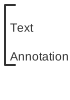 | Text annotation | A comment that is attached to an element |
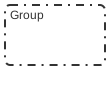 | Group | A dashed frame around elements that belong together |
Data Objects and Data Stores
Processes consume and produce data. A task Place order produces an order, a task Send invoice needs it. A data object makes this visible. It is connected to a task with a dotted data association: an arrow into the task is an input, an arrow out of the task is an output.

A data store is used when the information outlives the process, for example a customer database that many processes read and write.
Use data elements sparingly. A diagram in which every task has three documents is hard to read. Show the data that matters for understanding the process.
Text Annotations
A text annotation adds an explanation to an element: a rule, a hint, a reference to a document. It is connected with a dotted association and has no effect on the flow.

Groups
A group is a frame with a dashed border. It marks elements that belong together, for example all steps of one phase. A group is only a visual hint. It is not a sub-process, and the token ignores it.

In Flower and Jira
- Text annotations are documentation. They explain the model to the people who read it and do not reach Jira. To give the assignee instructions, use the documentation of the task: Flower writes it into the description of the work item. See User Tasks.
- Data objects and data stores are documentation. You can model them, and they are kept in the diagram. Flower does not read or write them. The data of a running process lives in the fields of its work items: gateway conditions read these fields, and forms collect them.
- Groups are documentation. They structure the diagram and do not affect the execution.
Common Mistakes
- A data object for every task. Show only what the reader needs.
- A group instead of a sub-process. A group does not bundle steps for the engine. Use a sub-process when the steps form a unit of work.
- Rules hidden in annotations. A rule that changes the course of the process belongs in a gateway, not in a note.
Read More
- User Tasks: summary and description of the work item
- Forms: collect the data of a process
- BPMN Flows
- All BPMN symbols at a glance
Frequently Asked Questions
What is a data object in BPMN?
A symbol for information that a process uses, such as a document or a form. It shows what a task needs or produces and has no effect on the flow.
What is the difference between a data object and a data store?
A data object exists only while the process instance runs. A data store keeps the information after the process has ended, like a database.
What is an artifact in BPMN?
Artifacts are elements that add information for the reader: text annotations and groups. They are not part of the flow.
Does a text annotation change the process?
No. It is only a note for the reader. In Flower, the instructions for the assignee come from the documentation of the task, which becomes the description of the Jira work item.