What Is BPMN?
In short: BPMN (Business Process Model and Notation) is the open standard for drawing business processes. A diagram shows the steps of a process, who does them, in which order, and what happens at decisions and deadlines. The Object Management Group (OMG) maintains the standard, and it is also the ISO standard ISO/IEC 19510. The current version is BPMN 2.0.
Why BPMN Exists
Every organization describes its processes somewhere: in documents, slides, wiki pages, or in the heads of the people who do the work. BPMN replaces these with one notation that everybody reads the same way:
- Business users see who does what and when.
- Analysts can find bottlenecks and gaps.
- Developers and admins get a model that is precise enough to automate.
Because BPMN is a standard, a diagram is not tied to one tool. A .bpmn file drawn in one modeler opens in another. See Export and Import Your BPMN File.
How to Read a BPMN Diagram
This is a budget request process. Read it from left to right, like a sentence.
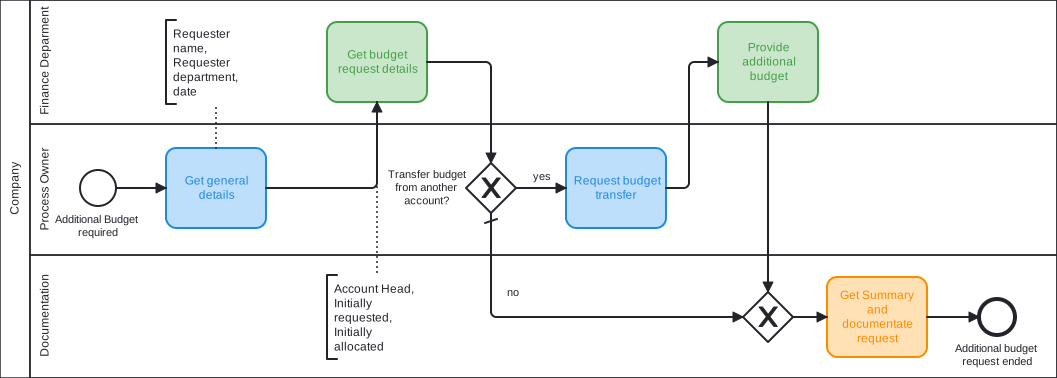
- Circles are events. The thin circle on the left is the start, the thick circle on the right is the end.
- Rounded rectangles are tasks. Each one is a piece of work.
- Diamonds are gateways. Here the flow splits or joins.
- Arrows are sequence flows. They give the order.
- The horizontal bands are lanes. A lane says who is responsible for the tasks in it.
That is most of BPMN. The overview of all symbols lists the rest.
The Token: How a Process Moves
BPMN explains the behavior of a process with a token. Imagine a marker that starts on the start event and travels along the arrows. A task holds the token until the work is done. A parallel gateway turns one token into several, one for each path. A joining parallel gateway waits until all of them have arrived. When the last token reaches an end event, the process is complete.
If you can follow the token, you can read any BPMN diagram, and you can predict what a process engine does with it.
BPMN vs. Flowchart
A flowchart has no fixed rules. Two people draw the same process in two different ways, and a box can mean anything. BPMN defines the meaning of every symbol, including what happens with parallel paths, deadlines, and messages. This is why a BPMN model can be executed and a flowchart cannot.
BPMN vs. Jira Workflow
A Jira workflow describes how one work item changes its status. A BPMN process describes how many steps, often of several teams, depend on each other.
| Jira workflow | BPMN process | |
|---|---|---|
| Describes | The statuses and transitions of one work item | The steps of a whole process and their order |
| Scope | One work item, usually one team | Many work items, often several spaces and teams |
| Parallel work | No | Yes, with parallel gateways |
| Decisions | Transitions that a person chooses | Gateways with conditions |
| Deadlines | Not part of the workflow | Timer events |
| Responsibility | The assignee of the work item | Lanes |
As a rule of thumb: use a Jira workflow for the life of one work item, and a BPMN model for the bigger picture across work items. The two fit together. With Flower, each task of the BPMN model is a work item, and this work item follows its own Jira workflow. A four-eyes review, for example, is easy to build as a Jira workflow inside one BPMN task. Read more in Jira Workflow vs. Business Process.
In Flower and Jira
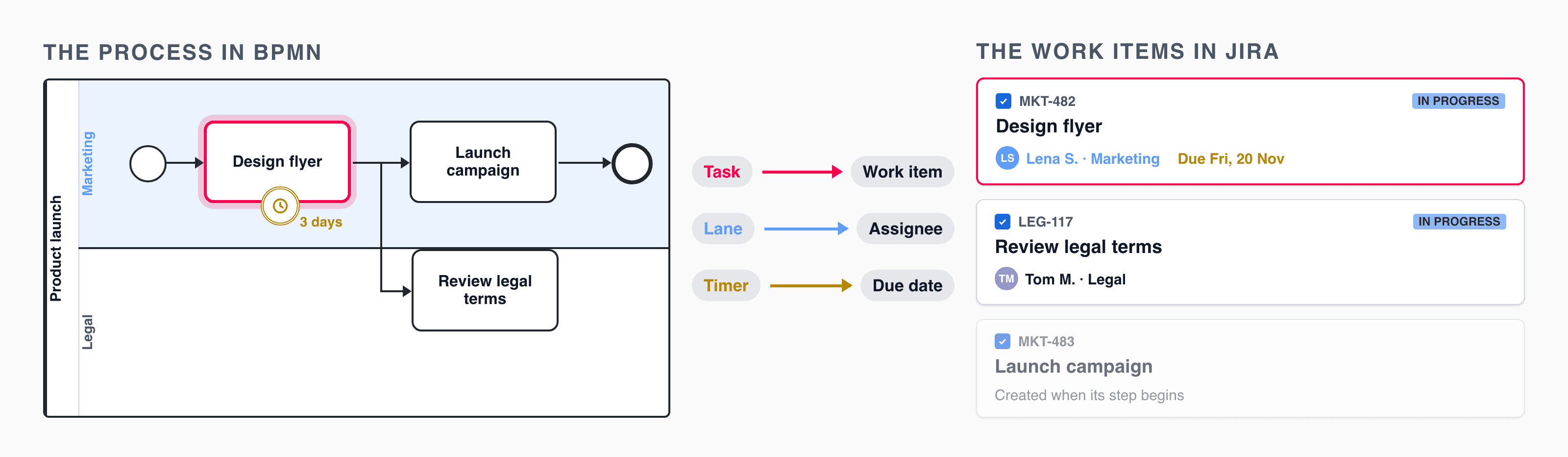
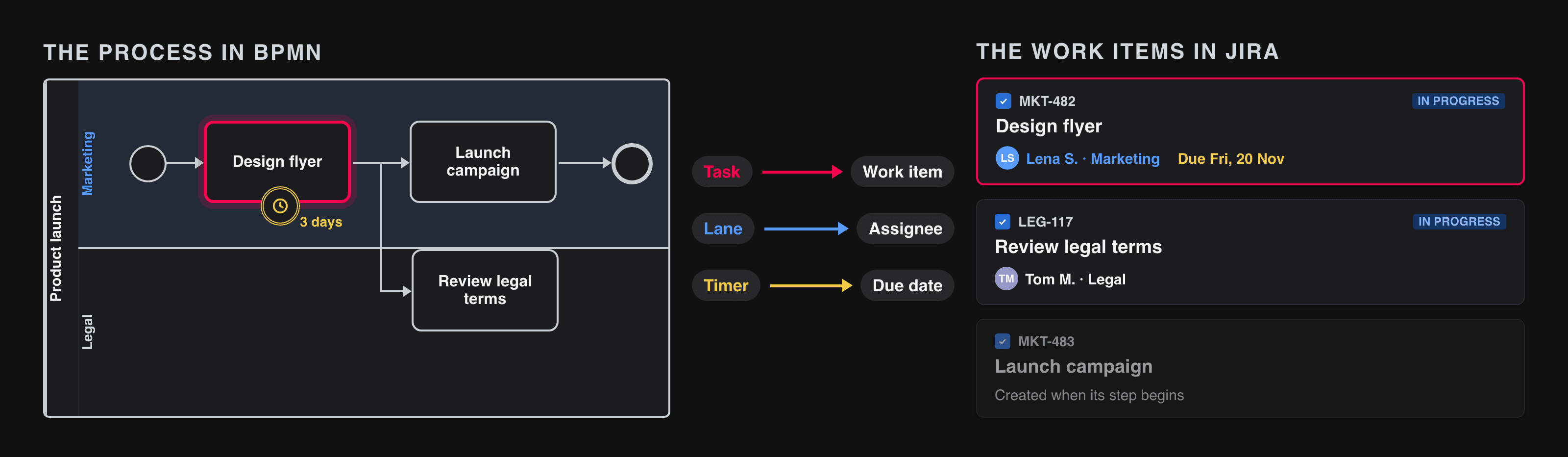
Flower is a BPMN modeler and a process engine inside Jira. You draw the model, and Flower runs it:
| BPMN element | In Jira with Flower |
|---|---|
| Process model | A versioned Jira work item |
| Process instance | A Jira work item that bundles all work items of one run |
| User task, manual task, plain task | A Jira work item |
| Lane | The assignee of its work items |
| Name and documentation of a task | The summary and the description of the work item |
| Exclusive gateway | A decision with conditions that read Jira fields |
| Parallel gateway | Several work items at the same time |
| Timer boundary event | A due date and a timeout path |
| Throw event | A Jira Automation rule or a webhook |
| Call activity | Another process model, run as a sub-process |
| Terminate end event | The process ends and all open work items are closed |
Not every element of the standard is executed. BPMN Coverage in Jira shows the status of each one.
What BPMN Is Good For, and What Not
Good for:
- Processes that repeat and have a known course: onboarding, approvals, change management, purchasing.
- Work that crosses teams, where handovers get lost.
- Rules that must be followed and shown later, for example in an audit.
Less suited for:
- Work without a predictable course. That is a project, and a Jira board fits better. Flower can still use a model as a guide for such work, see Agile Business Process Management.
- Very large diagrams. Split them into sub-processes, see BPMN Sub-Processes.
- Pure data processing without people.
Read More
- All BPMN symbols at a glance
- Pools and Lanes, BPMN Tasks, BPMN Gateways, BPMN Events
- 11 Common BPMN Modeling Mistakes
- Get Started with Modelling
Frequently Asked Questions
What does BPMN stand for?
Business Process Model and Notation. Until version 2.0 the name was Business Process Modeling Notation.
Who maintains BPMN?
The Object Management Group (OMG), a not-for-profit standards organization. BPMN 2.0 is also published as ISO/IEC 19510.
Is BPMN hard to learn?
No. Four shapes cover most diagrams: circles for events, rounded rectangles for tasks, diamonds for gateways, and arrows for the flow. The details of the standard matter when a model is to be executed.
Can I use BPMN in Jira?
Yes, with an app. Flower adds a BPMN modeler to Jira and runs the models: each task becomes a Jira work item.
Is BPMN the same as a workflow?
No. BPMN is a notation to describe processes. A workflow, for example a Jira workflow, is one way to run a part of a process. A BPMN model can contain many workflows.