Jira as a BPM System, Part 4: Running BPMN Processes in Jira
In short: A BPMN model can run inside Jira. You draw the process, publish it, and start it. From then on, every task of the model becomes a Jira work item at the moment the process reaches it. The lane passes on the assignee, gateways decide on Jira fields, timers set due dates, and people throw errors and escalations by choosing a Jira status. This part follows one purchase request through such a process, with Flower as the BPMN engine in Jira.
Last updated: November 2026
- 1Why Jira Is a BPMN Platform, Even Without a Gartner Quadrant
- 2Jira Workflow vs. Business Process
- 3Modeling Processes in BPMN
- 4Running BPMN Processes in Jira (this article)
- 5Operating and Governing Processes in Jira
Disclosure: the author works for the vendor of Flower, the BPMN app for Jira that this part uses as the engine.
Recap of parts 2 and 3: a Jira workflow is the status lifecycle of one work item, and a business process connects many work items across teams. Jira has the task list, the forms, the permissions, the rules, and the reports. Missing are a home for the process model and an engine that reads it. Part 3 drew the model in BPMN. Now it runs.
Key takeaways
- The model, every run of it, and every task are Jira work items. The process data stays in Jira.
- A task becomes a work item when the process reaches it, and the process goes on when that work item is resolved, that is when it gets a resolution.
- A lane has no fixed person: it passes the assignee of its work items on to the next work item of the same lane.
- Gateways read Jira fields with expressions. Timers work in days and set the Jira due date.
- Errors, escalations, and other outcomes are thrown with Jira statuses, by people or by a Jira Automation rule.
- Not everything BPMN can draw is executed. Service tasks, for example, are passed.
The Example: One Purchase Request
Lena, a team lead, needs a new test device for 2,400. Procurement checks the request. Above 1,000, the budget owner has to approve. Procurement orders, Lena receives the device, and finance processes the invoice. Here is the process with everything that can go wrong in it:
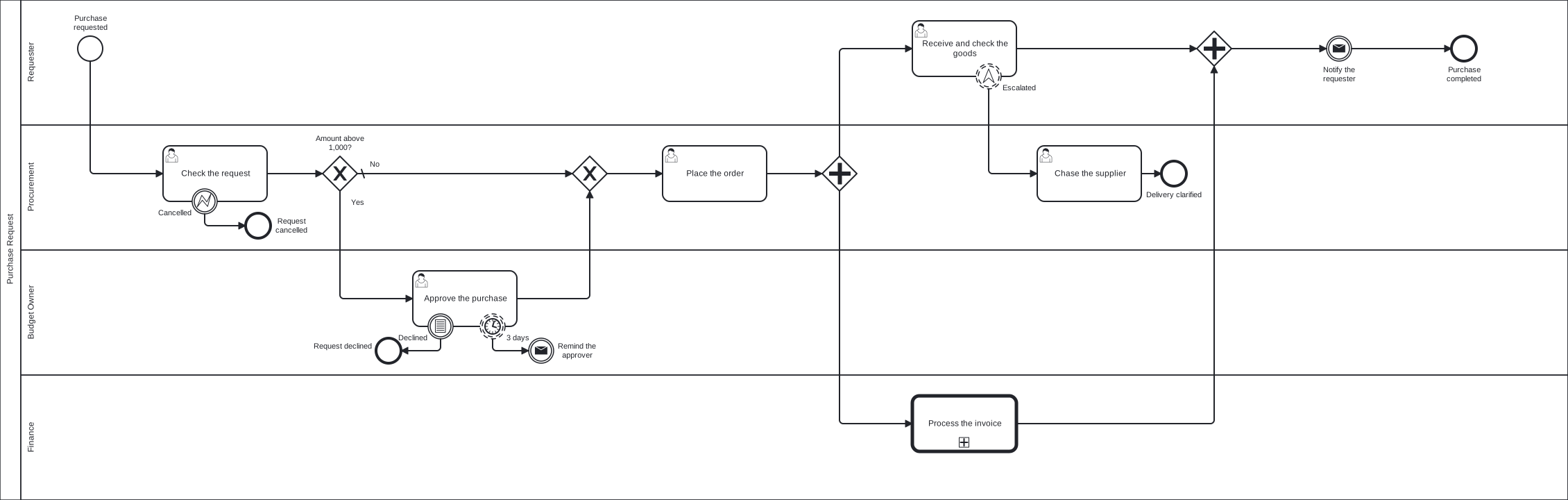
The purchase request with its deadline and its exceptions. Click the picture to enlarge it, or download the BPMN file and import it. The field id, the statuses, and the call activity have to be adjusted to your Jira before it runs.
And this is what Lena’s request does in Jira:
| # | What happens | What you see in Jira |
|---|---|---|
| 1 | Lena submits the request, amount 2,400 | The request is the process instance. Check the request appears in the procurement space |
| 2 | Procurement resolves the check | The gateway reads the amount: above 1,000. Approve the purchase appears with a due date in three days |
| 3 | The budget owner does not answer | On the due day, an automation rule reminds the approver. The work item stays open |
| 4 | The budget owner approves | Place the order appears, with the assignee of the check |
| 5 | The order is placed | Receive and check the goods and Process the invoice appear at the same time |
| 6 | The device is late, Lena moves her work item to Escalated | Chase the supplier appears for procurement. Lena’s work item stays open |
| 7 | Procurement has chased the supplier, the device has arrived, and the invoice is paid | A rule notifies Lena. With the last task done, the request is resolved |
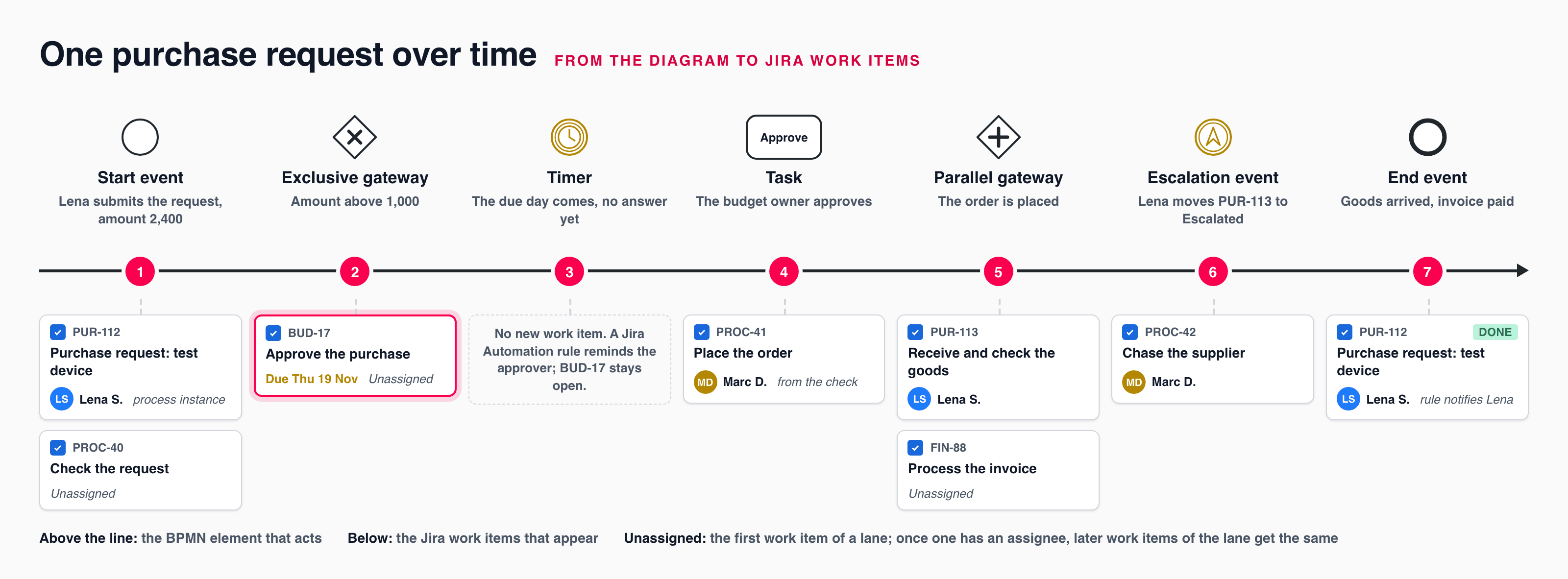
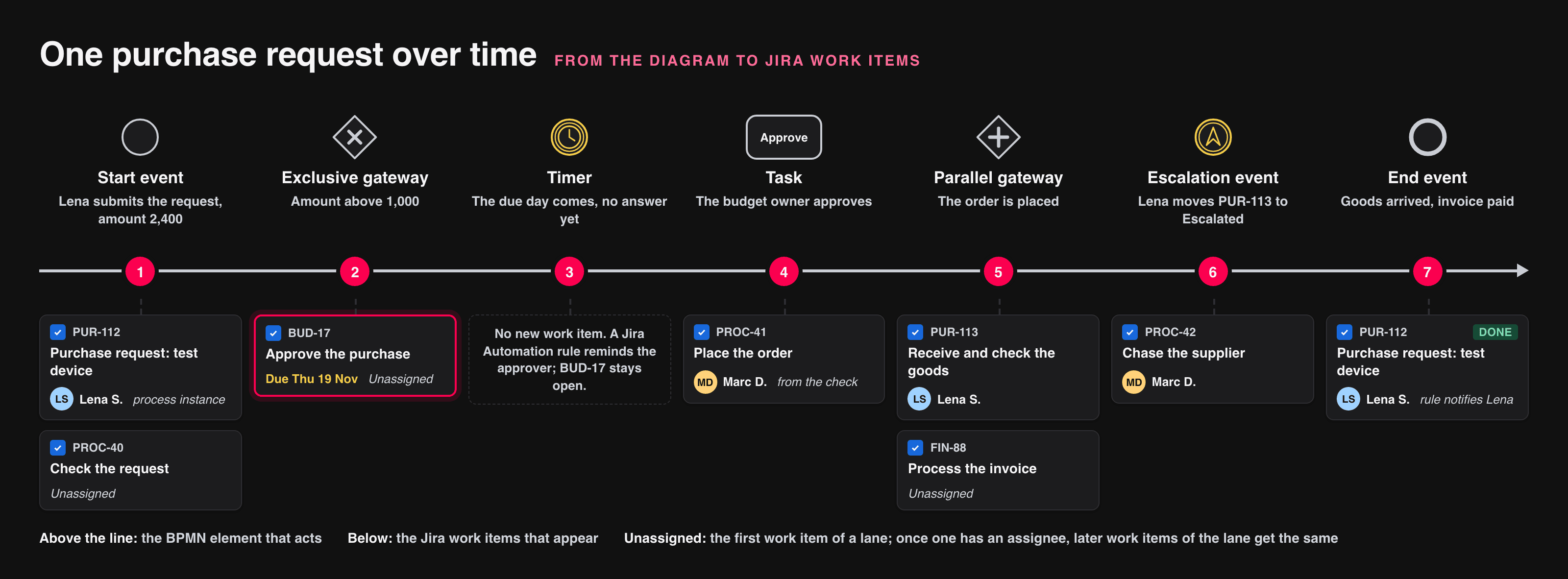
The seven steps of the table: what the diagram does, and which work items Jira shows. The first work item of a lane is unassigned; later ones get the assignee of the lane.
The rest of this article explains each mechanism.
How Does a BPMN Model Become Work in Jira?
A process engine is software that reads a process model and starts the next step when the previous one is finished.
Flower BPM brings such an engine into Jira, and it keeps all process data in Jira’s own objects:
- The model is a Jira work item that keeps all versions of the diagram.
- A process instance, one run of the model, is a Jira work item.
- Every task of a run is a Jira work item, linked to its process instance.
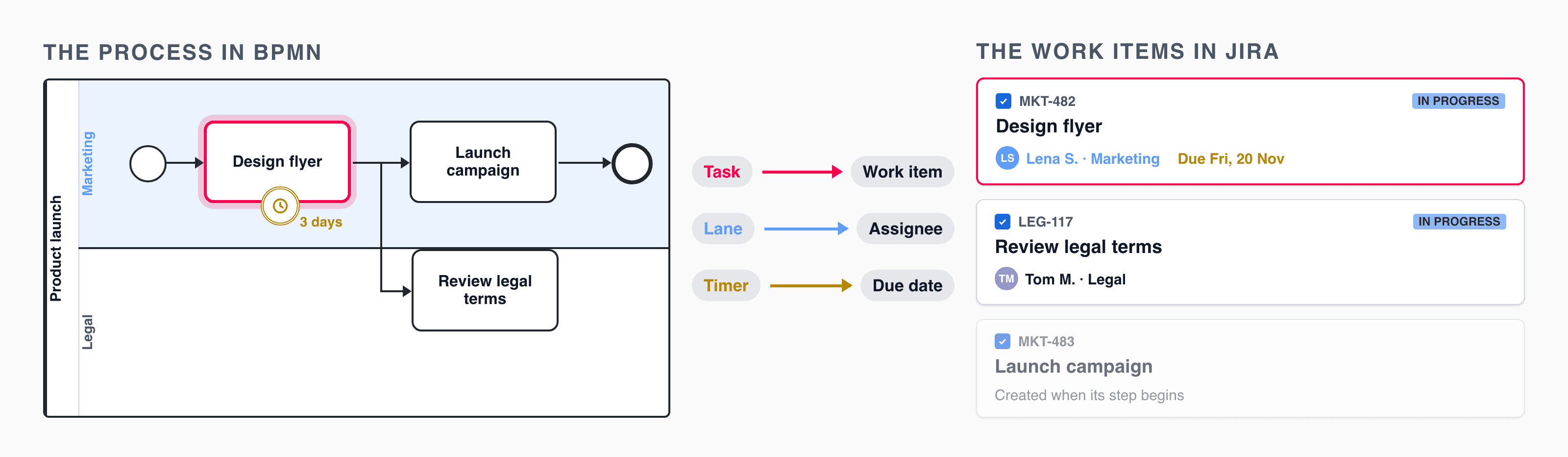
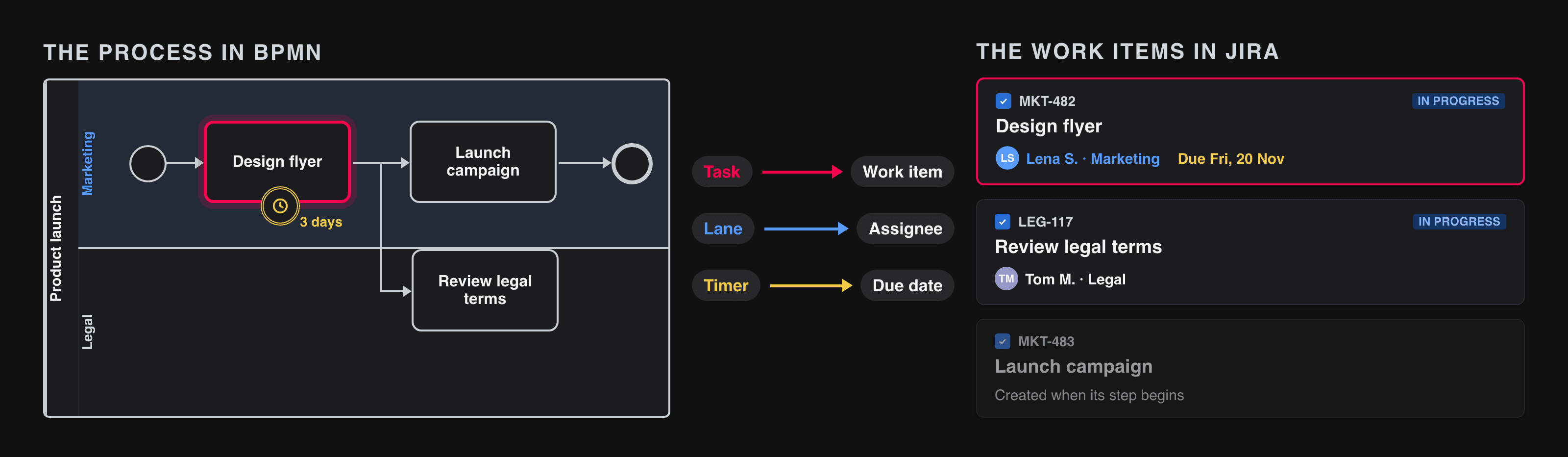
Because everything is a work item, the rest of Jira keeps working: workflows, screens, permissions, boards, and JQL. The complete mapping of BPMN elements to Jira is in The Ultimate Guide to BPMN in Jira.
How Do You Model, Publish, and Start a Process?
- Model. You draw the diagram in the BPMN modeler in Jira. A validation marks problems in yellow and red, and a token simulation shows how the process moves.
- Publish. The drawing is a draft until you publish it. Every publication is a new version. New process instances use the latest version, and running ones keep theirs.
- Start. There are two ways. Somebody clicks the play button of the model. Or a work item of a mapped work type is created, with the Create button, a form, a request in the portal of Jira Service Management, or a rule. This work item then becomes the process instance.
For the purchase request, the second way fits: the work type behind the request type Purchase request is mapped to the model, so Lena’s request itself is the process instance. Its fields, for example the amount, are the data of the process. See Setup.
What Happens When the Process Reaches a Task?
The engine creates a work item for it:
- The name of the task becomes the summary, and its documentation becomes the description.
- Space and work type come from the task, else from its lane, else from the defaults of the app. So the tasks of procurement are created in the procurement space and those of finance in the finance space.
- The work item follows the normal Jira workflow of its work type. Procurement can have a review status in it, and nobody has to learn a new tool.
Two rules are worth knowing exactly:
- The process goes on when the work item is resolved. Resolved means that a change sets the resolution. A transition into a done status that leaves the resolution empty does not continue the process, so check that your Done transitions set one. The fine print is in How a Work Item Continues the Process.
- People complete tasks, the engine does not. It changes a status only in a few defined cases: it resolves the process instance at the end, reopens a work item when the flow loops back to its task, and cancels a work item that an interrupting event ends.
A work item does not exist before its turn. While the approval is open, there is no Place the order on any board. If you want to plan later steps in advance, clear the Executable checkbox of the process: the model still runs, and each task of a process instance also gets a play button that creates its work item in advance.
Who Gets the Work? What Lanes Really Do
A Jira work item has one assignee, and it cannot be assigned to a role. Lanes fill this gap, in a way that is easy to get wrong:
- A lane has no fixed person. When somebody is assigned to a work item of a lane, the work items that are created later in the same lane get the same assignee. Whoever takes Check the request in procurement also gets Place the order and, if needed, Chase the supplier.
- The first work item of a lane gets no assignee from the lane. It is assigned the way your team does it anyway: somebody picks it up from a board, for example with the filter
flowerLane = "Procurement" AND resolution is EMPTY, or a Jira Automation rule assigns it. - Reassigning changes the future. If the work item goes to a colleague, later work items of the lane follow. Open ones keep their assignee.
- It holds for one process instance. The next request can have other people in the same roles.
A lane can also set the space and the work type for all its tasks. See Swimlanes.
How Does a Gateway Decide on Jira Fields?
Behind Check the request, an exclusive gateway asks Amount above 1,000? The flow Yes carries a condition:
${pi.fields.customfield_10113 > 1000}
An expression is a condition inside ${ } that the engine evaluates with the data of Jira work items. Three work items are available:
| Name | Work item | In the example |
|---|---|---|
pi | The process instance | Lena’s request with the field Amount |
cur | The work item whose change moved the process here | The check that procurement has just resolved |
par | In a sub-process: the process instance that called it | The request, seen from the invoice process |
The process takes the first flow whose condition is true. The flow No is the default flow: it is taken when no condition is true, also when the field is empty. Always define one. Without it, the process stops at the gateway with an error comment on the process instance.
Expressions are not program code. They are comparisons, &&, and a few text and list methods, for example ${cur.fields.resolution.name == 'Done'} or ${pi.fields.labels.includes('urgent')}. The complete list is in Expressions.
Behind the order, a parallel gateway creates the work items of both branches at the same time, and the joining gateway waits until both are resolved. One limit: a loop inside a parallel branch makes the join continue too early, see Known Issues.
How Do Timers and Due Dates Work?
The approval has a timer boundary event with the value P3D, three days in the ISO 8601 format. When the engine creates Approve the purchase, it sets the Jira due date to three days from now. The deadline shows where people look anyway: on the work item, on boards, and in filters.
| Non-interrupting timer (dashed border) | Interrupting timer (solid border) | |
|---|---|---|
| The work item | Stays open | Is cancelled by the engine |
| The process | Starts the timeout path in addition | Goes on only on the timeout path |
| Use it for | Reminders and escalations | Offers that expire, requests that are dropped |
Three things to know before you rely on timers:
- Timers work in days. A timer job runs once a day and fires the timers of that day. A timer fires on its due day, not at an exact hour.
- The due date is the truth. If somebody moves the due date of the work item in Jira, the timer follows.
- Repeating needs a cycle.
R3/P1Don a non-interrupting timer fires three times, one day apart.
A timer in the flow lets the process wait, and a timer start event delays the first task. To start a process every Monday, use a scheduled Jira Automation rule that creates a work item of the mapped work type. See BPMN Timer Events.
How Do Jira Statuses Throw Errors and Escalations?
In a process of people, exceptions are decisions of people: procurement cancels a request, the budget owner declines, Lena calls for help. With boundary events on a task, they do it the way they always do, with a status or a resolution of the work item:
| Boundary event | In the example | Fires when | What happens |
|---|---|---|---|
| Error | Cancelled on Check the request | The work item is resolved in the selected status | The task ends with the error, and the process takes the error path instead of the normal flow |
| Conditional | Declined on Approve the purchase | The work item is resolved and the expression is true: ${cur.fields.resolution.name == 'Declined'} | Interrupting: the path of the event instead of the normal flow. Non-interrupting: in addition |
| Escalation | Escalated on Receive and check the goods | The open work item is moved into the selected status | The escalation path starts at once. Non-interrupting, the work item stays open |
What this needs from your Jira workflows:
- The workflow of the work type has to offer the status, and the transition into an error status has to set a resolution.
- An escalation status is an open status of the category To Do or In Progress.
- A Jira Automation rule can do the move as well, for example when an SLA is breached. Then the process escalates without a person.
Escalation boundary events depend on the hosting, see Limits and Host Differences. The guides: error, escalation, and conditional events.
Call Activity or Embedded Sub-Process?
Process the invoice is a call activity: a step that runs another process model. Finance owns the invoice process and can change and publish it without touching the purchase request.
| Call activity | Embedded sub-process | |
|---|---|---|
| What it is | Another model, with its own process instance | A box in the same model that groups steps |
| Its tasks | Work items of the sub-process instance | Work items of the same process instance |
| Reuse and versions | Yes. It runs the version that is published when it is called | No, it is part of the model |
| Data | No parameters. The sub-process reads the calling instance with par | The same pi and cur as around it |
Which model a call activity runs is decided by its work type: this work type is mapped to the model. The work item of the call activity and the sub-process instance are one and the same work item, so its status says whether the sub-process still runs. The purchase request waits until it is resolved. A loop back into a call activity is not supported. See Sub-Processes and What Works Where.
How Does a Throw Event Trigger Jira Automation?
Remind the approver and Notify the requester are intermediate throw events. When the process reaches one, it triggers something and moves on. What it triggers depends on the app:
| What the throw event does | The Jira Automation rule | |
|---|---|---|
| Jira Cloud | Sets the property flowerAutomation on the process instance and adds the comment Flower Automation Event: <name> | Trigger Work item commented, with a condition on the text of the comment |
| Jira Data Center | Sends an HTTP POST with the key of the process instance to the webhook URL of the event | Trigger Incoming webhook |
The rule then does what rules are good at: send an e-mail or a chat message, set a field, or call another system with Send web request. The rule stays in Jira Automation, but when and why it runs is now a visible step of the process. See Triggering Jira Automation with BPMN Events.
Can an AI Agent Do a Step?
Yes, and the model does not change for it. Say procurement wants a first check of every request by an AI agent: Check the request stays a task of the model and becomes a work item like every other task. A Jira Automation rule sees the new work item, calls a Rovo agent, the AI of Atlassian, writes the agent’s answer into the work item, and resolves it. The process goes on, and the gateway after the task decides on the answer. When the agent cannot decide, the rule moves the work item to a status that an error boundary event catches, and a person takes over; a timer sets the limit.
The step stays visible: it is a work item with its history, and the diagram of the process instance shows it like every other step. See AI Agent Steps for the model and the rule.
What Is Not Executed?
Next releaseYou can draw every BPMN element, but the engine is built for work that people do:
- User, manual, and plain tasks become work items. Service, script, send, and business rule tasks run when they are set to Wait for Jira Automation: a rule does the work and reports it done. Without it they are passed, and the script of a model never runs.
- Multi-instance markers run the task once. A loop marker runs on tasks with a loop condition only.
- Compensation, transactions, and ad-hoc sub-processes are not supported; the last two run like an embedded sub-process.
- Messages and signals arrive through a comment with @FlowerBPM, a Jira Automation rule, or the REST endpoint on Data Center, and through message flows between the pools of one model.
The model validator warns about most of these. The complete list, with what happens in each case, is in BPMN Coverage in Jira.
Frequently Asked Questions
Can a BPMN diagram create Jira work items?
Yes, with a BPMN engine in Jira such as Flower BPM. Every user task, manual task, or plain task of the model becomes a work item when the process reaches it.
When does the process continue?
When the work item of the task is resolved, that is when a change sets its resolution. A done status without a resolution does not continue the process.
How are work items assigned in a BPMN process in Jira?
Through lanes. A lane passes on the assignee: once a work item of a lane has an assignee, the later work items of that lane in the same process instance get the same one.
Can a BPMN process in Jira wait for a deadline?
Yes. A timer boundary event sets the due date of the work item and starts a timeout path when it passes. Timers fire on their due day, with a job that runs once a day.
Do I still need Jira workflows and Jira Automation?
Yes. Every task keeps the workflow of its work type, and rules do the reactions around the process: reminders, notifications, calls to other systems, and scheduled starts.
What Comes Next
One request runs. Now picture a normal month: sixty purchase requests are open at the same time, an onboarding and a change process run next to them, the approval limit changes in January, and an auditor asks who approved what.
Where do you look? Who may change the model, and who may see finance’s work items? And what happens to the forty requests that are running when you publish version 2?
Part 5 covers the monitoring with JQL and dashboards, permissions, Jira Service Management, versions, Cloud and Data Center, the limits, and a checklist to start.