The Approval Process, Steps and Examples
In short: In an approval process, a second person confirms a request before it is carried out. It has four steps: request, review, decision, and implementation. This article explains the steps and roles, shows two examples as BPMN diagrams, and describes how to run approvals in Jira.
Last updated: November 2026
What Is an Approval Process?
An approval process makes sure that a decision is not taken by the person who benefits from it. Somebody asks for something, for example a purchase, a discount, or access to a system, and somebody else decides. This is also called the four-eyes principle.
Approvals are part of almost every other business process. The invoice needs an approval before it is paid, the change before it is deployed, and the job offer before it is sent.
The Steps of an Approval Process
- Request. The requester describes what is needed and why. A form makes sure that nothing is missing.
- Review. A reviewer checks whether the request is complete and correct.
- Decision. The approver approves or rejects. A rejection should come with a reason.
- Implementation. An approved request is carried out. A rejected request goes back to the requester or ends.
Who Is Involved?
- Requester: starts the process and answers questions.
- Reviewer: checks the request. In small processes the approver does this.
- Approver: decides. The approver is usually the owner of the budget or the manager.
- Implementer: carries out the approved request, for example purchasing or IT.
Example 1: Approval with a Decision
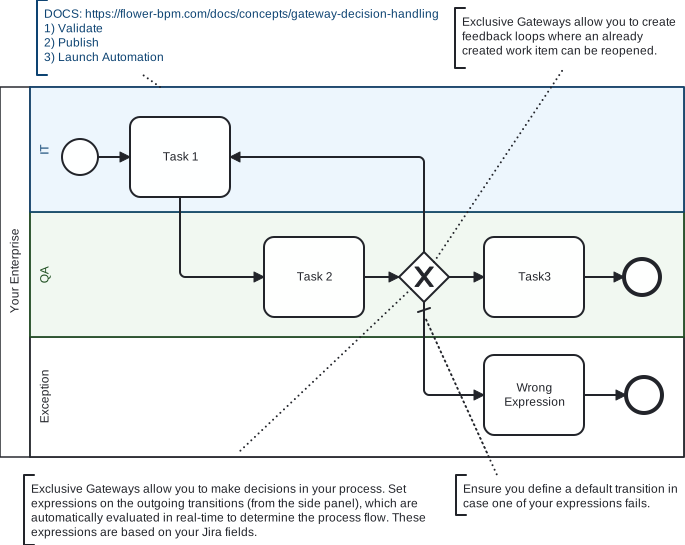
The template Approvals and Decision Handling. Click the picture to enlarge it.
The work is done in one lane and approved in another. An exclusive gateway follows the approval: if the work is approved, the process continues, and if it is rejected, the flow leads back to the work.
Example 2: Invoice Approval by Amount
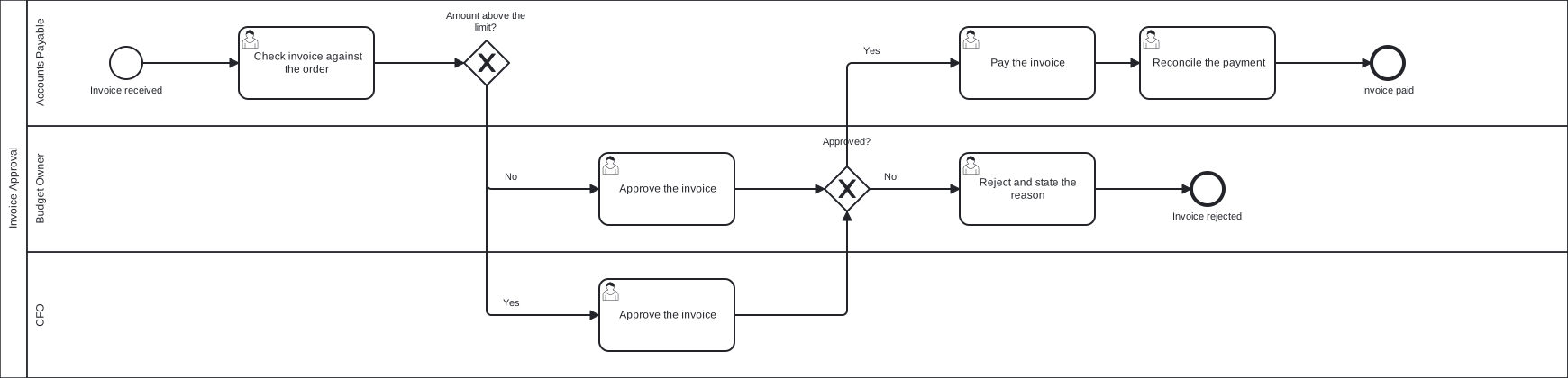
An invoice approval in BPMN. Click the picture to enlarge it, or download the BPMN file.
Not every invoice needs the same approver. A first gateway looks at the amount: invoices below the limit go to the budget owner, invoices above the limit go to the CFO. A second gateway looks at the decision: approved invoices are paid, and rejected invoices are closed with a reason.
More Examples of Approval Processes
| Approval | Who requests | Who approves |
|---|---|---|
| Purchase request | Employee | Budget owner, above a limit also finance |
| Invoice | Accounts payable | Budget owner or CFO |
| Leave request | Employee | Manager |
| Travel expenses | Employee | Manager, then accounting |
| Discount | Sales representative | Sales manager |
| Change to an IT service | Change requester | Change manager or change advisory board |
| Access to a system | Employee | System owner |
Where Approvals Usually Get Stuck
- Approvals happen in e-mail. Nobody knows who has to decide next, and there is no record for an audit.
- Every request takes the same path. Small requests wait as long as large ones. Limits by amount or risk keep small requests fast.
- The approver is not available. Without a deadline and a deputy, requests wait for weeks.
- A rejection has no reason. The requester does not know what to change and asks again.
Run Approvals in Jira
Jira offers two ways to build an approval. See Approvals with Flower BPM for the details.
- Approval in a Jira workflow: an approval step on a status. It fits approvals that belong to a single work item.
- Approval in a process with Flower: an approval activity in its own swimlane, followed by an exclusive gateway. It fits approvals that are one step of a larger process and that another team decides.
With Flower, the approval is a Jira work item that is assigned to the approver through the swimlane. When the approver resolves it, the gateway reads the decision and continues the process or sends the request back. Conditions on the gateway can also read fields of the work item, for example the amount. See Gateway Decision Handling. A timer can remind the approver or escalate. See Due Dates and Timer Events.
Frequently Asked Questions
What are the steps of an approval process?
Request, review, decision, and implementation.
What is the four-eyes principle?
A second person has to confirm a decision before it takes effect, so that nobody decides alone on something that affects them.
What is the difference between an approval process and an approval workflow?
The terms are often used for the same thing. In Jira, a workflow describes the statuses of one work item, and a process connects several work items and roles.
How many approval levels should a process have?
As few as possible. One level is enough for most requests. Add a second level only above a limit of amount or risk.
Related Processes
- List of 25 key business processes
- The employee onboarding process
- Template: Invoice Approval
- Template: Purchase Request
- Template: Leave Request
- BPMN Gateways