
Known Issues
Known Issues
Cases in which Flower does not behave the way BPMN describes it, each with a workaround. The list is short on purpose. Fixed issues are listed in the changelog.
A Parallel Join after a Loop Continues Too Early
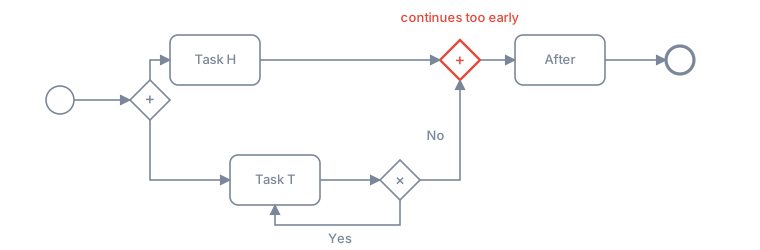
What happens: One branch of a parallel split leads to the join directly (Task H). The other branch has a decision that loops back (Yes) or goes on to the join (No). When the decision takes Yes for the first time, the join continues at once: After starts while Task T is open again.
Expected: The join waits until the loop is left with No.
Workaround: Keep the loop out of the parallel branch. Put the looping part into its own model and call it with a call activity, or make the decision before the parallel split.
Status: An issue of the process engine library, reported to its maintainer. Without a loop, a parallel join waits for all branches.
A Loop into a Call Activity Is Not Supported
What happens: A sequence flow leads back to a call activity that has already run. Flower does not start the sub-process a second time and writes an error comment to the process instance (Loop into the node … is not supported).
Workaround: Put the loop inside the called model, so that the call activity itself runs once. See Sub-Processes.
Timers on Call Activities Do Not Fire
What happens: A timer boundary event on a call activity sets the due date of its work item, but the timeout path is not started when the date has passed.
Workaround: Attach the timer to a task inside the called model, or let a Jira Automation rule react to the due date of the work item.
A Repeating Timer Needs a Non-Interrupting Event
What happens: A repeating interval such as R/P1D on an interrupting timer boundary event fires only once, because the first timeout ends the activity. The model validator shows a warning.
Workaround: Use the non-interrupting timer boundary event for reminders that repeat. See Set Jira Due Dates with Timer Events.
Something Else?
If a process does not behave as you expect, see Help or write to us. An error comment at the process instance usually says what went wrong.