BPMN Timer Events
In short: A timer event is a circle with a clock. It lets time drive a process: start every Monday, wait three days, or react when a task takes too long. A timer is defined by a date, a duration, or a cycle, written in the ISO 8601 format.
Guide: Set Due Dates with Timers shows how to add a timer to a task in Flower and how the timer job works.
Symbols
| Symbol | Element | Meaning |
|---|---|---|
 | Timer start event | The process starts at a date or on a schedule |
 | Intermediate timer event (catch) | The process waits here for a time, then goes on |
 | Timer boundary event, interrupting | A deadline on a task. When it passes, the task is canceled and the timeout path is taken |
 | Timer boundary event, non-interrupting | A deadline on a task. When it passes, the task stays open and the timeout path starts next to it. Dashed border |
A timer is always a catch event: the process reacts to time. There is no timer throw event and no timer end event.
The Three Positions
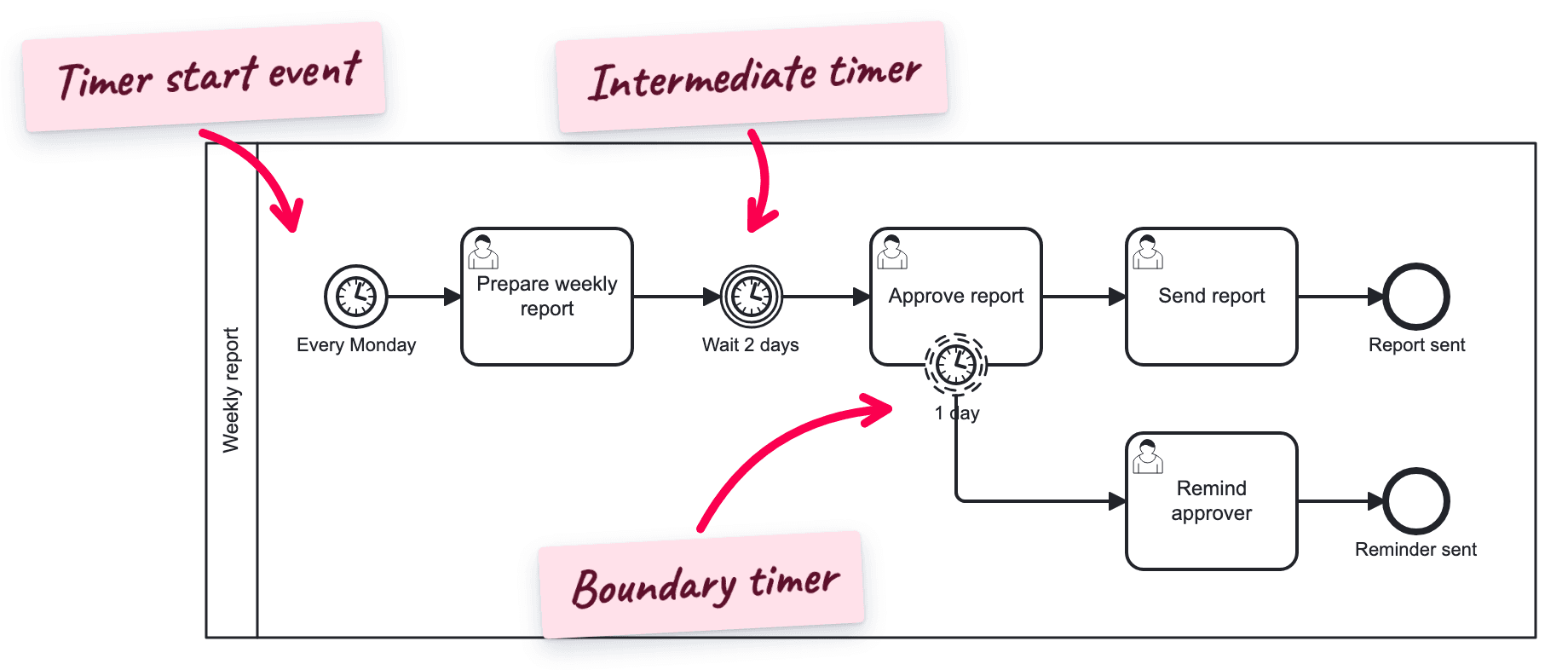
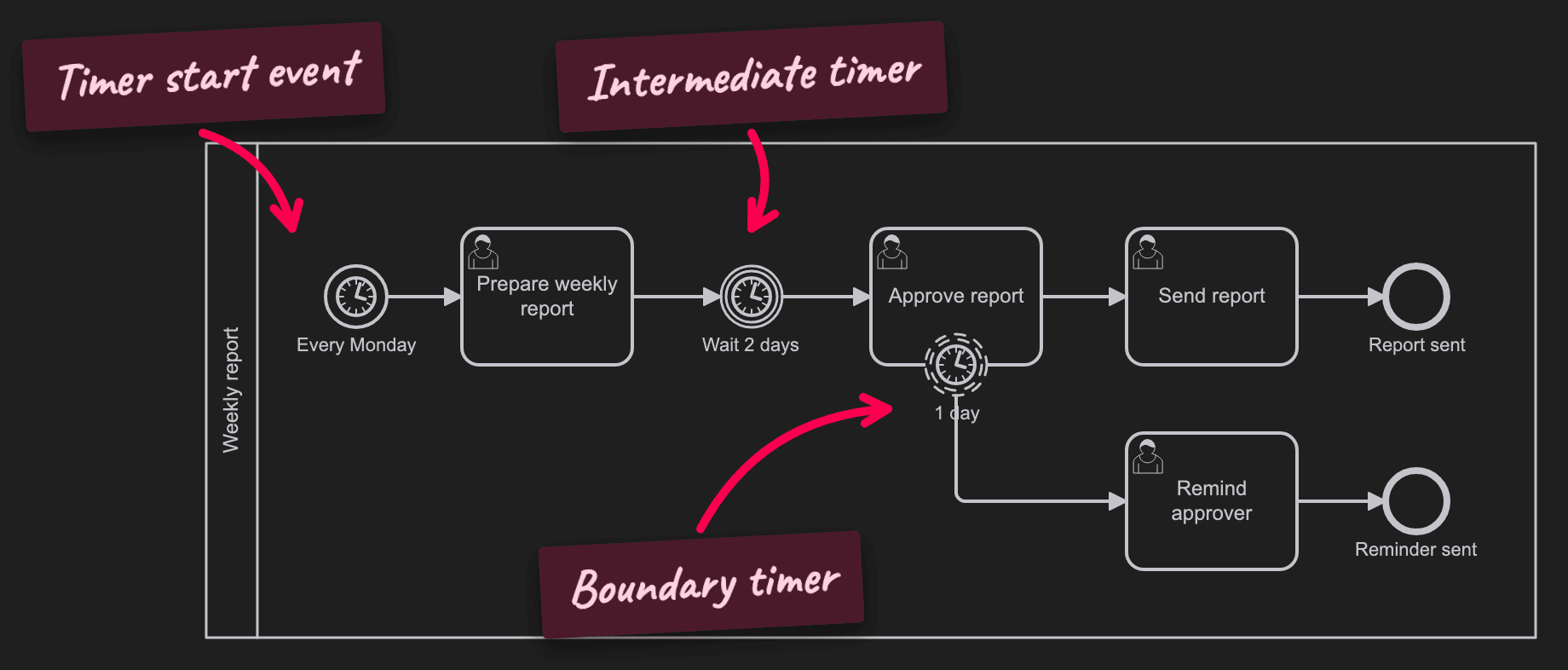
Timer start event. The process begins without anybody starting it: on the first day of the month, every night, or once at a given date. Typical for reports, reviews, and maintenance.
Intermediate timer event. The token waits in the flow: wait two days after the reminder, then check again. The process does nothing while it waits.
Timer boundary event. The timer sits on the border of a task or sub-process and runs while this activity is open. If the activity is finished in time, the timer is dropped. If not, the timer fires. This is the usual way to model deadlines, reminders, and escalations.
Interrupting or Non-Interrupting?
| Interrupting | Non-interrupting | |
|---|---|---|
| Border | Solid | Dashed |
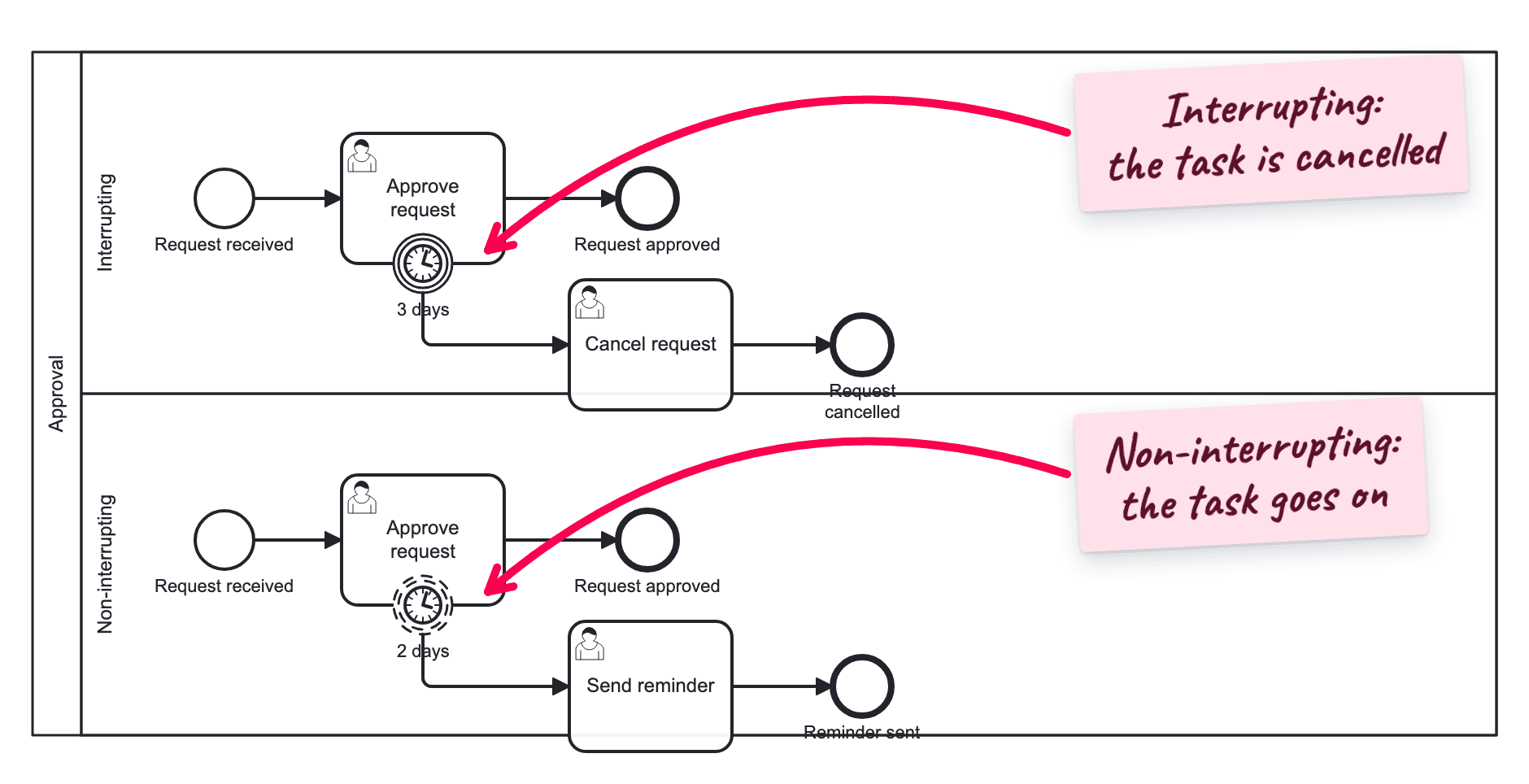
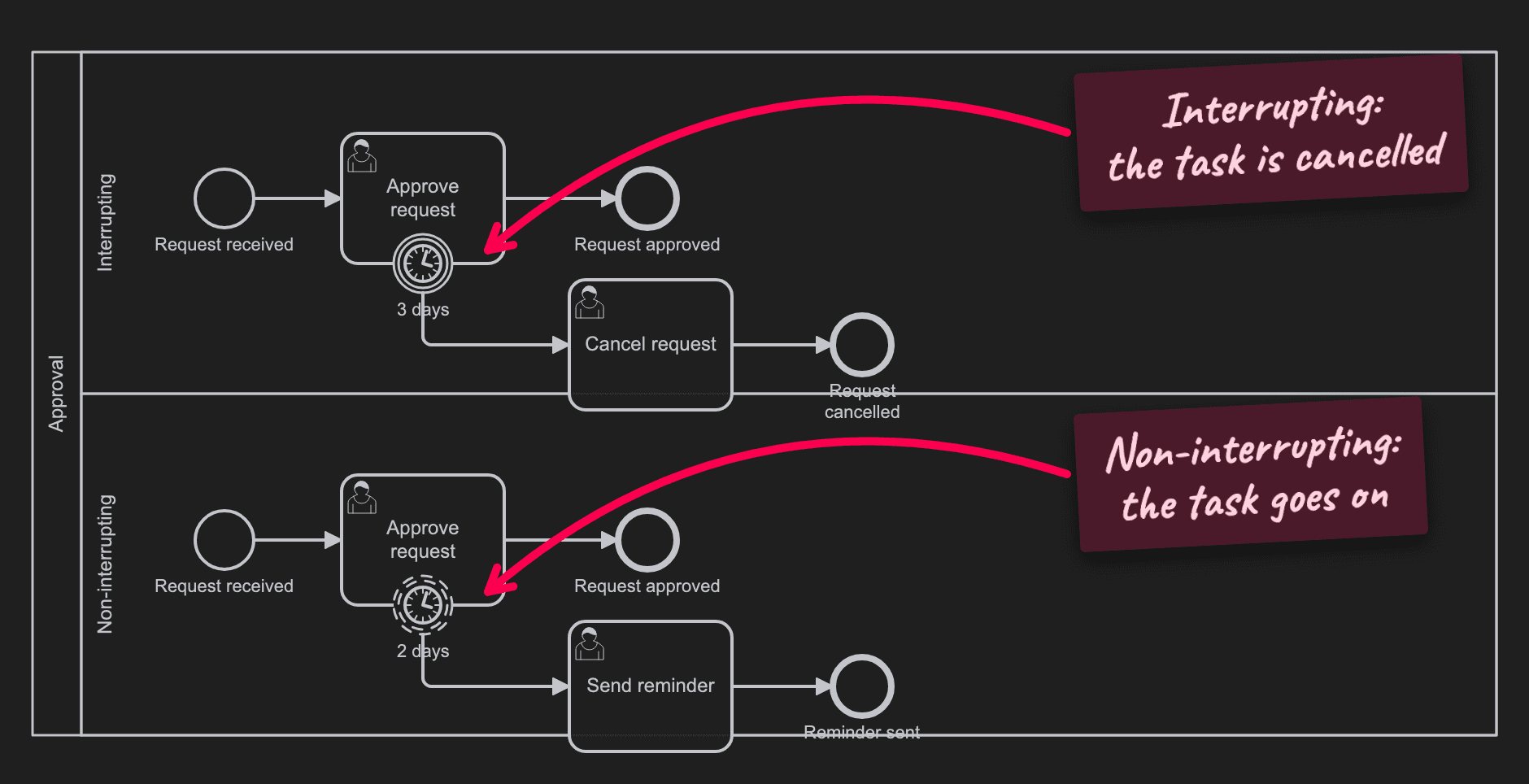
| The task | Is canceled | Stays open |
| The flow | Continues only on the timeout path | Continues on both paths |
| Fires | Once | Once or several times |
| Use it for | Timeouts: the offer expires, the request is closed | Reminders and escalations: tell the manager, the work goes on |
Date, Duration, or Cycle
BPMN defines three kinds of timer. All use ISO 8601.
| Kind | Meaning | Examples |
|---|---|---|
| Time date | A fixed moment | 2027-01-15T09:00:00Z: 15 January 2027, 9:00 UTC |
| Time duration | A span of time from the moment the timer starts | P3D: 3 days. P2W: 2 weeks. PT4H: 4 hours. P1M: 1 month. P14DT1H30M: 14 days, 1 hour, 30 minutes |
| Time cycle | A repeating interval | R3/P1W: 3 times, once a week. R/P1D: every day without end |
How to read a duration: P starts the period, T separates the date part from the time part. So P1M is one month and PT1M is one minute.
In Flower and Jira
| Element | Status in Flower |
|---|---|
| Timer boundary event, interrupting and non-interrupting | Executed |
| Timer start event, intermediate timer event, timer event sub-process | Can be modeled, ignored during execution |
What a timer boundary event does:
- It sets the due date. When Flower creates the work item of the task, it writes the deadline into the Jira due date field. The team sees the deadline where it looks anyway: on the work item, on boards, and in filters.
- It starts the timeout path. A timer job checks the open work items. When the due date has passed, the process continues on the outgoing flow of the timer.
- It supports all three kinds: date, duration, and repeating interval. A repeating interval needs a non-interrupting timer.
- Days, not minutes. Jira stores the due date as a date without a time. A duration shorter than one day is due today.
Typical uses: escalate to the manager after three days, send a reminder every week through Jira Automation, or close a request that got no answer.
One limit: on a call activity, the timer sets the due date but does not start the timeout path. See Known Issues.
The step-by-step guide with all settings is Set Due Dates with Timer Events.
Common Mistakes
P1Mwhen one minute is meant. That is one month. One minute isPT1M.- An interrupting timer for a reminder. It cancels the task. Use a non-interrupting timer.
- A cycle on an interrupting timer. It fires once, then the task is gone.
- No path after the timer. A boundary timer needs an outgoing flow that says what happens then.
- A deadline only in the task name (Approve within 3 days). Nobody enforces it. Model the timer.
Read More
- Set Due Dates with Timer Events: the guide for Flower
- BPMN Events: all event types and positions
- BPMN Workflow Patterns: deadline and escalation
- All BPMN symbols at a glance
Frequently Asked Questions
What is a timer event in BPMN?
An event that is triggered by time: a fixed date, a duration, or a repeating cycle. It is drawn as a circle with a clock.
What is a timer boundary event?
A timer that is attached to a task. It runs while the task is open and fires when the task is not finished in time.
What is the difference between an interrupting and a non-interrupting timer?
An interrupting timer cancels the task and continues on the timeout path. A non-interrupting timer leaves the task open and starts the timeout path in addition.
How do I write a duration for a BPMN timer?
In ISO 8601: P followed by the date parts, T followed by the time parts. P3D is three days, PT2H is two hours, P1DT12H is one and a half days.
Can a BPMN timer set a due date in Jira?
Yes, with Flower. A timer boundary event sets the due date of the Jira work item and starts a timeout path when the date has passed.