Purchase Request
Purchase Request
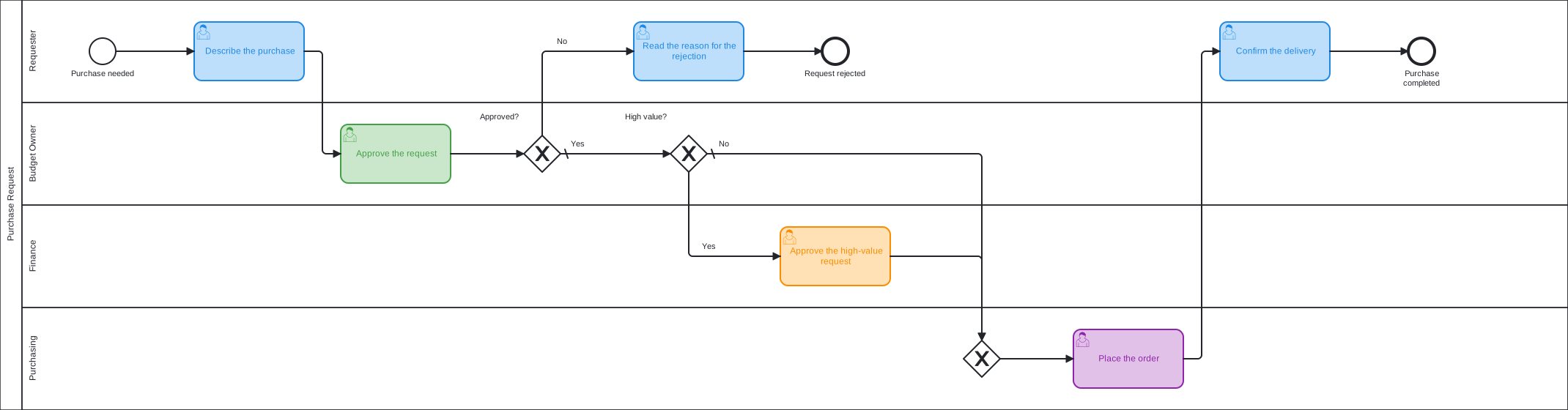
A purchase with approval by value: the budget owner approves every request, finance approves the high-value ones as well.
Download Business Process Template for Free
Use the process template as it is or adjust and extend it to your needs.
The requester describes the purchase, and the budget owner approves or rejects it. A second gateway looks at the value. A high-value request needs a further approval by finance. All other requests go directly to purchasing, which places the order. The requester confirms the delivery at the end.
The decision is the status of the approval work item: when it is resolved with the status Rejected, the process takes the rejection path. The workflow of the work type needs this status. Without it, the default path is taken.
The template treats a request as high value when its process instance has the label high-value, so it runs in every Jira without custom fields. Adapt it: replace the label in the condition with your own field, for example an amount. See Gateway Decision Handling.
Learn More